Glenwing's Guide to Display Cables / Adapters (v2)
This Revision: 2.4.3 (2018-03-26)
(If you can see this message without needing to examine the page source, then something somewhere has gone terribly wrong)
BEHOLD,
the terrible programming of the one known as GLENWING, first of his name, bane of the spammers,
champion of thinking, denizen of the Internet (with a capital I), and a Senior Moderator of the
LINUS TECH TIPS forum (his lair lies herein: https://linustechtips.com/main/profile/2466-glenwing/
Venture with caution, and remember monsieur: your hand at the level of your eyes! If you can see this
message, it is not yet too late for you to heed this warning! Madness descends on all those who attempt
to read his writings and decipher his code.
Seek not logic, nor efficiency, nor sensible style, nor comments or documentation of any kind (mostly
because the forum strips all comments when posting), lest you end up ALT-F4-ing in a fit of rage and
losing the contents of your other tabs, causing an infinite loop of frustration:
(while (Frustration > 0) { Frustration++; });
The lines ahead contain only darkness and confusion. It is not for the timid, nor for anyone hoping to
easily understand what's even going on in this thing.
Continue reading at your own peril!
--- YE BE WARN'D ---
(verbal warning only, no points assigned)
| DisplayPort Version | 1.0–1.1 | 1.2 | 1.3–1.4 | ||||||||||||||||||||||||||||||||||||||||||||||||||||||||||||||||||||||||||||||||||||||||||||||||||||||||||||||||||||||||||||||||||||||||||||||||||||||||||||||||||||||||||||||||||||||||||||||||||||||||||||||||||||||||||||||||||||||||||||||||||||||||||||
|
Maximum Bandwidth
(Maximum Data Rate)
|
10.80 Gbit/s
(8.64 Gbit/s)
|
21.60 Gbit/s
(17.28 Gbit/s)
|
32.40 Gbit/s
(25.92 Gbit/s)
|
||||||||||||||||||||||||||||||||||||||||||||||||||||||||||||||||||||||||||||||||||||||||||||||||||||||||||||||||||||||||||||||||||||||||||||||||||||||||||||||||||||||||||||||||||||||||||||||||||||||||||||||||||||||||||||||||||||||||||||||||||||||||||||
|
Resolution
|
Maximum Refresh Frequency*
|
||||||||||||||||||||||||||||||||||||||||||||||||||||||||||||||||||||||||||||||||||||||||||||||||||||||||||||||||||||||||||||||||||||||||||||||||||||||||||||||||||||||||||||||||||||||||||||||||||||||||||||||||||||||||||||||||||||||||||||||||||||||||||||||
|
2K
1920 × 1080 (16:9)
1920 × 1200 (16:10)
|
144 Hz
120 Hz
|
240 Hz
240 Hz
|
360 Hz
360 Hz
|
||||||||||||||||||||||||||||||||||||||||||||||||||||||||||||||||||||||||||||||||||||||||||||||||||||||||||||||||||||||||||||||||||||||||||||||||||||||||||||||||||||||||||||||||||||||||||||||||||||||||||||||||||||||||||||||||||||||||||||||||||||||||||||
|
2.5K
2560 × 1080 (≈21:9)
2560 × 1440 (16:9)
2560 × 1600 (16:10)
|
100 Hz
85 Hz
75 Hz
|
200 Hz
144 Hz
144 Hz
|
300 Hz
240 Hz
200 Hz
|
||||||||||||||||||||||||||||||||||||||||||||||||||||||||||||||||||||||||||||||||||||||||||||||||||||||||||||||||||||||||||||||||||||||||||||||||||||||||||||||||||||||||||||||||||||||||||||||||||||||||||||||||||||||||||||||||||||||||||||||||||||||||||||
|
3.5K
3440 × 1440 (≈21:9)
|
60 Hz
|
120 Hz
|
180 Hz
|
||||||||||||||||||||||||||||||||||||||||||||||||||||||||||||||||||||||||||||||||||||||||||||||||||||||||||||||||||||||||||||||||||||||||||||||||||||||||||||||||||||||||||||||||||||||||||||||||||||||||||||||||||||||||||||||||||||||||||||||||||||||||||||
|
4K
3840 × 1600 (≈21:9)
3840 × 2160 (16:9)
4096 × 2160 (≈19:10)
|
50 Hz
30 Hz
30 Hz
|
100 Hz
75 Hz
75 Hz
|
144 Hz
120 Hz
100 Hz
|
||||||||||||||||||||||||||||||||||||||||||||||||||||||||||||||||||||||||||||||||||||||||||||||||||||||||||||||||||||||||||||||||||||||||||||||||||||||||||||||||||||||||||||||||||||||||||||||||||||||||||||||||||||||||||||||||||||||||||||||||||||||||||||
|
5K
5120 × 2160 (≈21:9)
5120 × 2880 (16:9)
|
30 Hz
-
|
60 Hz
30 Hz
|
85 Hz
60 Hz
|
||||||||||||||||||||||||||||||||||||||||||||||||||||||||||||||||||||||||||||||||||||||||||||||||||||||||||||||||||||||||||||||||||||||||||||||||||||||||||||||||||||||||||||||||||||||||||||||||||||||||||||||||||||||||||||||||||||||||||||||||||||||||||||
|
8K
7680 × 4320 (16:9)
|
-
|
-
|
30 Hz
|
||||||||||||||||||||||||||||||||||||||||||||||||||||||||||||||||||||||||||||||||||||||||||||||||||||||||||||||||||||||||||||||||||||||||||||||||||||||||||||||||||||||||||||||||||||||||||||||||||||||||||||||||||||||||||||||||||||||||||||||||||||||||||||
|
* Only the highest common / standard frequencies are listed (24 / 30 / 50 / 60 / 75 / 85 / 100 / 120 / 144 / 180 / 200 / 240 Hz, or higher multiples of 60). This table is not meant to list the absolute limits down to the very last Hz. For more exact limits, or for other resolutions, refer to the bandwidth calculator here.
Uncompressed 8 bpc RGB color and CVT-R2 timing are assumed on this table. Maximum frequency may be different when different settings are used. For frequency limits at different settings or resolutions, refer to the bandwidth calculator here. |
|||||||||||||||||||||||||||||||||||||||||||||||||||||||||||||||||||||||||||||||||||||||||||||||||||||||||||||||||||||||||||||||||||||||||||||||||||||||||||||||||||||||||||||||||||||||||||||||||||||||||||||||||||||||||||||||||||||||||||||||||||||||||||||||
| HDMI Version | 1.0–1.2 | 1.3–1.4 | 2.0 | 2.1 | |||||||||||||||||||||||||||||||||||||||||||||||||||||||||||||||||||||||||||||||||||||||||||||||||||||||||||||||||||||||||||||||||||||||||||||||||||||||||||||||||||||||||||||||||||||||||||||||||||||||||||||||||||||||||||||||||||||||||||||||||||||||||||
|
Maximum Bandwidth
(Maximum Data Rate)
|
4.95 Gbit/s
(3.96 Gbit/s)
|
10.20 Gbit/s
(8.16 Gbit/s)
|
18.00 Gbit/s
(14.40 Gbit/s)
|
48.00 Gbit/s
(42.67 Gbit/s)
|
|||||||||||||||||||||||||||||||||||||||||||||||||||||||||||||||||||||||||||||||||||||||||||||||||||||||||||||||||||||||||||||||||||||||||||||||||||||||||||||||||||||||||||||||||||||||||||||||||||||||||||||||||||||||||||||||||||||||||||||||||||||||||||
|
Resolution
|
Maximum Refresh Frequency*
|
||||||||||||||||||||||||||||||||||||||||||||||||||||||||||||||||||||||||||||||||||||||||||||||||||||||||||||||||||||||||||||||||||||||||||||||||||||||||||||||||||||||||||||||||||||||||||||||||||||||||||||||||||||||||||||||||||||||||||||||||||||||||||||||
|
2K
1920 × 1080 (16:9)
1920 × 1200 (16:10)
|
60 Hz
60 Hz
|
144 Hz
120 Hz
|
240 Hz
200 Hz
|
480+ Hz
480+ Hz
|
|||||||||||||||||||||||||||||||||||||||||||||||||||||||||||||||||||||||||||||||||||||||||||||||||||||||||||||||||||||||||||||||||||||||||||||||||||||||||||||||||||||||||||||||||||||||||||||||||||||||||||||||||||||||||||||||||||||||||||||||||||||||||||
|
2.5K
2560 × 1080 (≈21:9)
2560 × 1440 (16:9)
2560 × 1600 (16:10)
|
50 Hz
30 Hz
30 Hz
|
100 Hz
85 Hz
75 Hz
|
180 Hz
144 Hz
120 Hz
|
480+ Hz
360 Hz
300 Hz
|
|||||||||||||||||||||||||||||||||||||||||||||||||||||||||||||||||||||||||||||||||||||||||||||||||||||||||||||||||||||||||||||||||||||||||||||||||||||||||||||||||||||||||||||||||||||||||||||||||||||||||||||||||||||||||||||||||||||||||||||||||||||||||||
|
3.5K
3440 × 1440 (≈21:9)
|
30 Hz
|
60 Hz
|
100 Hz
|
300 Hz
|
|||||||||||||||||||||||||||||||||||||||||||||||||||||||||||||||||||||||||||||||||||||||||||||||||||||||||||||||||||||||||||||||||||||||||||||||||||||||||||||||||||||||||||||||||||||||||||||||||||||||||||||||||||||||||||||||||||||||||||||||||||||||||||
|
4K
3840 × 1600 (≈21:9)
3840 × 2160 (16:9)
4096 × 2160 (≈19:10)
|
24 Hz
-
-
|
50 Hz
30 Hz
30 Hz
|
85 Hz
60 Hz
60 Hz
|
240 Hz
180 Hz
180 Hz
|
|||||||||||||||||||||||||||||||||||||||||||||||||||||||||||||||||||||||||||||||||||||||||||||||||||||||||||||||||||||||||||||||||||||||||||||||||||||||||||||||||||||||||||||||||||||||||||||||||||||||||||||||||||||||||||||||||||||||||||||||||||||||||||
|
5K
5120 × 2160 (≈21:9)
5120 × 2880 (16:9)
|
-
-
|
24 Hz
-
|
50 Hz
30 Hz
|
144 Hz
100 Hz
|
|||||||||||||||||||||||||||||||||||||||||||||||||||||||||||||||||||||||||||||||||||||||||||||||||||||||||||||||||||||||||||||||||||||||||||||||||||||||||||||||||||||||||||||||||||||||||||||||||||||||||||||||||||||||||||||||||||||||||||||||||||||||||||
|
8K
7680 × 4320 (16:9)
|
-
|
-
|
-
|
50 Hz
|
|||||||||||||||||||||||||||||||||||||||||||||||||||||||||||||||||||||||||||||||||||||||||||||||||||||||||||||||||||||||||||||||||||||||||||||||||||||||||||||||||||||||||||||||||||||||||||||||||||||||||||||||||||||||||||||||||||||||||||||||||||||||||||
|
* Only the highest common / standard frequencies are listed (24 / 30 / 50 / 60 / 75 / 85 / 100 / 120 / 144 / 180 / 200 / 240 Hz, or higher multiples of 60). This table is not meant to list the absolute limits down to the very last Hz. For more exact limits, or for other resolutions, refer to the bandwidth calculator here.
Uncompressed 8 bpc RGB color and CVT-R2 timing are assumed on this table. Maximum frequency may be different when different settings are used. For frequency limits at different settings or resolutions, refer to the bandwidth calculator here. |
|||||||||||||||||||||||||||||||||||||||||||||||||||||||||||||||||||||||||||||||||||||||||||||||||||||||||||||||||||||||||||||||||||||||||||||||||||||||||||||||||||||||||||||||||||||||||||||||||||||||||||||||||||||||||||||||||||||||||||||||||||||||||||||||
| DVI Type | Single-Link DVI-D / DVI-I |
Dual-Link DVI-D / DVI-I |
|||||||||||||||||||||||||||||||||||||||||||||||||||||||||||||||||||||||||||||||||||||||||||||||||||||||||||||||||||||||||||||||||||||||||||||||||||||||||||||||||||||||||||||||||||||||||||||||||||||||||||||||||||||||||||||||||||||||||||||||||||||||||||||
|
Maximum Bandwidth
(Maximum Data Rate)
|
4.95 Gbit/s
(3.96 Gbit/s)
|
9.90 Gbit/s
(7.92 Gbit/s)
|
|||||||||||||||||||||||||||||||||||||||||||||||||||||||||||||||||||||||||||||||||||||||||||||||||||||||||||||||||||||||||||||||||||||||||||||||||||||||||||||||||||||||||||||||||||||||||||||||||||||||||||||||||||||||||||||||||||||||||||||||||||||||||||||
|
Resolution
|
Maximum Refresh Frequency*
|
||||||||||||||||||||||||||||||||||||||||||||||||||||||||||||||||||||||||||||||||||||||||||||||||||||||||||||||||||||||||||||||||||||||||||||||||||||||||||||||||||||||||||||||||||||||||||||||||||||||||||||||||||||||||||||||||||||||||||||||||||||||||||||||
|
2K
1920 × 1080 (16:9)
1920 × 1200 (16:10)
|
60 Hz
60 Hz
|
144 Hz
120 Hz
|
|||||||||||||||||||||||||||||||||||||||||||||||||||||||||||||||||||||||||||||||||||||||||||||||||||||||||||||||||||||||||||||||||||||||||||||||||||||||||||||||||||||||||||||||||||||||||||||||||||||||||||||||||||||||||||||||||||||||||||||||||||||||||||||
|
2.5K
2560 × 1080 (≈21:9)
2560 × 1440 (16:9)
2560 × 1600 (16:10)
|
50 Hz
30 Hz
30 Hz
|
100 Hz
75 Hz
60 Hz
|
|||||||||||||||||||||||||||||||||||||||||||||||||||||||||||||||||||||||||||||||||||||||||||||||||||||||||||||||||||||||||||||||||||||||||||||||||||||||||||||||||||||||||||||||||||||||||||||||||||||||||||||||||||||||||||||||||||||||||||||||||||||||||||||
|
3.5K
3440 × 1440 (≈21:9)
|
30 Hz
|
60 Hz
|
|||||||||||||||||||||||||||||||||||||||||||||||||||||||||||||||||||||||||||||||||||||||||||||||||||||||||||||||||||||||||||||||||||||||||||||||||||||||||||||||||||||||||||||||||||||||||||||||||||||||||||||||||||||||||||||||||||||||||||||||||||||||||||||
|
4K
3840 × 1600 (≈21:9)
3840 × 2160 (16:9)
4096 × 2160 (≈19:10)
|
24 Hz
-
-
|
50 Hz
30 Hz
30 Hz
|
|||||||||||||||||||||||||||||||||||||||||||||||||||||||||||||||||||||||||||||||||||||||||||||||||||||||||||||||||||||||||||||||||||||||||||||||||||||||||||||||||||||||||||||||||||||||||||||||||||||||||||||||||||||||||||||||||||||||||||||||||||||||||||||
|
5K
5120 × 2160 (≈21:9)
5120 × 2880 (16:9)
|
-
-
|
24 Hz
-
|
|||||||||||||||||||||||||||||||||||||||||||||||||||||||||||||||||||||||||||||||||||||||||||||||||||||||||||||||||||||||||||||||||||||||||||||||||||||||||||||||||||||||||||||||||||||||||||||||||||||||||||||||||||||||||||||||||||||||||||||||||||||||||||||
|
8K
7680 × 4320 (16:9)
|
-
|
-
|
|||||||||||||||||||||||||||||||||||||||||||||||||||||||||||||||||||||||||||||||||||||||||||||||||||||||||||||||||||||||||||||||||||||||||||||||||||||||||||||||||||||||||||||||||||||||||||||||||||||||||||||||||||||||||||||||||||||||||||||||||||||||||||||
|
* Only the highest common / standard frequencies are listed (24 / 30 / 50 / 60 / 75 / 85 / 100 / 120 / 144 / 180 / 200 / 240 Hz, or higher multiples of 60). This table is not meant to list the absolute limits down to the very last Hz. For more exact limits, or for other resolutions, refer to the bandwidth calculator here.
Uncompressed 8 bpc RGB color and CVT-R2 timing are assumed on this table. Maximum frequency may be different when different settings are used. For frequency limits at different settings or resolutions, refer to the bandwidth calculator here. |
|||||||||||||||||||||||||||||||||||||||||||||||||||||||||||||||||||||||||||||||||||||||||||||||||||||||||||||||||||||||||||||||||||||||||||||||||||||||||||||||||||||||||||||||||||||||||||||||||||||||||||||||||||||||||||||||||||||||||||||||||||||||||||||||
| Version | Thunderbolt | Thunderbolt 2 | |||||||||||||||||||||||||||||||||||||||||||||||||||||||||||||||||||||||||||||||||||||||||||||||||||||||||||||||||||||||||||||||||||||||||||||||||||||||||||||||||||||||||||||||||||||||||||||||||||||||||||||||||||||||||||||||||||||||||||||||||||||||||||||
|
Video Protocol Used
|
DisplayPort 1.1
(4 HBR Lanes)
|
DisplayPort 1.2
(4 HBR2 Lanes)
|
|||||||||||||||||||||||||||||||||||||||||||||||||||||||||||||||||||||||||||||||||||||||||||||||||||||||||||||||||||||||||||||||||||||||||||||||||||||||||||||||||||||||||||||||||||||||||||||||||||||||||||||||||||||||||||||||||||||||||||||||||||||||||||||
|
Maximum Data Rate
|
8.64 Gbit/s
|
17.28 Gbit/s
|
|||||||||||||||||||||||||||||||||||||||||||||||||||||||||||||||||||||||||||||||||||||||||||||||||||||||||||||||||||||||||||||||||||||||||||||||||||||||||||||||||||||||||||||||||||||||||||||||||||||||||||||||||||||||||||||||||||||||||||||||||||||||||||||
|
Resolution
|
Maximum Refresh Frequency*
|
||||||||||||||||||||||||||||||||||||||||||||||||||||||||||||||||||||||||||||||||||||||||||||||||||||||||||||||||||||||||||||||||||||||||||||||||||||||||||||||||||||||||||||||||||||||||||||||||||||||||||||||||||||||||||||||||||||||||||||||||||||||||||||||
|
2K
1920 × 1080 (16:9)
1920 × 1200 (16:10)
|
144 Hz
120 Hz
|
240 Hz
240 Hz
|
|||||||||||||||||||||||||||||||||||||||||||||||||||||||||||||||||||||||||||||||||||||||||||||||||||||||||||||||||||||||||||||||||||||||||||||||||||||||||||||||||||||||||||||||||||||||||||||||||||||||||||||||||||||||||||||||||||||||||||||||||||||||||||||
|
2.5K
2560 × 1080 (≈21:9)
2560 × 1440 (16:9)
2560 × 1600 (16:10)
|
100 Hz
85 Hz
75 Hz
|
200 Hz
144 Hz
144 Hz
|
|||||||||||||||||||||||||||||||||||||||||||||||||||||||||||||||||||||||||||||||||||||||||||||||||||||||||||||||||||||||||||||||||||||||||||||||||||||||||||||||||||||||||||||||||||||||||||||||||||||||||||||||||||||||||||||||||||||||||||||||||||||||||||||
|
3.5K
3440 × 1440 (≈21:9)
|
60 Hz
|
120 Hz
|
|||||||||||||||||||||||||||||||||||||||||||||||||||||||||||||||||||||||||||||||||||||||||||||||||||||||||||||||||||||||||||||||||||||||||||||||||||||||||||||||||||||||||||||||||||||||||||||||||||||||||||||||||||||||||||||||||||||||||||||||||||||||||||||
|
4K
3840 × 1600 (≈21:9)
3840 × 2160 (16:9)
4096 × 2160 (≈19:10)
|
50 Hz
30 Hz
30 Hz
|
100 Hz
75 Hz
75 Hz
|
|||||||||||||||||||||||||||||||||||||||||||||||||||||||||||||||||||||||||||||||||||||||||||||||||||||||||||||||||||||||||||||||||||||||||||||||||||||||||||||||||||||||||||||||||||||||||||||||||||||||||||||||||||||||||||||||||||||||||||||||||||||||||||||
|
5K
5120 × 2160 (≈21:9)
5120 × 2880 (16:9)
|
30 Hz
-
|
60 Hz
30 Hz
|
|||||||||||||||||||||||||||||||||||||||||||||||||||||||||||||||||||||||||||||||||||||||||||||||||||||||||||||||||||||||||||||||||||||||||||||||||||||||||||||||||||||||||||||||||||||||||||||||||||||||||||||||||||||||||||||||||||||||||||||||||||||||||||||
|
8K
7680 × 4320 (16:9)
|
-
|
-
|
|||||||||||||||||||||||||||||||||||||||||||||||||||||||||||||||||||||||||||||||||||||||||||||||||||||||||||||||||||||||||||||||||||||||||||||||||||||||||||||||||||||||||||||||||||||||||||||||||||||||||||||||||||||||||||||||||||||||||||||||||||||||||||||
|
* Only the highest common / standard frequencies are listed (24 / 30 / 50 / 60 / 75 / 85 / 100 / 120 / 144 / 180 / 200 / 240 Hz, or higher multiples of 60). This table is not meant to list the absolute limits down to the very last Hz. For more exact limits, or for other resolutions, refer to the bandwidth calculator here.
Uncompressed 8 bpc RGB color and CVT-R2 timing are assumed on this table. Maximum frequency may be different when different settings are used. For frequency limits at different settings or resolutions, refer to the bandwidth calculator here. |
|||||||||||||||||||||||||||||||||||||||||||||||||||||||||||||||||||||||||||||||||||||||||||||||||||||||||||||||||||||||||||||||||||||||||||||||||||||||||||||||||||||||||||||||||||||||||||||||||||||||||||||||||||||||||||||||||||||||||||||||||||||||||||||||
| Thunderbolt 3 Video Mode |
Gen 1 4-Lane Mode |
Gen 1 8-Lane Mode |
Gen 2 4-Lane Mode |
Gen 2 8-Lane Mode |
|||||||||||||||||||||||||||||||||||||||||||||||||||||||||||||||||||||||||||||||||||||||||||||||||||||||||||||||||||||||||||||||||||||||||||||||||||||||||||||||||||||||||||||||||||||||||||||||||||||||||||||||||||||||||||||||||||||||||||||||||||||||||||
|
Maximum Data Rate
|
17.28 Gbit/s
|
34.56 Gbit/s
|
25.92 Gbit/s
|
40.00 Gbit/s
|
|||||||||||||||||||||||||||||||||||||||||||||||||||||||||||||||||||||||||||||||||||||||||||||||||||||||||||||||||||||||||||||||||||||||||||||||||||||||||||||||||||||||||||||||||||||||||||||||||||||||||||||||||||||||||||||||||||||||||||||||||||||||||||
|
Resolution
|
Maximum Refresh Frequency*
|
||||||||||||||||||||||||||||||||||||||||||||||||||||||||||||||||||||||||||||||||||||||||||||||||||||||||||||||||||||||||||||||||||||||||||||||||||||||||||||||||||||||||||||||||||||||||||||||||||||||||||||||||||||||||||||||||||||||||||||||||||||||||||||||
|
2K
1920 × 1080 (16:9)
1920 × 1200 (16:10)
|
240 Hz
240 Hz
|
480+ Hz
420 Hz
|
360 Hz
360 Hz
|
480+ Hz
480+ Hz
|
|||||||||||||||||||||||||||||||||||||||||||||||||||||||||||||||||||||||||||||||||||||||||||||||||||||||||||||||||||||||||||||||||||||||||||||||||||||||||||||||||||||||||||||||||||||||||||||||||||||||||||||||||||||||||||||||||||||||||||||||||||||||||||
|
2.5K
2560 × 1080 (≈21:9)
2560 × 1440 (16:9)
2560 × 1600 (16:10)
|
200 Hz
144 Hz
144 Hz
|
360 Hz
300 Hz
240 Hz
|
300 Hz
240 Hz
200 Hz
|
420 Hz
360 Hz
300 Hz
|
|||||||||||||||||||||||||||||||||||||||||||||||||||||||||||||||||||||||||||||||||||||||||||||||||||||||||||||||||||||||||||||||||||||||||||||||||||||||||||||||||||||||||||||||||||||||||||||||||||||||||||||||||||||||||||||||||||||||||||||||||||||||||||
|
3.5K
3440 × 1440 (≈21:9)
|
120 Hz
|
240 Hz
|
180 Hz
|
240 Hz
|
|||||||||||||||||||||||||||||||||||||||||||||||||||||||||||||||||||||||||||||||||||||||||||||||||||||||||||||||||||||||||||||||||||||||||||||||||||||||||||||||||||||||||||||||||||||||||||||||||||||||||||||||||||||||||||||||||||||||||||||||||||||||||||
|
4K
3840 × 1600 (≈21:9)
3840 × 2160 (16:9)
4096 × 2160 (≈19:10)
|
100 Hz
75 Hz
75 Hz
|
200 Hz
144 Hz
144 Hz
|
144 Hz
120 Hz
100 Hz
|
200 Hz
180 Hz
160 Hz
|
|||||||||||||||||||||||||||||||||||||||||||||||||||||||||||||||||||||||||||||||||||||||||||||||||||||||||||||||||||||||||||||||||||||||||||||||||||||||||||||||||||||||||||||||||||||||||||||||||||||||||||||||||||||||||||||||||||||||||||||||||||||||||||
|
5K
5120 × 2160 (≈21:9)
5120 × 2880 (16:9)
|
60 Hz
30 Hz
|
120 Hz
85 Hz
|
85 Hz
60 Hz
|
120 Hz
100 Hz
|
|||||||||||||||||||||||||||||||||||||||||||||||||||||||||||||||||||||||||||||||||||||||||||||||||||||||||||||||||||||||||||||||||||||||||||||||||||||||||||||||||||||||||||||||||||||||||||||||||||||||||||||||||||||||||||||||||||||||||||||||||||||||||||
|
8K
7680 × 4320 (16:9)
|
-
|
30 Hz
|
30 Hz
|
30 Hz
|
|||||||||||||||||||||||||||||||||||||||||||||||||||||||||||||||||||||||||||||||||||||||||||||||||||||||||||||||||||||||||||||||||||||||||||||||||||||||||||||||||||||||||||||||||||||||||||||||||||||||||||||||||||||||||||||||||||||||||||||||||||||||||||
|
* Only the highest common / standard frequencies are listed (24 / 30 / 50 / 60 / 75 / 85 / 100 / 120 / 144 / 180 / 200 / 240 Hz, or higher multiples of 60). This table is not meant to list the absolute limits down to the very last Hz. For more exact limits, or for other resolutions, refer to the bandwidth calculator here.
Uncompressed 8 bpc RGB color and CVT-R2 timing are assumed on this table. Maximum frequency may be different when different settings are used. For frequency limits at different settings or resolutions, refer to the bandwidth calculator here. |
|||||||||||||||||||||||||||||||||||||||||||||||||||||||||||||||||||||||||||||||||||||||||||||||||||||||||||||||||||||||||||||||||||||||||||||||||||||||||||||||||||||||||||||||||||||||||||||||||||||||||||||||||||||||||||||||||||||||||||||||||||||||||||||||
| DisplayPort to HDMI Passive Adapters |
Type 1 (165 MHz) |
Type 2 (300 MHz) |
|||||||||||||||||||||||||||||||||||||||||||||||||||||||||||||||||||||||||||||||||||||||||||||||||||||||||||||||||||||||||||||||||||||||||||||||||||||||||||||||||||||||||||||||||||||||||||||||||||||||||||||||||||||||||||||||||||||||||||||||||||||||||||||
|
DisplayPort Version
Required
|
DP 1.1
or higher
|
DP 1.2
or higher
|
|||||||||||||||||||||||||||||||||||||||||||||||||||||||||||||||||||||||||||||||||||||||||||||||||||||||||||||||||||||||||||||||||||||||||||||||||||||||||||||||||||||||||||||||||||||||||||||||||||||||||||||||||||||||||||||||||||||||||||||||||||||||||||||
|
Maximum Bandwidth
(Maximum Data Rate)
|
4.95 Gbit/s
(3.96 Gbit/s)
|
9.00 Gbit/s
(7.20 Gbit/s)
|
|||||||||||||||||||||||||||||||||||||||||||||||||||||||||||||||||||||||||||||||||||||||||||||||||||||||||||||||||||||||||||||||||||||||||||||||||||||||||||||||||||||||||||||||||||||||||||||||||||||||||||||||||||||||||||||||||||||||||||||||||||||||||||||
|
Resolution
|
Maximum Refresh Frequency*
|
||||||||||||||||||||||||||||||||||||||||||||||||||||||||||||||||||||||||||||||||||||||||||||||||||||||||||||||||||||||||||||||||||||||||||||||||||||||||||||||||||||||||||||||||||||||||||||||||||||||||||||||||||||||||||||||||||||||||||||||||||||||||||||||
|
2K
1920 × 1080 (16:9)
1920 × 1200 (16:10)
|
60 Hz
60 Hz
|
120 Hz
100 Hz
|
|||||||||||||||||||||||||||||||||||||||||||||||||||||||||||||||||||||||||||||||||||||||||||||||||||||||||||||||||||||||||||||||||||||||||||||||||||||||||||||||||||||||||||||||||||||||||||||||||||||||||||||||||||||||||||||||||||||||||||||||||||||||||||||
|
2.5K
2560 × 1080 (≈21:9)
2560 × 1440 (16:9)
2560 × 1600 (16:10)
|
50 Hz
30 Hz
30 Hz
|
85 Hz
75 Hz
60 Hz
|
|||||||||||||||||||||||||||||||||||||||||||||||||||||||||||||||||||||||||||||||||||||||||||||||||||||||||||||||||||||||||||||||||||||||||||||||||||||||||||||||||||||||||||||||||||||||||||||||||||||||||||||||||||||||||||||||||||||||||||||||||||||||||||||
|
3.5K
3440 × 1440 (≈21:9)
|
30 Hz
|
50 Hz
|
|||||||||||||||||||||||||||||||||||||||||||||||||||||||||||||||||||||||||||||||||||||||||||||||||||||||||||||||||||||||||||||||||||||||||||||||||||||||||||||||||||||||||||||||||||||||||||||||||||||||||||||||||||||||||||||||||||||||||||||||||||||||||||||
|
4K
3840 × 1600 (≈21:9)
3840 × 2160 (16:9)
4096 × 2160 (≈19:10)
|
24 Hz
-
-
|
30 Hz
30 Hz
30 Hz
|
|||||||||||||||||||||||||||||||||||||||||||||||||||||||||||||||||||||||||||||||||||||||||||||||||||||||||||||||||||||||||||||||||||||||||||||||||||||||||||||||||||||||||||||||||||||||||||||||||||||||||||||||||||||||||||||||||||||||||||||||||||||||||||||
|
5K
5120 × 2160 (≈21:9)
5120 × 2880 (16:9)
|
-
-
|
24 Hz
-
|
|||||||||||||||||||||||||||||||||||||||||||||||||||||||||||||||||||||||||||||||||||||||||||||||||||||||||||||||||||||||||||||||||||||||||||||||||||||||||||||||||||||||||||||||||||||||||||||||||||||||||||||||||||||||||||||||||||||||||||||||||||||||||||||
|
8K
7680 × 4320 (16:9)
|
-
|
< -
|
|||||||||||||||||||||||||||||||||||||||||||||||||||||||||||||||||||||||||||||||||||||||||||||||||||||||||||||||||||||||||||||||||||||||||||||||||||||||||||||||||||||||||||||||||||||||||||||||||||||||||||||||||||||||||||||||||||||||||||||||||||||||||||||
|
* Only the highest common / standard frequencies are listed (24 / 30 / 50 / 60 / 75 / 85 / 100 / 120 / 144 / 180 / 200 / 240 Hz, or higher multiples of 60). This table is not meant to list the absolute limits down to the very last Hz. For more exact limits, or for other resolutions, refer to the bandwidth calculator here.
Uncompressed 8 bpc RGB color and CVT-R2 timing are assumed on this table. Maximum frequency may be different when different settings are used. For frequency limits at different settings or resolutions, refer to the bandwidth calculator here. |
|||||||||||||||||||||||||||||||||||||||||||||||||||||||||||||||||||||||||||||||||||||||||||||||||||||||||||||||||||||||||||||||||||||||||||||||||||||||||||||||||||||||||||||||||||||||||||||||||||||||||||||||||||||||||||||||||||||||||||||||||||||||||||||||
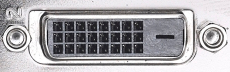 |
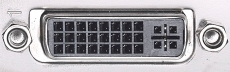 |
DVI-D |
DVI-I |
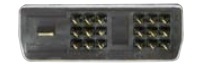 |
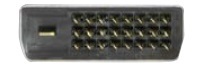 |
Single-Link DVI |
Single-Link or Dual-Link DVI |
| Constants: | ||||||||||||||||||||||||||||||||||||||||||||||||||||||||||||||||||||||||||||||||||||||||||||||||||||||||||||||||||||||||||||||||||||||||||||||||||||||||||||||||||||||||||||||||||||||||||||||||||||||||||||||||||||||||||||||||||||||||||||||||||||||||||||||
| VMIN | = | 0.00055 seconds | ||||||||||||||||||||||||||||||||||||||||||||||||||||||||||||||||||||||||||||||||||||||||||||||||||||||||||||||||||||||||||||||||||||||||||||||||||||||||||||||||||||||||||||||||||||||||||||||||||||||||||||||||||||||||||||||||||||||||||||||||||||||||||||
| DMIN | = | 0.2 (Minimum value of D. If the D formula is less than 0.2, use 0.2 for D instead) | ||||||||||||||||||||||||||||||||||||||||||||||||||||||||||||||||||||||||||||||||||||||||||||||||||||||||||||||||||||||||||||||||||||||||||||||||||||||||||||||||||||||||||||||||||||||||||||||||||||||||||||||||||||||||||||||||||||||||||||||||||||||||||||
| Input Variables: | ||||||||||||||||||||||||||||||||||||||||||||||||||||||||||||||||||||||||||||||||||||||||||||||||||||||||||||||||||||||||||||||||||||||||||||||||||||||||||||||||||||||||||||||||||||||||||||||||||||||||||||||||||||||||||||||||||||||||||||||||||||||||||||||
| H | = | 4,096 pixels | ||||||||||||||||||||||||||||||||||||||||||||||||||||||||||||||||||||||||||||||||||||||||||||||||||||||||||||||||||||||||||||||||||||||||||||||||||||||||||||||||||||||||||||||||||||||||||||||||||||||||||||||||||||||||||||||||||||||||||||||||||||||||||||
| V | = | 2,560 pixels | ||||||||||||||||||||||||||||||||||||||||||||||||||||||||||||||||||||||||||||||||||||||||||||||||||||||||||||||||||||||||||||||||||||||||||||||||||||||||||||||||||||||||||||||||||||||||||||||||||||||||||||||||||||||||||||||||||||||||||||||||||||||||||||
| F | = | 240 Hz | ||||||||||||||||||||||||||||||||||||||||||||||||||||||||||||||||||||||||||||||||||||||||||||||||||||||||||||||||||||||||||||||||||||||||||||||||||||||||||||||||||||||||||||||||||||||||||||||||||||||||||||||||||||||||||||||||||||||||||||||||||||||||||||
| Formulas: | ||||||||||||||||||||||||||||||||||||||||||||||||||||||||||||||||||||||||||||||||||||||||||||||||||||||||||||||||||||||||||||||||||||||||||||||||||||||||||||||||||||||||||||||||||||||||||||||||||||||||||||||||||||||||||||||||||||||||||||||||||||||||||||||
| D | = | 0.3 − | 3,000 • [ ( 1⁄F ) − VMIN ] | = | 0.3 − | 3,000 • [ ( 1⁄240 ) − 0.00055 ] | = | 0.296 | ||||||||||||||||||||||||||||||||||||||||||||||||||||||||||||||||||||||||||||||||||||||||||||||||||||||||||||||||||||||||||||||||||||||||||||||||||||||||||||||||||||||||||||||||||||||||||||||||||||||||||||||||||||||||||||||||||||||||||||||||||||||
| V + 3 | 2,563 | |||||||||||||||||||||||||||||||||||||||||||||||||||||||||||||||||||||||||||||||||||||||||||||||||||||||||||||||||||||||||||||||||||||||||||||||||||||||||||||||||||||||||||||||||||||||||||||||||||||||||||||||||||||||||||||||||||||||||||||||||||||||||||||
| HBLANK | = | H • D | = | 4,096 • 0.296 | = | ( 1,720.3 )↓16 | = | 1,712 pixels |
| 1 − D | 1 − 0.296 | |||||||
| VBLANK | = | (V + 3) • VMIN | + 4 | = | 2,563 • 0.00055 | + 4 | = | ( 393.765 )↓ | = | 393 pixels |
| ( 1⁄F ) − VMIN | ( 1⁄240 ) − 0.00055 | |||||||||
| HEFFECTIVE | = | H + HBLANK | = | 4,096 + 1,712 | = | 5,808 pixels |
| VEFFECTIVE | = | V + VBLANK | = | 2,560 + 393 | = | 2,953 pixels |
| Results can be checked against the official VESA CVT 1.2 spreadsheet, here: VESA CVT 1.2 Timing Generator.xlsx | ||||||||||||||||||||||||||||||||||||||||||||||||||||||||||||||||||||||||||||||||||||||||||||||||||||||||||||||||||||||||||||||||||||||||||||||||||||||||||||||||||||||||||||||||||||||||||||||||||||||||||||||||||||||||||||||||||||||||||||||||||||||||||||||
| Constants: | ||||||||||||||||||||||||||||||||||||||||||||||||||||||||||||||||||||||||||||||||||||||||||||||||||||||||||||||||||||||||||||||||||||||||||||||||||||||||||||||||||||||||||||||||||||||||||||||||||||||||||||||||||||||||||||||||||||||||||||||||||||||||||||||
| VMIN | = | 0.00046 seconds | ||||||||||||||||||||||||||||||||||||||||||||||||||||||||||||||||||||||||||||||||||||||||||||||||||||||||||||||||||||||||||||||||||||||||||||||||||||||||||||||||||||||||||||||||||||||||||||||||||||||||||||||||||||||||||||||||||||||||||||||||||||||||||||
| HBLANK | = | 80 pixels | ||||||||||||||||||||||||||||||||||||||||||||||||||||||||||||||||||||||||||||||||||||||||||||||||||||||||||||||||||||||||||||||||||||||||||||||||||||||||||||||||||||||||||||||||||||||||||||||||||||||||||||||||||||||||||||||||||||||||||||||||||||||||||||
| Input Variables: | ||||||||||||||||||||||||||||||||||||||||||||||||||||||||||||||||||||||||||||||||||||||||||||||||||||||||||||||||||||||||||||||||||||||||||||||||||||||||||||||||||||||||||||||||||||||||||||||||||||||||||||||||||||||||||||||||||||||||||||||||||||||||||||||
| H | = | 4,096 pixels | ||||||||||||||||||||||||||||||||||||||||||||||||||||||||||||||||||||||||||||||||||||||||||||||||||||||||||||||||||||||||||||||||||||||||||||||||||||||||||||||||||||||||||||||||||||||||||||||||||||||||||||||||||||||||||||||||||||||||||||||||||||||||||||
| V | = | 2,560 pixels | ||||||||||||||||||||||||||||||||||||||||||||||||||||||||||||||||||||||||||||||||||||||||||||||||||||||||||||||||||||||||||||||||||||||||||||||||||||||||||||||||||||||||||||||||||||||||||||||||||||||||||||||||||||||||||||||||||||||||||||||||||||||||||||
| F | = | 240 Hz | ||||||||||||||||||||||||||||||||||||||||||||||||||||||||||||||||||||||||||||||||||||||||||||||||||||||||||||||||||||||||||||||||||||||||||||||||||||||||||||||||||||||||||||||||||||||||||||||||||||||||||||||||||||||||||||||||||||||||||||||||||||||||||||
| Formulas: | ||||||||||||||||||||||||||||||||||||||||||||||||||||||||||||||||||||||||||||||||||||||||||||||||||||||||||||||||||||||||||||||||||||||||||||||||||||||||||||||||||||||||||||||||||||||||||||||||||||||||||||||||||||||||||||||||||||||||||||||||||||||||||||||
| VBLANK | = | V • VMIN | = | 2,560 • 0.00046 | = | ( 317.7 )↑ | = | 318 pixels | ||||||||||||||||||||||||||||||||||||||||||||||||||||||||||||||||||||||||||||||||||||||||||||||||||||||||||||||||||||||||||||||||||||||||||||||||||||||||||||||||||||||||||||||||||||||||||||||||||||||||||||||||||||||||||||||||||||||||||||||||||||||
| ( 1⁄F ) − VMIN | ( 1⁄240 ) − 0.00046 | |||||||||||||||||||||||||||||||||||||||||||||||||||||||||||||||||||||||||||||||||||||||||||||||||||||||||||||||||||||||||||||||||||||||||||||||||||||||||||||||||||||||||||||||||||||||||||||||||||||||||||||||||||||||||||||||||||||||||||||||||||||||||||||
| HEFFECTIVE | = | H + HBLANK | = | 4,096 + 80 | = | 4,176 pixels |
| VEFFECTIVE | = | V + VBLANK | = | 2,560 + 318 | = | 2,878 pixels |
| Results can be checked against the official VESA CVT 1.2 spreadsheet, here: VESA CVT 1.2 Timing Generator.xlsx | ||||||||||||||||||||||||||||||||||||||||||||||||||||||||||||||||||||||||||||||||||||||||||||||||||||||||||||||||||||||||||||||||||||||||||||||||||||||||||||||||||||||||||||||||||||||||||||||||||||||||||||||||||||||||||||||||||||||||||||||||||||||||||||||
YCBCR
| Options for Connecting to a Display's DisplayPort Input Port | [Link] |
The only port that can be easily adapted to DisplayPort is a USB Type-C port with DisplayPort Alternate Mode support (this includes Thunderbolt 3 ports), which can be done using a:
Other than that, it is generally very difficult to connect to a monitor's DisplayPort input if you don't have a native DisplayPort output available from your computer/source device. There is no way to do this without an active adapter, and these adapters tend to be finicky and unreliable. If you don't have a native DisplayPort output on your device, consider trying to connect to a different type of port on the display. Active adapters to a DisplayPort input should only be considered as a last resort, if the display has no other available ports to connect to.
If you absolutely need to connect to a monitor's DisplayPort input from a non-DP output, then the following options are available: Neither of these options are really preferable over the other (both are finicky and unreliable), but HDMI to DisplayPort active adapters are slightly more common.
DisplayPort-to-DVI or DisplayPort-to-HDMI passive adapters will NOT work for this configuration. These adapters only work from DisplayPort output to DVI/HDMI input, not in the reverse configuration.
If you absolutely need to connect to a monitor's DisplayPort input from a non-DP output, then the following options are available: Neither of these options are really preferable over the other (both are finicky and unreliable), but HDMI to DisplayPort active adapters are slightly more common.
DisplayPort-to-DVI or DisplayPort-to-HDMI passive adapters will NOT work for this configuration. These adapters only work from DisplayPort output to DVI/HDMI input, not in the reverse configuration.
| Options for Connecting to a Display's HDMI Input Port | [Link] |
If you need to connect to a display's HDMI input, then the following options are available (in order of preference):
DVI to HDMI passive adapters and DisplayPort to HDMI passive adapters are both equally preferable. Both are inexpensive, support inline audio (yes, DVI to HDMI passive adapters will support inline audio), and provide image quality identical to native HDMI without any added latency. If you do not have a DVI or DisplayPort output available, you can use a VGA to HDMI active adapter, but the image quality will only be equivalent to VGA, and inline audio will not be supported (though some adapters support audio over a separate cable).
| Options for Connecting to a Display's DVI Input Port | [Link] |
Single-Link DVI provides enough bandwidth for 1920×1200 at 60 Hz or 2560×1600 at 30 Hz. Video formats which require more bandwidth than those (such as 1920×1080 at 144 Hz or 2560×1600 at 60 Hz) will require Dual-Link DVI.
If you need to connect to a display's DVI input, and the bandwidth of Single-Link DVI is enough for your display, then the following options are available (in order of preference):
VGA to DVI adapters (passive or active) will only provide image quality equivalent to native VGA.
For DisplayPort to Dual-Link DVI conversion, keep in mind that even most DisplayPort to DVI active adapters are still Single-Link only. These are common because older graphics cards required active adapters for multi-monitor configurations beyond two screens. So not just any DP-to-DVI active adapter will work, it must be clearly identified as a Dual-Link DVI adapter, with support for up to 1920×1080 at 120/144 Hz or 2560×1440/2560×1600 at 60 Hz.
If you need to connect to a display's DVI input, and the bandwidth of Single-Link DVI is enough for your display, then the following options are available (in order of preference):
- HDMI to DVI passive adapter
- DisplayPort to DVI passive adapter
- DisplayPort to (Single-Link) DVI active adapter (required for 3+ monitors on some older graphics cards; see here)
- USB Type-C to DVI active adapter
- VGA to DVI-I passive adapter (ONLY if the display has a DVI-I port; this is very unusual)
- VGA to DVI-D active adapter
VGA to DVI adapters (passive or active) will only provide image quality equivalent to native VGA.
For DisplayPort to Dual-Link DVI conversion, keep in mind that even most DisplayPort to DVI active adapters are still Single-Link only. These are common because older graphics cards required active adapters for multi-monitor configurations beyond two screens. So not just any DP-to-DVI active adapter will work, it must be clearly identified as a Dual-Link DVI adapter, with support for up to 1920×1080 at 120/144 Hz or 2560×1440/2560×1600 at 60 Hz.
| Options for Connecting to a Display's VGA Input Port | [Link] |
If you need to connect to a display's VGA input, then the following options are available (in order of preference):
DVI-I is a type of DVI + VGA combo port. A passive DVI-I to VGA adapter provides access to the VGA section of the port, and therefore is equivalent to a native VGA connection. Graphics cards and motherboards which do not have native VGA capability will not have DVI-I ports, and so these adapters will not work with those devices.
If your graphics card/motherboard does not have a DVI-I port, then the next best option is a DisplayPort to VGA active adapter. These are inexpensive, reliable, and compact, and they are often mistaken as passive adapters. Passive DisplayPort to VGA adapters do not exist, but active DP to VGA adapters are very good.
HDMI to VGA active adapters are usually larger, less reliable, and may require a power cable or USB for power. They are usually slightly more expensive than DisplayPort to VGA active adapters.
DVI-D to VGA active adapters are no better or worse than HDMI to VGA active adapters, but they are much more difficult to find since historically most graphics cards have been equipped with DVI-I ports and shipped with a DVI-I to VGA passive adapter included, which has resulted in very low demand for DVI-D to VGA conversion devices.
- DVI-I to VGA passive adapter (ONLY if the source device has a DVI-I port (shown below); this will not work in a DVI-D port)
- DisplayPort to VGA active adapter
- USB Type-C to VGA active adapter
- HDMI to VGA active adapter
- DVI-D to VGA active adapter
DVI-I is a type of DVI + VGA combo port. A passive DVI-I to VGA adapter provides access to the VGA section of the port, and therefore is equivalent to a native VGA connection. Graphics cards and motherboards which do not have native VGA capability will not have DVI-I ports, and so these adapters will not work with those devices.
If your graphics card/motherboard does not have a DVI-I port, then the next best option is a DisplayPort to VGA active adapter. These are inexpensive, reliable, and compact, and they are often mistaken as passive adapters. Passive DisplayPort to VGA adapters do not exist, but active DP to VGA adapters are very good.
HDMI to VGA active adapters are usually larger, less reliable, and may require a power cable or USB for power. They are usually slightly more expensive than DisplayPort to VGA active adapters.
DVI-D to VGA active adapters are no better or worse than HDMI to VGA active adapters, but they are much more difficult to find since historically most graphics cards have been equipped with DVI-I ports and shipped with a DVI-I to VGA passive adapter included, which has resulted in very low demand for DVI-D to VGA conversion devices.
| Options for Connecting to a Display's USB Type-C DisplayPort Alternate Mode Input Port | [Link] |
USB Type-C DisplayPort Alternate Mode input ports found on displays will only accept video from:
Normal DisplayPort / HDMI / etc. output ports cannot be connected to a monitor's USB Type-C input with a cheap passive adapter or cable, and there are currently (July 2017) no active adapters available which can do this.
Not all USB Type-C ports have video capability. The ports on both the source and display must support USB DisplayPort Alternate Mode to be used for video. This is an optional feature and is not supported by all USB-C ports; laptops or motherboards with USB-C ports may or may not support video output through those ports, and displays with USB-C ports may or may not accept video input through those ports. Check your product's specifications carefully.
Thunderbolt 3 ports also include DisplayPort 1.2 Alt Mode capability, so Thunderbolt 3 output ports on laptop or motherboards can be connected to displays that have non-Thunderbolt USB Type-C inputs.
- USB Type-C DisplayPort Alternate Mode output ports
- USB Type-C Thunderbolt 3 Alternate Mode output ports
Normal DisplayPort / HDMI / etc. output ports cannot be connected to a monitor's USB Type-C input with a cheap passive adapter or cable, and there are currently (July 2017) no active adapters available which can do this.
Not all USB Type-C ports have video capability. The ports on both the source and display must support USB DisplayPort Alternate Mode to be used for video. This is an optional feature and is not supported by all USB-C ports; laptops or motherboards with USB-C ports may or may not support video output through those ports, and displays with USB-C ports may or may not accept video input through those ports. Check your product's specifications carefully.
Thunderbolt 3 ports also include DisplayPort 1.2 Alt Mode capability, so Thunderbolt 3 output ports on laptop or motherboards can be connected to displays that have non-Thunderbolt USB Type-C inputs.
| Options for Connecting to a Display's Thunderbolt 3 Input Port | [Link] |
Thunderbolt 3 input ports will only accept video from Thunderbolt sources. Non-Thunderbolt USB Type-C ports using DisplayPort Alternate Mode are not compatible. No other connection types can be adapted to Thunderbolt 3.
UPDATE JAN. 2018: Intel has released a new generation of Thunderbolt 3 controllers (the "Titan Ridge" family). Displays using these TB3 Gen 2 controllers can accept video input from a non-Thunderbolt USB Type-C port with DisplayPort Alt Mode. This is the same as a USB-C to USB-C connection.
For Thunderbolt 3 to Thunderbolt 3 connections:
UPDATE JAN. 2018: Intel has released a new generation of Thunderbolt 3 controllers (the "Titan Ridge" family). Displays using these TB3 Gen 2 controllers can accept video input from a non-Thunderbolt USB Type-C port with DisplayPort Alt Mode. This is the same as a USB-C to USB-C connection.
For Thunderbolt 3 to Thunderbolt 3 connections:
- Thunderbolt 3 sources connected with a passive USB 3.1 Type-C cable (20 Gbit/s) will be limited to 4-lane mode (4K 60 Hz)
- Thunderbolt 3 sources connected with an active Thunderbolt 3 cable (40 Gbit/s) will be able to use the full 8-lane mode (5K 60 Hz)
- Thunderbolt and Thunderbolt 2 sources can be connected via an adapter, and will be limited to 4-lane mode
| DisplayPort | [Link] |
| DisplayPort Capabilities | |
| Inline Audio | Yes |
| HDR |
Yes (DP 1.4+) No (DP 1.3 & Below) |
|
Multiple Video Streams From a Single Port |
Splitters/Hubs: Yes Daisy-Chaining: Yes |
|
Power Delivery (for charging) |
None |
Cabling
All DisplayPort cables have the same internal layout and wiring. All cables are compatible with all devices regardless of what version of DisplayPort the devices are. DisplayPort cables do not affect feature support.All features of DisplayPort will work through any cable. There are no "special" DisplayPort cables required for inline audio, FreeSync, HDR, or anything else.
To run at high resolutions and refresh rates, the cable must be able to handle the required bandwidth. Not all DisplayPort cables can handle the same amount of bandwidth. VESA (the creators of DisplayPort) offer two certifications for cables that can handle certain levels of bandwidth:
Although many cables advertise themselves as "DP 1.1" or "DP 1.2" or "DP 1.4" cables, be aware that these terms have no official meaning. If they are not a VESA-certified Standard DisplayPort cable or DP8K cable, then it is not certified and there are no guarantees about how much bandwidth it can handle. It is advised to purchase cables which are certified by VESA. The official list of certified cables may be found here.
Since many people seem to be having trouble finding quality DisplayPort cables, here are some recommendations:
Accell DisplayPort to DisplayPort cable (VESA-certified):
B142C-007B-2 (2.0 meters / 6.6 feet)
B142C-010B-2 (3.0 meters / 9.8 feet)
Accell DisplayPort to Mini DisplayPort cable (VESA-certified):
B143B-007B (2.0 meters / 6.6 feet)
GearIT DisplayPort to DisplayPort cable (not VESA-certified, but reviews seem to indicate they handle full DP 1.2 bandwidth out to 15 feet (4.6 meters); 25-foot version does not):
AZ-AV-DP-DP-6FT (1.8 meters / 6.0 feet)
AZ-AV-DP-DP-10FT (3.0 meters / 10.0 feet)
AZ-AV-DP-DP-15FT (4.6 meters / 15.0 feet)
CompatibilityTo run at high resolutions and refresh rates, the cable must be able to handle the required bandwidth. Not all DisplayPort cables can handle the same amount of bandwidth. VESA (the creators of DisplayPort) offer two certifications for cables that can handle certain levels of bandwidth:
- Standard DisplayPort cables are certified to handle up to at least 21.6 Gbit/s (the full bandwidth of DisplayPort 1.2)
- DP8K cables are certified to handle up to at least 32.4 Gbit/s (the full bandwidth of DisplayPort 1.3/1.4)
Although many cables advertise themselves as "DP 1.1" or "DP 1.2" or "DP 1.4" cables, be aware that these terms have no official meaning. If they are not a VESA-certified Standard DisplayPort cable or DP8K cable, then it is not certified and there are no guarantees about how much bandwidth it can handle. It is advised to purchase cables which are certified by VESA. The official list of certified cables may be found here.
Since many people seem to be having trouble finding quality DisplayPort cables, here are some recommendations:
Accell DisplayPort to DisplayPort cable (VESA-certified):
B142C-007B-2 (2.0 meters / 6.6 feet)
B142C-010B-2 (3.0 meters / 9.8 feet)
Accell DisplayPort to Mini DisplayPort cable (VESA-certified):
B143B-007B (2.0 meters / 6.6 feet)
GearIT DisplayPort to DisplayPort cable (not VESA-certified, but reviews seem to indicate they handle full DP 1.2 bandwidth out to 15 feet (4.6 meters); 25-foot version does not):
AZ-AV-DP-DP-6FT (1.8 meters / 6.0 feet)
AZ-AV-DP-DP-10FT (3.0 meters / 10.0 feet)
AZ-AV-DP-DP-15FT (4.6 meters / 15.0 feet)
All DisplayPort devices are compatible with all other DisplayPort devices, regardless of the version of each device. When connecting two DisplayPort devices that have different versions, the capabilities and features available are determined by the lower of the two versions. For example if a GPU with DisplayPort 1.4 support is plugged into a monitor with a DisplayPort 1.2 port, the connection will be limited to only the bandwidth and features provided by DisplayPort 1.2. DisplayPort cables themselves do not have versions.
How is Mini DisplayPort different from full-size DisplayPort?
It isn't. Mini DisplayPort (mDP) is just a different shape connector. It is functionally identical to a full-size DisplayPort connector, there are no differences in capability, feature support, or compatibility with devices or adapters (other than the different physical shape). The data that goes through an mDP connector is exactly the same as the data that goes through a full-size DP connector. Passive DP-to-mDP adapters can be freely used to change between DisplayPort and Mini DisplayPort to match whichever connector your device has without affecting the signal in any way.
How does the image quality of DisplayPort compare with DVI and HDMI?
The image quality of DisplayPort is identical to DVI and HDMI when set to the same image settings.
DisplayPort and HDMI do support a wider range of possible settings compared to DVI, but this does not affect anything on displays which don't take advantage of those extra capabilities. DVI supports up to 24 bit/px color depth (16.7 million colors), which is what most computer monitors and TVs run at. DisplayPort and HDMI are capable of higher color depth than 24 bit/px (like 30 bit/px or 1.07 billion colors) while DVI isn't, but this does not make them any better at displaying 24 bit/px color than DVI, so it is irrelevant on most standard displays.
Unless your display has capabilities that are beyond what DVI supports, there will be no advantage to using DP or HDMI instead of DVI.
Do DisplayPort cables affect image quality?DisplayPort and HDMI do support a wider range of possible settings compared to DVI, but this does not affect anything on displays which don't take advantage of those extra capabilities. DVI supports up to 24 bit/px color depth (16.7 million colors), which is what most computer monitors and TVs run at. DisplayPort and HDMI are capable of higher color depth than 24 bit/px (like 30 bit/px or 1.07 billion colors) while DVI isn't, but this does not make them any better at displaying 24 bit/px color than DVI, so it is irrelevant on most standard displays.
Unless your display has capabilities that are beyond what DVI supports, there will be no advantage to using DP or HDMI instead of DVI.
No, DisplayPort cables do not affect image quality. DisplayPort transmits data in a digital format, which means that the distortion from electromagnetic interference can be corrected by the receiving device, and the final image is always identical to what was originally sent by the source device. The image quality cannot be degraded by the cable, so the "cable quality" or "signal strength" are irrelevant to the appearance of the image. Features such as "gold-plated connectors" or "high-quality shielding" are superfluous and do not affect the image quality.
DisplayPort Standard
The latest version of the DisplayPort standard available to the public is version 1.1a:
Also available is the specification for the Mini DisplayPort connector:
Also available is the specification for the Mini DisplayPort connector:
| DisplayPort Source to HDMI Display | [Link] |
Passive Adapters
| DisplayPort Source to HDMI Display | |
| Possible with a passive adapter? | Yes |
| Inline audio supported? | Yes |
| Image Quality: | Same as HDMI |
| Maximum Resolution / Frequency: |
Depends on equipment Show DisplayPort to HDMI Adapter Limits |
A simple and inexpensive passive adapter may be used to connect a DisplayPort source to an HDMI display. Any features common to both DisplayPort and HDMI will work through these adapters, such as inline audio, high color depth, or FreeSync if the monitor supports FreeSync-over-HDMI (not all FreeSync monitors support this). The maximum resolution and refresh frequency depend on the equipment used.
There are two types of passive DisplayPort to HDMI adapters which support different speeds:
Using a DisplayPort to HDMI passive adapter does not provide any special advantage compared to a straight HDMI-to-HDMI connection. No additional bandwidth, features, or image improvements are inherited from DisplayPort by using a DP to HDMI adapter instead of a native HDMI output.
Retailers do not usually label their passive adapters as "Type 1" or "Type 2", so they must be identified by the maximum resolution claimed by the manufacturer. Type 1 passive adapters will usually list a maximum of 1920×1080 or 1920×1200 at 60 Hz, while Type 2 adapters will support up to 1920×1080 120 Hz or 4K 30 Hz.
Type 2 passive adapters are generally around the same price as a Type 1 adapter, so there is usually no reason to buy a Type 1 adapter anymore.
DisplayPort to HDMI passive adapters are not bi-directional, so they cannot be used to connect an HDMI source to a DisplayPort display.
DisplayPort to HDMI Type 2 passive adapter dongle (use with HDMI cable): Amazon US (1) US (2) UK DE
DisplayPort to HDMI Type 2 passive adapter cable (1.8 meters): Amazon US (1) US (2)
Mini DisplayPort to HDMI Type 2 passive adapter dongle (use with HDMI cable): Amazon US UK DE
Mini DisplayPort to HDMI Type 2 passive adapter cable (1.8 meters): Amazon US
Active AdaptersThere are two types of passive DisplayPort to HDMI adapters which support different speeds:
- Type 1 passive adapters support up to 4.95 Gbit/s (HDMI 1.2 speed; up to 1080p 60 Hz / 1440p 30 Hz)
-
Type 2 passive adapters support up to 9.0 Gbit/s (≈HDMI 1.4 speed; up to 1080p 120 Hz / 1440p 60 Hz / 4K 30 Hz)
(For a more detailed list of resolutions and refresh rates supported by each type, refer to the table above)
- DisplayPort 1.1 only supports Type 1 adapters*.
- DisplayPort 1.2 (and higher) supports both Type 1 and Type 2 adapters.
*(Type 2 adapters will still work in a DP 1.1 port, but will be capped to the same speed as a Type 1 adapter)
Using a DisplayPort to HDMI passive adapter does not provide any special advantage compared to a straight HDMI-to-HDMI connection. No additional bandwidth, features, or image improvements are inherited from DisplayPort by using a DP to HDMI adapter instead of a native HDMI output.
Retailers do not usually label their passive adapters as "Type 1" or "Type 2", so they must be identified by the maximum resolution claimed by the manufacturer. Type 1 passive adapters will usually list a maximum of 1920×1080 or 1920×1200 at 60 Hz, while Type 2 adapters will support up to 1920×1080 120 Hz or 4K 30 Hz.
Type 2 passive adapters are generally around the same price as a Type 1 adapter, so there is usually no reason to buy a Type 1 adapter anymore.
DisplayPort to HDMI passive adapters are not bi-directional, so they cannot be used to connect an HDMI source to a DisplayPort display.
DisplayPort to HDMI Type 2 passive adapter dongle (use with HDMI cable): Amazon US (1) US (2) UK DE
DisplayPort to HDMI Type 2 passive adapter cable (1.8 meters): Amazon US (1) US (2)
Mini DisplayPort to HDMI Type 2 passive adapter dongle (use with HDMI cable): Amazon US UK DE
Mini DisplayPort to HDMI Type 2 passive adapter cable (1.8 meters): Amazon US
Using active adapters,
The recommendations listed below all support both DP 1.2+ to HDMI 2.0 conversion, with inline audio and full resolution/refresh rate/color support. They are not bi-directional, so they cannot be used to connect an HDMI computer/laptop/console to a DisplayPort display.
DisplayPort 1.2+ to HDMI 2.0 active adapter dongle (use with HDMI cable): Amazon US (1) US (2) UK (1) UK (2) DE (1) DE (2)
Mini DisplayPort 1.2+ to HDMI 2.0 active adapter dongle (use with HDMI cable): Amazon US (1) US (2) UK DE
Comments About Componentry Inside DisplayPort to HDMI Passive Adapters- DisplayPort 1.0–1.1 can support up to HDMI 1.4 speeds (10.2 Gbit/s; 1080p 144 Hz / 4K 30 Hz)
- DisplayPort 1.2–1.4 can support up to HDMI 2.0 speeds (18.0 Gbit/s; 1440p 144 Hz / 4K 60 Hz)
The recommendations listed below all support both DP 1.2+ to HDMI 2.0 conversion, with inline audio and full resolution/refresh rate/color support. They are not bi-directional, so they cannot be used to connect an HDMI computer/laptop/console to a DisplayPort display.
DisplayPort 1.2+ to HDMI 2.0 active adapter dongle (use with HDMI cable): Amazon US (1) US (2) UK (1) UK (2) DE (1) DE (2)
Mini DisplayPort 1.2+ to HDMI 2.0 active adapter dongle (use with HDMI cable): Amazon US (1) US (2) UK DE
| › | Click to expand |
|
I have seen some controversy over whether DisplayPort to HDMI passive adapters count as "passive" or not, because they have an integrated circuit inside, so I want to comment on this point.
Although DisplayPort sources support the direct output of TMDS-encoded HDMI signals, it sends them at DisplayPort's native voltage (3.3 V) with AC coupling instead of the DC-coupled 5 V used by HDMI and DVI. Passive DisplayPort to HDMI adapters have a conversion circuit inside them which converts the voltage of the signals from AC-coupled 3.3 V to DC-coupled 5 V, called a level shifter. This does not make it an "active adapter", because it is not decoding DisplayPort packets and converting the information contained into an equivalent data stream in the 3-channel TMDS format that HDMI uses. The initial signal received by the adapter is already in the 3-channel TMDS format used by HDMI, and the adapter has no effect on the digital values of the signals passing through it, and so does not "convert" or modify any information in the data stream. It is a simple voltage change for electrical compatibility between the two systems, and the circuit is powered by the integrated 3.3 V power line from the DisplayPort source. The only real impact this has (from an engineering standpoint) is that it places a hard limit on what speeds a particular adapter can support, which is why there are different "types" of DP to HDMI adapters which support different speeds. This is because the output of the level shifter circuit needs to be able to keep up with frequency of the input signal (i.e. it needs to be able to change between 0 V and 5 V fast enough that it can generate digital signals at the required frequency). As new versions of HDMI keep doubling the frequency of the previous version, the DisplayPort to HDMI adapters made for the previous version are not suitable for supporting the newer speeds, so a new adapter using upgraded circuits is required each time. |
|
| Close | |
Note 1: Resolution and refresh frequency limitations on active adapters are subject to each individual product's limitations. Read the product description.
Note 2: Mini DisplayPort is functionally identical to DisplayPort, the only difference is the physical shape. Additional adapters to change between DisplayPort and Mini DisplayPort can be used freely without affecting the operation or compatibility of other devices in any way.
| DisplayPort Source to DVI Display | [Link] |
Passive Adapters
| DisplayPort Source to DVI Display | |
| Possible with a passive adapter? | Yes |
| Inline audio supported? | No |
| Image Quality: | Same as DVI |
| Maximum Resolution / Frequency: |
Same as Single-Link DVI Show DVI Limits |
A passive adapter can be used to connect a DisplayPort output to a DVI input. This is equivalent to a Single-Link DVI-D connection. Inline audio is not supported. These adapters can still be used to connect to monitors that have Dual-Link DVI ports, but the connection will be limited to the capabilities of Single-Link DVI as outlined in the table above (click here).
All DisplayPort to DVI passive adapters are Single-Link only. DisplayPort to Dual-Link DVI passive adapters do not exist. Although most DisplayPort to DVI passive adapters are advertised as "Dual-Link" and may appear to have "Dual-Link" connectors on them, please be warned that these are fake. The extra pins on these DVI connectors are dummy pins which are not connected to anything, and the adapter will still only function as a Single-Link DVI adapter. It is physically impossible to create a passive DisplayPort to Dual-Link DVI adapter due to an insufficient number of pins on the DisplayPort connector.
DisplayPort to DVI passive adapters are not bi-directional, so they cannot be used to connect a DVI source to a DisplayPort display.
DisplayPort to Single-Link DVI-D passive adapter dongle (use with DVI cable): Amazon US (1) Amazon US (2)
DisplayPort to Single-Link DVI-D passive adapter cable (1.8 meters, latching): Amazon US
DisplayPort to Single-Link DVI-D passive adapter cable (1.8 meters, non-latching): Amazon US
Mini DisplayPort to Single-Link DVI-D passive adapter dongle (use with DVI cable): Amazon US (1) Amazon US (2)
Active Adapters (Single-Link DVI)All DisplayPort to DVI passive adapters are Single-Link only. DisplayPort to Dual-Link DVI passive adapters do not exist. Although most DisplayPort to DVI passive adapters are advertised as "Dual-Link" and may appear to have "Dual-Link" connectors on them, please be warned that these are fake. The extra pins on these DVI connectors are dummy pins which are not connected to anything, and the adapter will still only function as a Single-Link DVI adapter. It is physically impossible to create a passive DisplayPort to Dual-Link DVI adapter due to an insufficient number of pins on the DisplayPort connector.
DisplayPort to DVI passive adapters are not bi-directional, so they cannot be used to connect a DVI source to a DisplayPort display.
DisplayPort to Single-Link DVI-D passive adapter dongle (use with DVI cable): Amazon US (1) Amazon US (2)
DisplayPort to Single-Link DVI-D passive adapter cable (1.8 meters, latching): Amazon US
DisplayPort to Single-Link DVI-D passive adapter cable (1.8 meters, non-latching): Amazon US
Mini DisplayPort to Single-Link DVI-D passive adapter dongle (use with DVI cable): Amazon US (1) Amazon US (2)
Inexpensive DisplayPort to Single-Link DVI active adapters exist. These are intended for multi-monitor configurations on some older graphics cards which do not support more than two monitors through DVI / HDMI, including DisplayPort to DVI / HDMI passive adapters; these graphics cards are identified here. Generally speaking, any inexpensive DisplayPort to DVI active adapter is Single-Link-only. As with passive adapters, these may appear to have "Dual-Link" connectors on them and may be advertised as "Dual-Link", so it is advised to read the description carefully to look for the maximum resolution and refresh frequency that the adapter claims to support. Single-Link DVI adapters will be limited to 1920×1200 @ 60 Hz or 2560×1600 @ 30 Hz.
DisplayPort to Single-Link DVI active adapter dongle (use with DVI cable): Amazon US (1) Amazon US (2)
Active Adapters (Dual-Link DVI)DisplayPort to Single-Link DVI active adapter dongle (use with DVI cable): Amazon US (1) Amazon US (2)
A more complex active adapter is required to convert DisplayPort to a full Dual-Link DVI connection. Please note that DisplayPort to Dual-Link DVI active adapters can be somewhat unreliable, so these should only be considered as a last resort.
DisplayPort to Dual-Link DVI active adapter dongle (use with DVI cable): Amazon US (1) Amazon US (2) Amazon US (3)
Mini DisplayPort to Dual-Link DVI active adapter dongle (use with DVI cable): Amazon US (1) Amazon US (2)
Comments About Componentry Inside DisplayPort to DVI Passive AdaptersDisplayPort to Dual-Link DVI active adapter dongle (use with DVI cable): Amazon US (1) Amazon US (2) Amazon US (3)
Mini DisplayPort to Dual-Link DVI active adapter dongle (use with DVI cable): Amazon US (1) Amazon US (2)
| › | Click to expand |
|
I have seen some controversy over whether DisplayPort to DVI passive adapters count as "passive" or not, because they have an integrated circuit inside, so I want to comment on this point.
Although DisplayPort sources support the direct output of TMDS-encoded DVI signals, it sends them at DisplayPort's native voltage (3.3 V) with AC coupling instead of the DC-coupled 5 V used by HDMI and DVI. Passive DisplayPort to DVI adapters have a conversion circuit inside them which converts the voltage of the signals from AC-coupled 3.3 V to DC-coupled 5 V, called a level shifter. This does not make it an "active adapter", because it is not decoding DisplayPort packets and converting the information contained into an equivalent data stream in the 3-channel TMDS format that DVI uses. The initial signal received by the adapter is already in the 3-channel TMDS format used by DVI, and the adapter has no effect on the digital values of the signals passing through it, and so does not "convert" or modify any information in the data stream. It is a simple voltage change for electrical compatibility between the two systems, and the circuit is powered by the integrated 3.3 V power line from the DisplayPort source. |
|
| Close | |
Note 1: Resolution and refresh frequency limitations on active adapters are subject to each individual product's limitations. Read the product description.
Note 2: Any DVI-D device or cable will also work in a DVI-I port. If your display has a DVI-I port, you do not need to search specifically for a "DisplayPort to DVI-I" adapter.
Note 3: Mini DisplayPort is functionally identical to DisplayPort, the only difference is the physical shape. Additional adapters to change between DisplayPort and Mini DisplayPort can be used freely without affecting the operation or compatibility of other devices in any way.
| DisplayPort Source to VGA Display | [Link] |
Passive Adapters
| DisplayPort Source to VGA Display | |
| Possible with a passive adapter? | No |
Passive DisplayPort to VGA adapters do not actually exist, but active DisplayPort to VGA adapters are inexpensive and require no additional power, so they are often mistaken as passive adapters.
Active Adapters
DisplayPort to VGA active adapters are inexpensive and reliable, and require no additional power connectors. If your graphics card has no native VGA or DVI-I output, then DisplayPort to VGA is the preferred way of connecting to a VGA display, generally more preferred than an HDMI to VGA or DVI-D to VGA active adapter. Since DisplayPort to VGA adapters perform active conversion, they will also work in newer graphics cards without native VGA support, such as the AMD Radeon R9 290X or NVIDIA GeForce GTX 1080 or newer.
DisplayPort to VGA active adapters are often mistaken as passive adapters because of their low cost and size and lack of external power, but all DisplayPort to VGA adapters are active adapters.

Yes, even this is an active adapter, not a passive adapter.
DisplayPort to VGA active adapter dongle (use with VGA cable): Amazon US
DisplayPort to VGA active adapter cable (1.8 meters): Amazon US
DisplayPort to VGA active adapters are often mistaken as passive adapters because of their low cost and size and lack of external power, but all DisplayPort to VGA adapters are active adapters.
Yes, even this is an active adapter, not a passive adapter.
DisplayPort to VGA active adapter dongle (use with VGA cable): Amazon US
DisplayPort to VGA active adapter cable (1.8 meters): Amazon US
Note 1: Resolution and refresh frequency limitations on active adapters are subject to each individual product's limitations. Read the product description.
Note 2: Mini DisplayPort is functionally identical to DisplayPort, the only difference is the physical shape. Additional adapters to change between DisplayPort and Mini DisplayPort can be used freely without affecting the operation or compatibility of other devices in any way.
| DisplayPort Source to USB Type-C DisplayPort Alternate Mode Display | [Link] |
A DisplayPort output cannot be connected to a USB Type-C input. No passive or active adapters exist for this combination.
USB Type-C to DisplayPort adapters work from a USB-C source to a DisplayPort display, but not the reverse configuration.
USB Type-C to DisplayPort adapters work from a USB-C source to a DisplayPort display, but not the reverse configuration.
| DisplayPort Source to Thunderbolt 3 Display | [Link] |
A DisplayPort output cannot be connected to a Thunderbolt 3 input. No passive or active adapters exist for this combination.
USB Type-C to DisplayPort adapters work from a Thunderbolt 3 source to a DisplayPort display, but not the reverse configuration.
USB Type-C to DisplayPort adapters work from a Thunderbolt 3 source to a DisplayPort display, but not the reverse configuration.
| DisplayPort Source to Thunderbolt or Thunderbolt 2 Display | [Link] |
Passive Adapters
| DisplayPort Source to TB or TB2 Display | |
| Possible with a passive adapter? | No |
A plain DisplayPort source cannot connect to a display's Thunderbolt or Thunderbolt 2 input port. Only a Thunderbolt source can connect to a Thunderbolt input port on a display. Furthermore, a Thunderbolt cable must be used, not a Mini DisplayPort cable. Despite having an identical connector, Thunderbolt cables have additional electronics inside which Mini DisplayPort cables do not have.
However, the Apple Thunderbolt Display was the only monitor ever produced with no other inputs besides Thunderbolt. All other monitors ever produced with Thunderbolt or Thunderbolt 2 inputs also have native DisplayPort inputs which can be used if you need to connect a plain DisplayPort source.
Active Adapters AdaptersHowever, the Apple Thunderbolt Display was the only monitor ever produced with no other inputs besides Thunderbolt. All other monitors ever produced with Thunderbolt or Thunderbolt 2 inputs also have native DisplayPort inputs which can be used if you need to connect a plain DisplayPort source.
There are no active adapters for converting a DisplayPort source to a Thunderbolt or Thunderbolt 2 display.
| HDMI Source to DisplayPort Display | [Link] |
Passive Adapters
| HDMI Source to DisplayPort Display | |
| Possible with a passive adapter? | No |
An HDMI output CANNOT be connected to a DisplayPort input with a passive adapter. Passive DisplayPort to HDMI cables/adapters will only function from DisplayPort output to HDMI input, not the other way around.
Active Adapters
Conversion from HDMI to DisplayPort requires an active adapter. Please note that these adapters are very unreliable and should only be considered as a last resort. Most HDMI to DisplayPort active adapters do not support the newest HDCP protocols and so they will not work with modern game consoles. I am not aware of any HDMI 2.0+ to DisplayPort 1.2+ active adapters at this time.
HDMI 1.4 to DisplayPort 1.1 active adapter dongle (use with DisplayPort cable): Amazon US (1) Amazon US (2) Amazon US (3)
HDMI 1.2 to DisplayPort 1.1 active adapter dongle (use with an HDMI and a DisplayPort cable): Amazon US
HDMI 1.4 to DisplayPort 1.1 active adapter dongle (use with DisplayPort cable): Amazon US (1) Amazon US (2) Amazon US (3)
HDMI 1.2 to DisplayPort 1.1 active adapter dongle (use with an HDMI and a DisplayPort cable): Amazon US
Note 1: Resolution and refresh frequency limitations on active adapters are subject to each individual product's limitations. Read the product description.
Note 2: Mini DisplayPort is functionally identical to DisplayPort, the only difference is the physical shape. Additional adapters to change between DisplayPort and Mini DisplayPort can be used freely without affecting the operation or compatibility of other devices in any way.
| HDMI | [Link] |
| HDMI Capabilities | |
| Inline Audio | Yes |
| HDR |
Yes (version 2.0a+) No (version 1.0–2.0) |
|
Multiple Video Streams From a Single Port |
Splitters/Hubs: No Daisy-Chaining: No |
|
Power Delivery (for charging) |
None |
Cabling
Main article here.
HDMI cables do not have versions. There is no such thing as an "HDMI 1.4 cable" or an "HDMI 2.0 cable". All HDMI features such as inline audio, ARC, HDR, and others will work over any cable. There are however several different tiers of HDMI cable rated by bandwidth. High resolutions and refresh rates require better rated cables, but nothing else depends on the cable. See the main article for more details.
CompatibilityHDMI cables do not have versions. There is no such thing as an "HDMI 1.4 cable" or an "HDMI 2.0 cable". All HDMI features such as inline audio, ARC, HDR, and others will work over any cable. There are however several different tiers of HDMI cable rated by bandwidth. High resolutions and refresh rates require better rated cables, but nothing else depends on the cable. See the main article for more details.
All HDMI devices are compatible with all other HDMI devices and cables, regardless of the version of each device or cable certification tier. When connecting two HDMI devices that have different versions, the capabilities and features available are determined by the lower of the two versions. For example if a GPU with HDMI 2.0 support is plugged into a monitor with an HDMI 1.4 port, the connection will be limited to only the bandwidth and features provided by HDMI 1.4. HDMI cables themselves do not have versions. They affect bandwidth, but not version or feature support.
Do I need to get a special HDMI cable to handle 4K 60 Hz?
Main article here.
Not usually. Although not guaranteed, most normal High Speed HDMI cables are capable of handling 4K 60 Hz just fine, and "4K compatible" HDMI cables are generally not necessary. See the main article for more details.
Do HDMI cables affect image quality?Not usually. Although not guaranteed, most normal High Speed HDMI cables are capable of handling 4K 60 Hz just fine, and "4K compatible" HDMI cables are generally not necessary. See the main article for more details.
No, HDMI cables do not affect image quality. HDMI transmits data in a digital format, which means that the distortion from electromagnetic interference can be corrected by the receiving device, and the final image is always identical to what was originally sent by the source device. The image quality cannot be degraded by the cable, so the "cable quality" or "signal strength" are irrelevant to the appearance of the image. Features such as "gold-plated connectors" or "high-quality shielding" are superfluous and do not affect the image quality.
How does the image quality of HDMI compare with DisplayPort and DVI?
The image quality of HDMI is identical to DisplayPort and DVI when set to the same image settings.
HDMI and DisplayPort do support a wider range of possible settings compared to DVI, but this does not affect anything on displays which don't take advantage of those extra capabilities. DVI supports up to 24 bit/px color depth (16.7 million colors), which is what most computer monitors and TVs run at. DisplayPort and HDMI are capable of higher color depth than 24 bit/px (like 30 bit/px or 1.07 billion colors) while DVI isn't, but this does not make them any better at displaying 24 bit/px color than DVI, so it is irrelevant on most standard displays.
Unless your display has capabilities that are beyond what DVI supports, there will be no advantage to using DP or HDMI instead of DVI.
Is HDMI limited to 60 Hz?HDMI and DisplayPort do support a wider range of possible settings compared to DVI, but this does not affect anything on displays which don't take advantage of those extra capabilities. DVI supports up to 24 bit/px color depth (16.7 million colors), which is what most computer monitors and TVs run at. DisplayPort and HDMI are capable of higher color depth than 24 bit/px (like 30 bit/px or 1.07 billion colors) while DVI isn't, but this does not make them any better at displaying 24 bit/px color than DVI, so it is irrelevant on most standard displays.
Unless your display has capabilities that are beyond what DVI supports, there will be no advantage to using DP or HDMI instead of DVI.
Main article here.
No, HDMI is not limited to 60 Hz. Many 1080p 120+ Hz displays are limited to 60 Hz on their HDMI ports, but that is a limitation of those particular products, not a limitation of the HDMI standard. See the main article for more details.
HDMI 2.1 NotesNo, HDMI is not limited to 60 Hz. Many 1080p 120+ Hz displays are limited to 60 Hz on their HDMI ports, but that is a limitation of those particular products, not a limitation of the HDMI standard. See the main article for more details.
The new HDMI 2.1 version has recently (at the time of writing) been announced. It increases the maximum transmission bandwidth to 48.0 Gbit/s. New "48G" HDMI cables will be required to take advantage of the higher data rate, but other features of HDMI 2.1 that are unrelated to bandwidth (such as dynamic HDR metadata or Game Mode VRR) will not require new cables.
HDMI 2.1 achieves 48 Gbit/s bandwidth by doubling the signaling frequency to 12 GHz (compared to 6 GHz in HDMI 2.0), as well as adding an additional data channel (4 channels total, compared to 3 in HDMI 2.0). This will not require a change in the physical connector, so 48G HDMI cables and HDMI 2.1 devices will still be usable with previous-version HDMI devices and other HDMI cable types. The fourth data channel will use pins 10 and 12 on the HDMI connector, previously used for the TMDS clock signal (which is now embedded in the data channel signals in HDMI 2.1). In previous HDMI versions, this clock signal ran at only one-tenth the frequency that the data channels ran at (600 MHz in HDMI 2.0), but in HDMI 2.1 this channel runs at 12 GHz like the other data channels, twenty times the frequency required by HDMI 2.0. As a result, previous HDMI cables (Premium, High Speed, and Standard Speed HDMI cables) are not suitable for 12 GHz signaling on these pins and will not be capable of facilitating the full 48 Gbit/s bandwidth of HDMI 2.0. New 48G cables with a much more tightly controlled pair on pins 10 and 12 will be required for this. These cables will still be compatible with previous HDMI versions.
What can be done with 48 Gbit/s bandwidth? Some people say 8K 60 Hz 4:4:4 uncompressed is possible, based on some quick math: 60 frame/s × (7680 × 4320) px/frame × 24 bit/px = 47,775,744,000 bit/s, or 47.8 Gbit/s, which does seem to fit (barely) within 48.0 Gbit/s. However, this is incorrect as it is missing two things.
First, 48.0 Gbit/s is the transmission bandwidth of HDMI 2.1, not the data rate. The maximum data rate will be some fraction of the bandwidth, the exact numbers depending on the encoding scheme being used. Previous versions of HDMI used 8b/10b encoding, where the maximum data rate was 80% (8/10ths) of the bandwidth; for example, HDMI 2.0 with a bandwidth of 18.0 Gbit/s had a maximum data rate of 14.4 Gbit/s. HDMI 2.1 uses 16b/18b encoding, which gives it a maximum data rate of 42.66 Gbit/s.
That alone is enough to show that HDMI 2.1 isn't capable of 8K 60 Hz uncompressed, since the 47.8 Gbit/s data rate required is more than what HDMI 2.1 provides. However, that isn't all; data rate required is actually greater than 47.8 Gbit/s, because that calculation doesn't take timing format into account.
Timing format (such as CVT, CVT-RB, or CVT-R2) slightly increases the data rate required for a video signal. Displays need small pauses in the data stream between frames (known as blanking intervals), so in order to keep the framerate the same, during the time the data stream is active, it needs to be sent at a slightly higher rate than if it were being sent continuously. As such, the cabling system needs to be able to handle this slightly higher data rate. CVT-R2 is currently the most efficient standardized timing format. If you include overhead for CVT-R2 timing, 8K 60 Hz with 24 bit/px color would require 49.7 Gbit/s, not 47.8.
So yes HDMI 2.1 does need to use compression to achieve 8K 60 Hz with 4:4:4 color, both in theory and in practice. According to the HDMI consortium, HDMI 2.1 implements VESA's DSC 1.2 compression algorithm for display modes beyond 8K with 4:2:0 subsampling. DSC is claimed to be "visually lossless" (meaning yes it's lossy, but very unlikely to be noticeable), with near-zero latency and low cost/complexity, although no actual implementations of DSC have been seen in the market yet so no consumer testing has been done.
HDMI StandardHDMI 2.1 achieves 48 Gbit/s bandwidth by doubling the signaling frequency to 12 GHz (compared to 6 GHz in HDMI 2.0), as well as adding an additional data channel (4 channels total, compared to 3 in HDMI 2.0). This will not require a change in the physical connector, so 48G HDMI cables and HDMI 2.1 devices will still be usable with previous-version HDMI devices and other HDMI cable types. The fourth data channel will use pins 10 and 12 on the HDMI connector, previously used for the TMDS clock signal (which is now embedded in the data channel signals in HDMI 2.1). In previous HDMI versions, this clock signal ran at only one-tenth the frequency that the data channels ran at (600 MHz in HDMI 2.0), but in HDMI 2.1 this channel runs at 12 GHz like the other data channels, twenty times the frequency required by HDMI 2.0. As a result, previous HDMI cables (Premium, High Speed, and Standard Speed HDMI cables) are not suitable for 12 GHz signaling on these pins and will not be capable of facilitating the full 48 Gbit/s bandwidth of HDMI 2.0. New 48G cables with a much more tightly controlled pair on pins 10 and 12 will be required for this. These cables will still be compatible with previous HDMI versions.
What can be done with 48 Gbit/s bandwidth? Some people say 8K 60 Hz 4:4:4 uncompressed is possible, based on some quick math: 60 frame/s × (7680 × 4320) px/frame × 24 bit/px = 47,775,744,000 bit/s, or 47.8 Gbit/s, which does seem to fit (barely) within 48.0 Gbit/s. However, this is incorrect as it is missing two things.
First, 48.0 Gbit/s is the transmission bandwidth of HDMI 2.1, not the data rate. The maximum data rate will be some fraction of the bandwidth, the exact numbers depending on the encoding scheme being used. Previous versions of HDMI used 8b/10b encoding, where the maximum data rate was 80% (8/10ths) of the bandwidth; for example, HDMI 2.0 with a bandwidth of 18.0 Gbit/s had a maximum data rate of 14.4 Gbit/s. HDMI 2.1 uses 16b/18b encoding, which gives it a maximum data rate of 42.66 Gbit/s.
That alone is enough to show that HDMI 2.1 isn't capable of 8K 60 Hz uncompressed, since the 47.8 Gbit/s data rate required is more than what HDMI 2.1 provides. However, that isn't all; data rate required is actually greater than 47.8 Gbit/s, because that calculation doesn't take timing format into account.
Timing format (such as CVT, CVT-RB, or CVT-R2) slightly increases the data rate required for a video signal. Displays need small pauses in the data stream between frames (known as blanking intervals), so in order to keep the framerate the same, during the time the data stream is active, it needs to be sent at a slightly higher rate than if it were being sent continuously. As such, the cabling system needs to be able to handle this slightly higher data rate. CVT-R2 is currently the most efficient standardized timing format. If you include overhead for CVT-R2 timing, 8K 60 Hz with 24 bit/px color would require 49.7 Gbit/s, not 47.8.
So yes HDMI 2.1 does need to use compression to achieve 8K 60 Hz with 4:4:4 color, both in theory and in practice. According to the HDMI consortium, HDMI 2.1 implements VESA's DSC 1.2 compression algorithm for display modes beyond 8K with 4:2:0 subsampling. DSC is claimed to be "visually lossless" (meaning yes it's lossy, but very unlikely to be noticeable), with near-zero latency and low cost/complexity, although no actual implementations of DSC have been seen in the market yet so no consumer testing has been done.
The latest version of the HDMI Specification available to the public is version 1.3a:
Also available is the 3D portion of the HDMI 1.4a specification:
HDMI Specification v1.3a
HDMI Specification v1.3
HDMI Specification v1.2a
HDMI Specification v1.2
HDMI Specification v1.1
HDMI Specification v1.0
HDMI Specification v1.3
HDMI Specification v1.2a
HDMI Specification v1.2
HDMI Specification v1.1
HDMI Specification v1.0
Also available is the 3D portion of the HDMI 1.4a specification:
| HDMI Source to DVI Display | [Link] |
Passive Adapters
| HDMI Source to DVI Display | |
| Possible with a passive adapter? | Yes |
| Inline audio supported? | Not usually (depends on the display) |
| Image Quality: | Same as DVI |
| Maximum Resolution / Frequency: |
Same as Single-Link DVI Show DVI Limits |
A passive adapter can be used to connect an HDMI output to a DVI input. This is equivalent to a native Single-Link DVI-D connection. Inline audio is not supported. These adapters can still be used to connect to monitors that have Dual-Link DVI ports, but the connection will be limited to the capabilities of Single-Link DVI as outlined in the table below.
All HDMI to DVI passive adapters are Single-Link only. HDMI to Dual-Link DVI passive adapters do not exist. Although most HDMI to DVI passive adapters are advertised as "Dual-Link" and may appear to have "Dual-Link" connectors on them, please be warned that these are fake. The extra pins on these DVI connectors are dummy pins which are not connected to anything, and the adapter will still only function as a Single-Link DVI adapter. It is physically impossible to create a passive HDMI to Dual-Link DVI adapter due to an insufficient number of pins on the HDMI connector.
Since HDMI is only capable of passively adapting to Single-Link DVI-D (and not DVI-I), this means it is not possible to make a chain of adapters from HDMI → DVI → VGA. Passive DVI to VGA adapters are not supported on all DVI ports, they only work in special DVI + VGA combo ports called DVI-I. An HDMI to DVI passive adapter only provides a standard DVI-D port, not DVI-I.
HDMI to DVI passive adapters are bi-directional, so the same adapter can be used both from an HDMI source to a DVI display, and from a DVI source to an HDMI display.
HDMI to Single-Link DVI-D passive adapter dongle (use with HDMI cable): Amazon US
HDMI to Single-Link DVI-D passive adapter dongle (use with DVI cable): Amazon US
HDMI to Single-Link DVI-D passive adapter cable (2.0 meters): Amazon US
Active AdaptersAll HDMI to DVI passive adapters are Single-Link only. HDMI to Dual-Link DVI passive adapters do not exist. Although most HDMI to DVI passive adapters are advertised as "Dual-Link" and may appear to have "Dual-Link" connectors on them, please be warned that these are fake. The extra pins on these DVI connectors are dummy pins which are not connected to anything, and the adapter will still only function as a Single-Link DVI adapter. It is physically impossible to create a passive HDMI to Dual-Link DVI adapter due to an insufficient number of pins on the HDMI connector.
Since HDMI is only capable of passively adapting to Single-Link DVI-D (and not DVI-I), this means it is not possible to make a chain of adapters from HDMI → DVI → VGA. Passive DVI to VGA adapters are not supported on all DVI ports, they only work in special DVI + VGA combo ports called DVI-I. An HDMI to DVI passive adapter only provides a standard DVI-D port, not DVI-I.
HDMI to DVI passive adapters are bi-directional, so the same adapter can be used both from an HDMI source to a DVI display, and from a DVI source to an HDMI display.
HDMI to Single-Link DVI-D passive adapter dongle (use with HDMI cable): Amazon US
HDMI to Single-Link DVI-D passive adapter dongle (use with DVI cable): Amazon US
HDMI to Single-Link DVI-D passive adapter cable (2.0 meters): Amazon US
An active adapter would be required to convert HDMI output to a full Dual-Link DVI signal, but at the time of writing I am not aware of any such adapters existing.
Note 1: Any DVI-D device or cable will also work in a DVI-I port. If your display has a DVI-I port, you do not need to search specifically for an "HDMI to DVI-I" adapter.
| HDMI Source to VGA Display | [Link] |
Passive Adapters
| HDMI Source to VGA Display | |
| Possible with a passive adapter? | No |
It is not possible to connect HDMI output to VGA input with a passive adapter.
It is also not possible to create a chain of adapters from HDMI → DVI → VGA. Passive DVI to VGA adapters do not work in all DVI ports. They only work in special DVI + VGA combo ports called DVI-I. HDMI only supports passive adapters to DVI-D, not to DVI-I.
Active AdaptersIt is also not possible to create a chain of adapters from HDMI → DVI → VGA. Passive DVI to VGA adapters do not work in all DVI ports. They only work in special DVI + VGA combo ports called DVI-I. HDMI only supports passive adapters to DVI-D, not to DVI-I.
Conversion from HDMI to VGA requires an active adapter. HDMI to VGA active adapters are fairly inexpensive and generally reliable.
HDMI to VGA active adapter dongle (use with VGA cable): Amazon US
HDMI to VGA active adapter dongle (use with HDMI cable): Amazon US
HDMI to VGA active adapter dongle (use with VGA cable): Amazon US
HDMI to VGA active adapter dongle (use with HDMI cable): Amazon US
Note: Resolution and refresh frequency limitations on active adapters are subject to each individual product's limitations. Read the product description.
| HDMI Source to USB Type-C DisplayPort Alternate Mode Display | [Link] |
An HDMI output cannot be connected to a USB Type-C input. No passive or active adapters exist for this combination.
USB Type-C to HDMI adapters work from a USB-C source to an HDMI display, but not the reverse configuration.
USB Type-C to HDMI adapters work from a USB-C source to an HDMI display, but not the reverse configuration.
| HDMI Source to Thunderbolt 3 Display | [Link] |
An HDMI output cannot be connected to a Thunderbolt 3 input. No passive or active adapters exist for this combination.
USB Type-C to HDMI adapters work from a Thunderbolt 3 source to an HDMI display, but not the reverse configuration.
USB Type-C to HDMI adapters work from a Thunderbolt 3 source to an HDMI display, but not the reverse configuration.
| DVI Source to DisplayPort Display | [Link] |
Passive Adapters
| DVI Source to DisplayPort Display | |
| Possible with a passive adapter? | No |
A DVI output CANNOT be connected to a DisplayPort input with a passive adapter. Passive DisplayPort to DVI cables/adapters will only function from DisplayPort output to DVI input, not the other way around.
Active Adapters
Conversion from DVI to DisplayPort requires an active adapter.
Single-Link DVI-D to DisplayPort 1.1 active adapter dongle (use with DisplayPort cable): Amazon US (1) Amazon US (2)
Single-Link DVI-D to Mini DisplayPort 1.1 active adapter dongle (use with Mini DisplayPort cable): Amazon US
Single-Link DVI-D to DisplayPort 1.1 active adapter dongle (use with DisplayPort cable): Amazon US (1) Amazon US (2)
Single-Link DVI-D to Mini DisplayPort 1.1 active adapter dongle (use with Mini DisplayPort cable): Amazon US
Note 1: Resolution and refresh frequency limitations on active adapters are subject to each individual product's limitations. Read the product description.
Note 2: Any DVI-D device or cable will also work in a DVI-I port. If your graphics card has a DVI-I port, you do not need to search specifically for a "DVI-I to DisplayPort" active adapter.
Note 3: Mini DisplayPort is functionally identical to DisplayPort, the only difference is the physical shape. Additional adapters to change between DisplayPort and Mini DisplayPort can be used freely without affecting the operation or compatibility of other devices in any way.
| DVI Source to HDMI Display | [Link] |
Passive Adapters
| DVI Source to HDMI Display | |
| Possible with a passive adapter? | Yes |
| Inline audio supported? | Yes |
| Image Quality: | Same as HDMI |
| Maximum Resolution / Frequency: |
Same as HDMI (version depends on equipment) Show HDMI Limits |
A passive adapter can be used to connect a DVI output to an HDMI input. It does not matter what type of DVI port is used (DVI-D, DVI-I, Single/Dual-Link), all of them function identically when connected to an HDMI port.
A DVI output to HDMI input connection with a passive adapter has the same capabilities as a native HDMI connection. All HDMI-specific features such as inline audio will work when a DVI to HDMI adapter is used from a DVI source to an HDMI display.
DVI to HDMI adapters are not strictly limited to the speed Single-Link DVI-D. Some adapters will only support speeds up to 165 MHz (4.95 Gbit/s, the speed of HDMI 1.2 and Single-Link DVI), but some will support up to 340 MHz (10.2 Gbit/s, the speed of HDMI 1.4). DVI ports on graphics cards do support the output of these high-frequency Single-Link signals, even though they are only used by HDMI, not by DVI. Modern DVI output ports are designed to be able to send HDMI signals.
Please note that this information only applies from DVI output to HDMI input. It does not apply to the reverse configuration (HDMI source to DVI display). Adapter compatibility and rules are not symmetric. Please click here to see information for a DVI source to an HDMI display.
DVI to HDMI passive adapters are bi-directional, so the same adapters are used for both DVI source to HDMI display and HDMI source to DVI display.
Single-Link DVI-D to Standard Speed HDMI passive adapter dongle (use with HDMI cable): Amazon US
Single-Link DVI-D to Standard Speed HDMI passive adapter dongle (use with DVI cable): Amazon US
Single-Link DVI-D to High Speed HDMI passive adapter cable (2.0 meters): Amazon US
Active AdaptersA DVI output to HDMI input connection with a passive adapter has the same capabilities as a native HDMI connection. All HDMI-specific features such as inline audio will work when a DVI to HDMI adapter is used from a DVI source to an HDMI display.
DVI to HDMI adapters are not strictly limited to the speed Single-Link DVI-D. Some adapters will only support speeds up to 165 MHz (4.95 Gbit/s, the speed of HDMI 1.2 and Single-Link DVI), but some will support up to 340 MHz (10.2 Gbit/s, the speed of HDMI 1.4). DVI ports on graphics cards do support the output of these high-frequency Single-Link signals, even though they are only used by HDMI, not by DVI. Modern DVI output ports are designed to be able to send HDMI signals.
Please note that this information only applies from DVI output to HDMI input. It does not apply to the reverse configuration (HDMI source to DVI display). Adapter compatibility and rules are not symmetric. Please click here to see information for a DVI source to an HDMI display.
DVI to HDMI passive adapters are bi-directional, so the same adapters are used for both DVI source to HDMI display and HDMI source to DVI display.
Single-Link DVI-D to Standard Speed HDMI passive adapter dongle (use with HDMI cable): Amazon US
Single-Link DVI-D to Standard Speed HDMI passive adapter dongle (use with DVI cable): Amazon US
Single-Link DVI-D to High Speed HDMI passive adapter cable (2.0 meters): Amazon US
To my knowledge, there are no active adapters available for converting DVI to HDMI, but there is really no reason for them to exist anyway. Modern graphics cards allow HDMI 1.4 signals to be sent through Single-Link DVI to HDMI passive adapters, which gives equivalent bandwidth to Dual-Link DVI. Therefore Dual-Link DVI to HDMI active adapters are not necessary.
Note 1: Any DVI-D device or cable will also work in a DVI-I port. If your graphics card has a DVI-I port, you do not need to search specifically for a "DVI-I to HDMI" adapter.
| DVI | [Link] |
| DVI Capabilities | |
| Inline Audio | No |
| HDR | No |
|
Multiple Video Streams From a Single Port |
Splitters/Hubs: No Daisy-Chaining: No |
|
Power Delivery (for charging) |
None |
What kind of DVI cable do I need?
If you are connecting two DVI devices together, a standard Dual-Link DVI-D cable will work between any two DVI ports and will allow their maximum capability. It doesn't matter what types of DVI ports they are, whether they are DVI-D, DVI-I, Single-Link, or Dual-Link ports. For a DVI-to-DVI connection, use a Dual-Link DVI-D cable.
What's the difference between DVI-D and DVI-I?
DVI-I is a DVI + VGA combo port. Passive DVI-to-VGA adapters will only work in these special combo ports, they will not work in standard DVI-D ports. DVI-I ports can be identified by four extra pins surrounding the long pin on the side of the connector (refer to the images above), which are used for the VGA signals. These pins are not present on DVI ports that don't have VGA capability (DVI-D ports), to prevent VGA adapters from fitting into these ports.
All other DVI cables and adapters will function identically in DVI-D ports and DVI-I ports. A DVI-I port can do everything that a DVI-D port can do, plus VGA adapter compatibility. If you are not using a VGA adapter, there is no difference between a DVI-D and a DVI-I port.
What's the difference between Single-Link DVI and Dual-Link DVI?All other DVI cables and adapters will function identically in DVI-D ports and DVI-I ports. A DVI-I port can do everything that a DVI-D port can do, plus VGA adapter compatibility. If you are not using a VGA adapter, there is no difference between a DVI-D and a DVI-I port.
A DVI port operating in Single-Link mode can only transmit half as much data per second compared to the standard (Dual-Link) signaling mode. This means the maximum refresh frequency at any given resolution is only half of what Dual-Link DVI can support. For example, at 2560×1600 Dual-Link DVI can support up to a 60 Hz refresh frequency, but Single-Link DVI can only support up to 30 Hz.
Single-Link mode is generally only used by DisplayPort-to-DVI and HDMI-to-DVI passive adapters, because DisplayPort and HDMI ports do not have enough pins to transmit native Dual-Link DVI signals. However, occasionally you may see cheap DVI-to-DVI cables that are also only wired for Single-Link mode, mostly on cables that come included with an inexpensive monitor. There is no reason to specifically buy one of these Single-Link-only cables, since Dual-Link cables are usually the same price and are still compatible with all DVI devices.
Single-Link mode is generally only used by DisplayPort-to-DVI and HDMI-to-DVI passive adapters, because DisplayPort and HDMI ports do not have enough pins to transmit native Dual-Link DVI signals. However, occasionally you may see cheap DVI-to-DVI cables that are also only wired for Single-Link mode, mostly on cables that come included with an inexpensive monitor. There is no reason to specifically buy one of these Single-Link-only cables, since Dual-Link cables are usually the same price and are still compatible with all DVI devices.
Some Single-Link DVI cables can be identified by a section of missing pins in the center of the connector (shown above), but many Single-Link connectors, especially on HDMI-to-DVI and DisplayPort-to-DVI adapters, will still have dummy pins present in those positions, making them indistinguishable from Dual-Link DVI connectors.
DVI ports may support both Single-Link and Dual-Link mode (most do), or they may only support Single-Link mode (uncommon), but all DVI ports are compatible with both Single-Link and Dual-Link DVI cables/connectors even if the port only supports the Single-Link signaling mode. There are no compatibility considerations involving Single-Link versus Dual-Link cables and ports.
You may come across diagrams like this which indicate that Single-Link DVI ports have no center pinholes, making them visually identifiable and also incompatible with Dual-Link DVI cables. These diagrams are incorrect. In the real world, even DVI ports that only support Single-Link mode still have holes for the extra Dual-Link pins to allow compatibility with Dual-Link cables. DVI ports with blocked center pins do not exist.
How does the image quality of DVI compare with DisplayPort and HDMI?DVI ports may support both Single-Link and Dual-Link mode (most do), or they may only support Single-Link mode (uncommon), but all DVI ports are compatible with both Single-Link and Dual-Link DVI cables/connectors even if the port only supports the Single-Link signaling mode. There are no compatibility considerations involving Single-Link versus Dual-Link cables and ports.
You may come across diagrams like this which indicate that Single-Link DVI ports have no center pinholes, making them visually identifiable and also incompatible with Dual-Link DVI cables. These diagrams are incorrect. In the real world, even DVI ports that only support Single-Link mode still have holes for the extra Dual-Link pins to allow compatibility with Dual-Link cables. DVI ports with blocked center pins do not exist.
DVI lacks most of the ancillary features that HDMI and DisplayPort have (such as inline audio, HDR, or FreeSync), but picture-wise there will be no visual difference between any of these three interfaces on most displays.
DVI provides enough video bandwidth for 1920×1080 at 144 Hz or 2560×1600 at 60 Hz, and is limited to 24 bit/px color depth (16.7 million colors) in practice (the DVI specification allows support for higher color depth, but no existing displays have implemented support for it over DVI). Most displays do not exceed these limits, and so on these displays there is no visual disadvantage to using DVI, it produces an image identical to what HDMI and DisplayPort produce. HDMI and DisplayPort are only necessary for monitors which exceed those specs, such as 4K 60 Hz monitors, in which case DVI is not an option.
Isn't DVI limited to 2560×1600?DVI provides enough video bandwidth for 1920×1080 at 144 Hz or 2560×1600 at 60 Hz, and is limited to 24 bit/px color depth (16.7 million colors) in practice (the DVI specification allows support for higher color depth, but no existing displays have implemented support for it over DVI). Most displays do not exceed these limits, and so on these displays there is no visual disadvantage to using DVI, it produces an image identical to what HDMI and DisplayPort produce. HDMI and DisplayPort are only necessary for monitors which exceed those specs, such as 4K 60 Hz monitors, in which case DVI is not an option.
No, DVI does not have any inherent limit on resolution. Any combination of resolution and refresh frequency is allowed as long as it fits within DVI's maximum bandwidth. Refer to the table above for some valid combinations.
Sometimes, specific products (such as a certain graphics card or monitor) may be limited to 2560×1600 over DVI, but that is a limitation of that particular product, not DVI as a whole. Sometimes, this is a software restriction which may be updated over time or overridden with custom resolutions. Even more often (especially with graphics card spec sheets) the supposed "2560×1600" maximum is simply incorrect, and was written into the spec sheet because 2560×1600 was the highest resolution available at the time and the manufacturer wanted to reassure people that the graphics card would support those monitors, when in reality it can go even higher. For example, the NVIDIA GeForce GTX 580 lists a maximum resolution of 2560×1600 over DVI, but can be used with 4K monitors at 30 Hz without issue.
DVI StandardSometimes, specific products (such as a certain graphics card or monitor) may be limited to 2560×1600 over DVI, but that is a limitation of that particular product, not DVI as a whole. Sometimes, this is a software restriction which may be updated over time or overridden with custom resolutions. Even more often (especially with graphics card spec sheets) the supposed "2560×1600" maximum is simply incorrect, and was written into the spec sheet because 2560×1600 was the highest resolution available at the time and the manufacturer wanted to reassure people that the graphics card would support those monitors, when in reality it can go even higher. For example, the NVIDIA GeForce GTX 580 lists a maximum resolution of 2560×1600 over DVI, but can be used with 4K monitors at 30 Hz without issue.
The DVI Specification v1.0 (the only version) is available to the public and may be downloaded here:
| DVI Source to VGA Display | [Link] |
Passive Adapters
| DVI Source to VGA Display | |
| Possible with a passive adapter? | No (DVI-D) / Yes (DVI-I) |
| Inline audio supported? | No |
| Image Quality: | Same as VGA |
| Maximum Resolution / Frequency: | Same as VGA |
A passive adapter can be used to connect a DVI output to a VGA input. These adapters will only work in special DVI + VGA combo ports called DVI-I. They will NOT work in a standard DVI-D port.
Using a passive DVI to VGA adapter is equivalent to a native VGA connection from the source device.
DVI to VGA passive adapters are bi-directional, so the same adapter can be used both from a DVI source to a VGA display, and from a VGA source to a DVI display, if the display's DVI port is DVI-I. However, this is very rare; most displays have DVI-D ports, which will not accept VGA passive adapters.
DVI-I to VGA passive adapter dongle (use with VGA cable): Amazon US (1) Amazon US (2) Amazon US (3)
DVI-I to VGA passive adapter cable (1.8 meters): Amazon US
DVI-I to VGA passive adapter cable (1.5 meters): Amazon US
Active AdaptersUsing a passive DVI to VGA adapter is equivalent to a native VGA connection from the source device.
DVI to VGA passive adapters are bi-directional, so the same adapter can be used both from a DVI source to a VGA display, and from a VGA source to a DVI display, if the display's DVI port is DVI-I. However, this is very rare; most displays have DVI-D ports, which will not accept VGA passive adapters.
DVI-I to VGA passive adapter dongle (use with VGA cable): Amazon US (1) Amazon US (2) Amazon US (3)
DVI-I to VGA passive adapter cable (1.8 meters): Amazon US
DVI-I to VGA passive adapter cable (1.5 meters): Amazon US
If your computer only has a DVI-D port available (not DVI-I), then a DVI-D to VGA active adapter is required.
DVI-D to VGA active adapter dongle (use with VGA cable): Amazon US
DVI-D to VGA active adapter dongle (use with VGA cable): Amazon US
Note: Resolution and refresh frequency limitations on active adapters are subject to each individual product's limitations. Read the product description.
| DVI Source to USB Type-C DisplayPort Alternate Mode Display | [Link] |
A DVI output cannot be connected to a USB Type-C input. No passive or active adapters exist for this combination.
USB Type-C to DVI adapters work from a USB-C source to a DVI display, but not the reverse configuration.
USB Type-C to DVI adapters work from a USB-C source to a DVI display, but not the reverse configuration.
| DVI Source to Thunderbolt 3 Display | [Link] |
A DVI output cannot be connected to a Thunderbolt 3 input. No passive or active adapters exist for this combination.
USB Type-C to DVI adapters work from a Thunderbolt 3 source to a DVI display, but not the reverse configuration.
USB Type-C to DVI adapters work from a Thunderbolt 3 source to a DVI display, but not the reverse configuration.
| VGA Source to DisplayPort Display | [Link] |
Passive Adapters
| VGA Source to DisplayPort Display | |
| Possible with a passive adapter? | No |
It is not possible to connect VGA output to DisplayPort input with a passive adapter.
Active Adapters
An active adapter would be required to convert VGA to DisplayPort, but at the time of writing I am not aware of any such adapters existing.
| VGA Source to HDMI Display | [Link] |
Passive Adapters
| VGA Source to HDMI Display | |
| Possible with a passive adapter? | No |
It is not possible to connect VGA output to HDMI input with a passive adapter. It is also not possible to create a chain of passive adapters from VGA → DVI → HDMI. VGA to DVI passive adapters do not convert your VGA signals into DVI signals, they do not actually do anything, they just pass the same VGA signal through. They will only work when connected to special DVI + VGA combo ports called DVI-I, which can accept VGA signals in addition to DVI signals. These adapters will not work for connecting to standard DVI-D ports (which only accept DVI signals) or for sending signals through a DVI to HDMI adapter (which also require DVI signals).
The only purpose of a VGA to DVI passive adapter is to physically change the shape of the port from VGA-shape to DVI-shape, so that it can be connected to a DVI-I port. It does not convert the electrical signals, they are still VGA signals the whole way through.
Active AdaptersThe only purpose of a VGA to DVI passive adapter is to physically change the shape of the port from VGA-shape to DVI-shape, so that it can be connected to a DVI-I port. It does not convert the electrical signals, they are still VGA signals the whole way through.
Conversion from VGA to HDMI requires an active adapter.
VGA to HDMI active adapter dongle (video + audio; use with HDMI cable): Amazon US
VGA to HDMI active adapter dongle (video only; use with HDMI cable): Amazon US
VGA to HDMI active adapter dongle (video + audio; use with HDMI cable): Amazon US
VGA to HDMI active adapter dongle (video only; use with HDMI cable): Amazon US
Note: Resolution and refresh frequency limitations on active adapters are subject to each individual product's limitations. Read the product description.
| VGA Source to DVI Display | [Link] |
Passive Adapters
| VGA Source to DVI Display | |
| Possible with a passive adapter? | No (DVI-D) / Yes (DVI-I) |
| Inline audio supported? | No |
| Image Quality: | Same as VGA |
| Maximum Resolution / Frequency: | Same as VGA |
A passive adapter can be used to connect VGA output to DVI input only if the DVI input is a DVI-I port (this is very uncommon). Most displays have DVI-D input ports, not DVI-I. Passive DVI to VGA adapters will not work in DVI-D ports.
Using a passive DVI to VGA adapter is equivalent to a native VGA connection from the source device.
DVI to VGA passive adapters are bi-directional, so the same adapter can be used both from a DVI source to a VGA display, and from a VGA source to a DVI display, if the display's DVI port is DVI-I. However, this is very rare; most displays have DVI-D ports, which will not accept VGA passive adapters.
DVI to VGA passive adapter: Amazon US (1) Amazon US (2)
Active AdaptersUsing a passive DVI to VGA adapter is equivalent to a native VGA connection from the source device.
DVI to VGA passive adapters are bi-directional, so the same adapter can be used both from a DVI source to a VGA display, and from a VGA source to a DVI display, if the display's DVI port is DVI-I. However, this is very rare; most displays have DVI-D ports, which will not accept VGA passive adapters.
DVI to VGA passive adapter: Amazon US (1) Amazon US (2)
Conversion from VGA to DVI-D would require an active adapter, but I'm not aware of any such adapters existing at the time of writing.
| VGA | [Link] |
| VGA Capabilities | |
| Inline Audio | No |
| HDR | No |
|
Multiple Video Streams From a Single Port |
Splitters/Hubs: No Daisy-Chaining |
|
Power Delivery (for charging) |
None |
What is the maximum resolution / refresh frequency of VGA?
VGA does not have any defined limits. Its capabilities are dependent on the individual limits of the graphics device and the display, which vary by product. The last generations of VGA devices could rival the capabilities of Dual-Link DVI, with some VGA displays handling signals as high as 2304×1440 at 80 Hz (like the Sony GDM-FW900). While many graphics cards list a maximum analog resolution of 2048×1536, this is often incorrect, and they do work with higher resolutions as long as the monitor supports it.
Can VGA be used for 1080p 60 Hz?
Yes, any reasonably modern VGA device will handle 1080p 60 Hz over VGA.
Is VGA limited to 60 Hz?
No, VGA is not limited to 60 Hz. Many CRT monitors (which only took VGA input) operated at 75 Hz or 85 Hz standard. VGA has no defined limit on refresh frequency, and can (and has) been used for video formats exceeding 120 Hz or even 240 Hz on high-end CRTs, if the resolution is lowered enough.
At medium-to-high resolutions like 1920×1080 or above, 120+ Hz should not be expected since this does push the limits of what most VGA devices are capable of handling, but VGA is in no way limited to 60 Hz as a whole.
How does the image quality of VGA compare to more modern interfaces like DVI, HDMI, and DisplayPort?At medium-to-high resolutions like 1920×1080 or above, 120+ Hz should not be expected since this does push the limits of what most VGA devices are capable of handling, but VGA is in no way limited to 60 Hz as a whole.
In general, the image quality of VGA is acceptable and usually difficult to distinguish from DVI, HDMI, and DisplayPort, but it depends on the specific situation and equipment. VGA signals can be degraded by electromagnetic interference, so the image quality may suffer depending on the quality of shielding in the VGA cable. Damage to the cable may also lead to a color-tinted screen if one of the color channels drops out. Image artifacts such as VGA ghosting (the echo/smearing effect; not to be confused with motion trails left behind fast-moving objects, which is also called ghosting) may also appear as a result of poor quality VGA cables.
VGA also lacks some of the image handshake protocols that digital interfaces have, which can lead to the image being "off-center". Most displays have adjustment options built into their on-screen menu to align the image manually.
VGA is generally considered a fallback option for situations in which DVI, HDMI, or DisplayPort are not available.
VGA also lacks some of the image handshake protocols that digital interfaces have, which can lead to the image being "off-center". Most displays have adjustment options built into their on-screen menu to align the image manually.
VGA is generally considered a fallback option for situations in which DVI, HDMI, or DisplayPort are not available.
| VGA Source to USB Type-C DisplayPort Alternate Mode Display | [Link] |
A VGA output cannot be connected to a USB Type-C input. No passive or active adapters exist for this combination.
USB Type-C to VGA adapters work from a USB-C source to a VGA display, but not the reverse configuration.
USB Type-C to VGA adapters work from a USB-C source to a VGA display, but not the reverse configuration.
| VGA Source to USB Type-C DisplayPort Alternate Mode Display | [Link] |
A VGA output cannot be connected to a Thunderbolt 3 input. No passive or active adapters exist for this combination.
USB Type-C to VGA adapters work from a Thunderbolt 3 source to a VGA display, but not the reverse configuration.
USB Type-C to VGA adapters work from a Thunderbolt 3 source to a VGA display, but not the reverse configuration.
| USB Type-C DisplayPort Alternate Mode Source to DisplayPort Display | [Link] |
| USB-C (DP Alt Mode) Source to DisplayPort Display | |
| Inline audio supported? | Yes |
| Image Quality: | Same as DisplayPort |
| Maximum Resolution / Frequency: |
Same as DisplayPort (dependent on source and adapter; see article below) Show DisplayPort Limits |
USB Type-C video output ports can be connected to a DisplayPort input using a passive USB Type-C to DisplayPort adapter. Not all USB Type-C ports support video output. These adapters will only function from USB Type-C ports that support video output via DisplayPort Alternate Mode (any video-capable USB Type-C port will support this).
USB Type-C to DisplayPort adapters operate passively via the USB Type-C DisplayPort Alternate Mode protocol, which allows native DisplayPort signals to be sent through the USB Type-C interface. These adapters do have a chip inside to negotiate the initial USB connection and switch the host port to DisplayPort output mode, so it is more expensive than a typical passive adapter, but there is no active format conversion involved with the actual video transmission.
USB Type-C adapters provide a complete DisplayPort signal, with all the capabilities that a standard DisplayPort connection has, including audio. Current adapters support the full bandwidth of DisplayPort 1.2 (21.6 Gbit/s; see here). The image produced is identical to that of a native DisplayPort connection. Using an adapter does not compromise any aspect of the connection.
A USB Type-C to DisplayPort adapter can only provide a DisplayPort signal, it cannot switch modes to output DVI or HDMI signals like a normal DisplayPort port can. For this reason, DisplayPort to DVI and DisplayPort to HDMI passive adapters will not function when chained from a USB Type-C to DisplayPort adapter, since they rely on that capability to operate.
USB Type-C to DisplayPort adapters are not bi-directional, so they cannot be used to connect a DisplayPort source to a USB-C display.
USB Type-C to DisplayPort adapters operate passively via the USB Type-C DisplayPort Alternate Mode protocol, which allows native DisplayPort signals to be sent through the USB Type-C interface. These adapters do have a chip inside to negotiate the initial USB connection and switch the host port to DisplayPort output mode, so it is more expensive than a typical passive adapter, but there is no active format conversion involved with the actual video transmission.
USB Type-C adapters provide a complete DisplayPort signal, with all the capabilities that a standard DisplayPort connection has, including audio. Current adapters support the full bandwidth of DisplayPort 1.2 (21.6 Gbit/s; see here). The image produced is identical to that of a native DisplayPort connection. Using an adapter does not compromise any aspect of the connection.
A USB Type-C to DisplayPort adapter can only provide a DisplayPort signal, it cannot switch modes to output DVI or HDMI signals like a normal DisplayPort port can. For this reason, DisplayPort to DVI and DisplayPort to HDMI passive adapters will not function when chained from a USB Type-C to DisplayPort adapter, since they rely on that capability to operate.
USB Type-C to DisplayPort adapters are not bi-directional, so they cannot be used to connect a DisplayPort source to a USB-C display.
USB Type-C to DisplayPort adapter dongle (use with DisplayPort cable):
Amazon US (1)
Amazon US (2)
USB Type-C to DisplayPort adapter cable (1.8 meters): Amazon US (1) Amazon US (2)
USB Type-C to Mini DisplayPort adapter dongle (use with Mini DisplayPort cable): Amazon US
USB Type-C to DisplayPort adapter cable (1.8 meters): Amazon US (1) Amazon US (2)
USB Type-C to Mini DisplayPort adapter dongle (use with Mini DisplayPort cable): Amazon US
Note: Mini DisplayPort is functionally identical to DisplayPort, the only difference is the physical shape. Additional adapters to change between DisplayPort and Mini DisplayPort can be used freely without affecting the operation or compatibility of other devices in any way.
| USB Type-C DisplayPort Alternate Mode Source to HDMI Display | [Link] |
| USB-C (DP Alt Mode) Source to HDMI Display | |
| Inline audio supported? | Yes |
| Image Quality: | Same as HDMI |
| Maximum Resolution / Frequency: |
Same as HDMI (version depends on adapter) Show HDMI Limits |
USB Type-C video output ports can be connected to an HDMI input port using a USB Type-C to HDMI active adapter. Not all USB Type-C ports support video output. These adapters will only function from USB Type-C ports that support video output via DisplayPort Alternate Mode (any video-capable USB Type-C port will support this).
USB Type-C to HDMI adapters are configured internally as a USB Type-C to DisplayPort passive adapter with a DisplayPort to HDMI active adapter attached to it. These adapters work on any USB Type-C port that supports video output via DisplayPort Alternate Mode, which is the video protocol used by all video-capable USB Type-C devices to date. Although a "USB Type-C HDMI Alternate Mode" specification exists, it is not used in most devices because it was not published until a long time after DisplayPort Alternate Mode had already been universally adopted, and furthermore HDMI Alternate Mode is limited to HDMI version 1.4 and therefore has seen little interest.
Passive USB Type-C to HDMI adapters are possible in theory via the HDMI Alternate Mode protocol, but to my knowledge have never been produced due to lack of HDMI Alternate Mode support. Since these passive adapters would still require a chip to negotiate the USB connection, they likely would not be much cheaper than the active adapters currently in use.
USB Type-C to HDMI adapters are not bi-directional, so they cannot be used to connect an HDMI source to a USB-C display.
USB Type-C to HDMI adapters are configured internally as a USB Type-C to DisplayPort passive adapter with a DisplayPort to HDMI active adapter attached to it. These adapters work on any USB Type-C port that supports video output via DisplayPort Alternate Mode, which is the video protocol used by all video-capable USB Type-C devices to date. Although a "USB Type-C HDMI Alternate Mode" specification exists, it is not used in most devices because it was not published until a long time after DisplayPort Alternate Mode had already been universally adopted, and furthermore HDMI Alternate Mode is limited to HDMI version 1.4 and therefore has seen little interest.
Passive USB Type-C to HDMI adapters are possible in theory via the HDMI Alternate Mode protocol, but to my knowledge have never been produced due to lack of HDMI Alternate Mode support. Since these passive adapters would still require a chip to negotiate the USB connection, they likely would not be much cheaper than the active adapters currently in use.
USB Type-C to HDMI adapters are not bi-directional, so they cannot be used to connect an HDMI source to a USB-C display.
USB Type-C to HDMI 2.0 active adapter dongle (use with HDMI cable):
Amazon US (1)
Amazon US (2)
Amazon US (3)
USB Type-C to HDMI 2.0 active adapter cable (1.8 meters): Amazon US
USB Type-C to HDMI 2.0 active adapter cable (1.8 meters): Amazon US
Note: Resolution and refresh frequency limitations on active adapters are subject to each individual product's limitations. Read the product description.
| USB Type-C DisplayPort Alternate Mode Source to DVI Display | [Link] |
| USB-C (DP Alt Mode) Source to DVI Display | |
| Inline audio supported? | No |
| Image Quality: | Same as DVI |
| Maximum Resolution / Frequency: |
Same as Single-Link DVI Show DVI Limits |
USB Type-C video output ports can be connected to a display's DVI input port using a USB Type-C to DVI active adapter. Not all USB Type-C ports support video output. These adapters will only function from USB Type-C ports that support video output via DisplayPort Alternate Mode (any video-capable USB Type-C port will support this).
USB Type-C to DVI adapters are configured internally as a USB Type-C to DisplayPort passive adapter with a DisplayPort to DVI active adapter attached to it. These adapters work on any USB Type-C port that supports video output via DisplayPort Alternate Mode, which is the video protocol used by all video-capable USB Type-C devices to date.
Currently only Single-Link DVI adapters are available. As with other DVI adapters, these may appear to have Dual-Link connectors on them, so you will not be able to tell whether it is a Single-Link or Dual-Link DVI adapter by looking at it.
All USB Type-C to DVI adapters currently available are Single-Link only. Even adapters that claim to support formats like 2560×1440 at 60 Hz or 3840×2160 at 30 Hz, normally achieved with Dual-Link DVI, are actually still only Single-Link DVI adapters. They can support higher modes by operating in Single-Link mode at double frequency, but this is outside DVI spec and will only work on very specific displays such as the Dell U2711. On all other displays, these adapters will be limited to 1080p 60 Hz like any other Single-Link DVI adapter, so they cannot be used with 1080p 144 Hz or 1440p 60 Hz monitors as a substitute for a Dual-Link DVI connection.
In addition, most USB-C to DVI adapters provide a DVI-D connection even though they appear to have a DVI-I connector. In reality the extra DVI-I pins are simply dummies and are not really wired to anything, so despite appearances these adapters are actually DVI-D adapters, meaning a chain of adapters from USB-C → DVI → VGA is not possible.
USB Type-C to DVI adapters are not bi-directional, so they cannot be used to connect a DVI source to a USB-C display.
USB Type-C to DVI adapters are configured internally as a USB Type-C to DisplayPort passive adapter with a DisplayPort to DVI active adapter attached to it. These adapters work on any USB Type-C port that supports video output via DisplayPort Alternate Mode, which is the video protocol used by all video-capable USB Type-C devices to date.
Currently only Single-Link DVI adapters are available. As with other DVI adapters, these may appear to have Dual-Link connectors on them, so you will not be able to tell whether it is a Single-Link or Dual-Link DVI adapter by looking at it.
All USB Type-C to DVI adapters currently available are Single-Link only. Even adapters that claim to support formats like 2560×1440 at 60 Hz or 3840×2160 at 30 Hz, normally achieved with Dual-Link DVI, are actually still only Single-Link DVI adapters. They can support higher modes by operating in Single-Link mode at double frequency, but this is outside DVI spec and will only work on very specific displays such as the Dell U2711. On all other displays, these adapters will be limited to 1080p 60 Hz like any other Single-Link DVI adapter, so they cannot be used with 1080p 144 Hz or 1440p 60 Hz monitors as a substitute for a Dual-Link DVI connection.
In addition, most USB-C to DVI adapters provide a DVI-D connection even though they appear to have a DVI-I connector. In reality the extra DVI-I pins are simply dummies and are not really wired to anything, so despite appearances these adapters are actually DVI-D adapters, meaning a chain of adapters from USB-C → DVI → VGA is not possible.
USB Type-C to DVI adapters are not bi-directional, so they cannot be used to connect a DVI source to a USB-C display.
USB Type-C to Single-Link DVI-D active adapter dongle (use with DVI cable):
Amazon US (1)
Amazon US (2)
USB Type-C to Single-Link DVI-D active adapter cable (1.8 meters): Amazon US
USB Type-C to Single-Link DVI-D active adapter cable (1.8 meters): Amazon US
Note: Resolution and refresh frequency limitations on active adapters are subject to each individual product's limitations. Read the product description.
| USB Type-C DisplayPort Alternate Mode Source to VGA Display | [Link] |
| USB-C (DP Alt Mode) Source to VGA Display | |
| Inline audio supported? | No |
| Image Quality: | Same as VGA |
| Maximum Resolution / Frequency: | Same as VGA |
A USB Type-C video output port can be connected to a display's VGA input port using a USB Type-C to VGA active adapter. Not all USB Type-C ports support video output. These adapters will only function from USB Type-C ports that support video output via DisplayPort Alternate Mode (any video-capable USB Type-C port will support this).
USB Type-C to VGA adapters are configured internally as a USB Type-C to DisplayPort passive adapter with a DisplayPort to VGA active adapter attached to it. These adapters work on any USB Type-C port that supports video output via DisplayPort Alternate Mode, which is the video protocol used by all video-capable USB Type-C devices to date.
Using a USB Type-C to VGA adapter is equivalent to using a native VGA connection. There are no special advantage gained by using an adapter from USB Type-C.
USB Type-C to VGA adapters are not bi-directional, so they cannot be used to connect a VGA source to a USB-C display.
USB Type-C to VGA adapters are configured internally as a USB Type-C to DisplayPort passive adapter with a DisplayPort to VGA active adapter attached to it. These adapters work on any USB Type-C port that supports video output via DisplayPort Alternate Mode, which is the video protocol used by all video-capable USB Type-C devices to date.
Using a USB Type-C to VGA adapter is equivalent to using a native VGA connection. There are no special advantage gained by using an adapter from USB Type-C.
USB Type-C to VGA adapters are not bi-directional, so they cannot be used to connect a VGA source to a USB-C display.
USB Type-C to VGA active adapter dongle (use with VGA cable):
Amazon US (1)
Amazon US (2)
USB Type-C to VGA active adapter cable (1.8 meters): Amazon US
USB Type-C to VGA active adapter cable (1.8 meters): Amazon US
Note: Resolution and refresh frequency limitations on active adapters are subject to each individual product's limitations. Read the product description.
| USB Type-C DisplayPort Alternate Mode | [Link] |
| USB-C (DP Alt Mode) Capabilities | |
| Inline Audio | Yes |
| HDR |
Yes (DP 1.4+) No (DP 1.3 & Below) |
|
Multiple Video Streams From a Single Port |
Splitters/Hubs: Yes Daisy-Chaining: Yes |
|
Power Delivery (for charging) |
Up to 100 W (Optional; varies by device) |
What is DisplayPort Alternate Mode?
DisplayPort Alternate Mode is an optional feature for USB Type-C ports which allows DisplayPort signals to be routed through the USB port. This is how USB Type-C ports output video. USB Type-C ports that do not have this feature cannot output video.
Technically there are other video-over-USB-C standards such as HDMI Alternate Mode or MHL Alternate Mode, but these are not supported by any devices in the real world. DisplayPort Alternate Mode is the ubiquitous standard for video over USB and is used by all current devices. Even USB-C to HDMI adapters operate using DisplayPort Alternate Mode.
The DisplayPort signal sent over a USB Type-C port is exactly the same as the one sent over a normal DisplayPort connection. There is no compromise in image quality, features, or bandwidth when using USB-C. The DisplayPort version is dependent on the source device. Currently all devices use DisplayPort 1.2.
What kind of cable do I need?Technically there are other video-over-USB-C standards such as HDMI Alternate Mode or MHL Alternate Mode, but these are not supported by any devices in the real world. DisplayPort Alternate Mode is the ubiquitous standard for video over USB and is used by all current devices. Even USB-C to HDMI adapters operate using DisplayPort Alternate Mode.
The DisplayPort signal sent over a USB Type-C port is exactly the same as the one sent over a normal DisplayPort connection. There is no compromise in image quality, features, or bandwidth when using USB-C. The DisplayPort version is dependent on the source device. Currently all devices use DisplayPort 1.2.
Video over USB uses standard USB Type-C cables. It does not require any "special" USB cables designed specifically for video or anything like that, but it does require USB Type-C cables that can handle high bandwidth. Not all USB Type-C cables are suitable for video transmission.
Some of the names and bandwidth ratings for USB-C cables that you may commonly see are:
A cable with a 10 Gbit/s or 20 Gbit/s rating should be used. A 10 Gbit/s cable is sufficient for formats up to around 1920×1080 @ 144 Hz, 2560×1600 @ 60 Hz, or 3840×2160 @ 30 Hz, or lower. Higher formats like 4K 60 Hz will require cables rated for 20 Gbit/s.
Thunderbolt 3 active cables (40 Gbit/s) can only be used for Thunderbolt 3 devices, they cannot be used for plain USB Type-C devices despite using the same connector. Thunderbolt 3 passive cables on the other hand are just normal (though high-grade) USB Type-C cables and are fully compatible with all USB Type-C devices.
Some of the names and bandwidth ratings for USB-C cables that you may commonly see are:
- USB 2.0 (480 Mbit/s)
- USB 3.0 or USB 3.1 or "USB 3.1 Gen 1" (5 Gbit/s)
- USB 3.1 or "USB 3.1 Gen 2" (10 Gbit/s)
- Thunderbolt 3 Passive Cable (20 Gbit/s)
- Thunderbolt 3 Active Cable (40 Gbit/s)
A cable with a 10 Gbit/s or 20 Gbit/s rating should be used. A 10 Gbit/s cable is sufficient for formats up to around 1920×1080 @ 144 Hz, 2560×1600 @ 60 Hz, or 3840×2160 @ 30 Hz, or lower. Higher formats like 4K 60 Hz will require cables rated for 20 Gbit/s.
Thunderbolt 3 active cables (40 Gbit/s) can only be used for Thunderbolt 3 devices, they cannot be used for plain USB Type-C devices despite using the same connector. Thunderbolt 3 passive cables on the other hand are just normal (though high-grade) USB Type-C cables and are fully compatible with all USB Type-C devices.
| USB Type-C DisplayPort Alternate Mode Source to Thunderbolt 3 Display | [Link] |
| Thunderbolt 3 Source to USB-C (DP Alt Mode) Display | |
| Inline audio supported? | Yes |
| Image Quality: | Same as DisplayPort |
| Maximum Resolution / Frequency: |
Same as DisplayPort 1.2 Show DisplayPort Limits |
USB Type-C DisplayPort Alt Mode output ports cannot be connected to a Thunderbolt 3 display. Thunderbolt 3 input ports on displays only accept video input from a Thunderbolt source. No adapters exist that can make this connection possible.
UPDATE JAN. 2018:
Intel has released a new generation of Thunderbolt 3 controllers (the "Titan Ridge" family). Displays equipped with these new TB3 controllers can accept USB-C Alt Mode video input using a standard USB 3.1 Type-C cable rated for at least 20 Gbit/s. These may be sold as "Thunderbolt 3 passive cables". Please note that active Thunderbolt 3 cables will only work with Thunderbolt 3 devices, they cannot be used for connecting a Thunderbolt 3 device to a non-Thunderbolt USB-C device.
UPDATE JAN. 2018:
Intel has released a new generation of Thunderbolt 3 controllers (the "Titan Ridge" family). Displays equipped with these new TB3 controllers can accept USB-C Alt Mode video input using a standard USB 3.1 Type-C cable rated for at least 20 Gbit/s. These may be sold as "Thunderbolt 3 passive cables". Please note that active Thunderbolt 3 cables will only work with Thunderbolt 3 devices, they cannot be used for connecting a Thunderbolt 3 device to a non-Thunderbolt USB-C device.
| Thunderbolt 3 Source to DisplayPort Display | [Link] |
| Thunderbolt 3 Source to DisplayPort Display | |
| Inline audio supported? | Yes |
| Image Quality: | Same as DisplayPort |
| Maximum Resolution / Frequency: |
Same as DisplayPort 1.2 Show DisplayPort Limits |
Thunderbolt 3 output ports can be connected to a display's DisplayPort input port using a standard USB Type-C to DisplayPort adapter. There are no special "Thunderbolt 3 to DisplayPort" adapters needed.
USB Type-C to DisplayPort adapters operate passively via the USB Type-C DisplayPort Alternate Mode protocol, which allows native DisplayPort signals to be sent through the USB Type-C interface. These adapters do have a chip inside to negotiate the initial USB connection and switch the host port to DisplayPort output mode, so it is more expensive than a typical passive adapter, but there is no active format conversion involved with the actual video transmission.
DisplayPort-to-DVI and DisplayPort-to-HDMI passive adapters will not function when chained off of a USB Type-C to DisplayPort adapter.
USB Type-C to DisplayPort adapters operate passively via the USB Type-C DisplayPort Alternate Mode protocol, which allows native DisplayPort signals to be sent through the USB Type-C interface. These adapters do have a chip inside to negotiate the initial USB connection and switch the host port to DisplayPort output mode, so it is more expensive than a typical passive adapter, but there is no active format conversion involved with the actual video transmission.
DisplayPort-to-DVI and DisplayPort-to-HDMI passive adapters will not function when chained off of a USB Type-C to DisplayPort adapter.
USB Type-C to DisplayPort adapter dongle (use with DisplayPort cable):
Amazon US (1)
Amazon US (2)
USB Type-C to DisplayPort adapter cable (1.8 meters): Amazon US (1) Amazon US (2)
USB Type-C to Mini DisplayPort adapter dongle (use with Mini DisplayPort cable): Amazon US
USB Type-C to DisplayPort adapter cable (1.8 meters): Amazon US (1) Amazon US (2)
USB Type-C to Mini DisplayPort adapter dongle (use with Mini DisplayPort cable): Amazon US
Note: Mini DisplayPort is functionally identical to DisplayPort, the only difference is the physical shape. Additional adapters to change between DisplayPort and Mini DisplayPort can be used freely without affecting the operation or compatibility of other devices in any way.
| Thunderbolt 3 Source to HDMI Display | [Link] |
| Thunderbolt 3 Source to HDMI Display | |
| Inline audio supported? | Yes |
| Image Quality: | Same as HDMI |
| Maximum Resolution / Frequency: |
Same as HDMI (version depends on adapter) Show HDMI Limits |
Thunderbolt 3 output ports can be connected to a display's HDMI input port using a standard USB Type-C to HDMI adapter. There are no special "Thunderbolt 3 to HDMI" adapters needed.
USB Type-C to HDMI adapters are configured internally as a USB Type-C to DisplayPort passive adapter with a DisplayPort to HDMI active adapter attached to it. These adapters work on any USB Type-C port that supports video output via DisplayPort Alternate Mode, which is the video protocol used by all video-capable USB Type-C devices to date. Although a "USB Type-C HDMI Alternate Mode" specification exists, it is not used in most devices because it was not published until a long time after DisplayPort Alternate Mode had already been universally adopted, and furthermore HDMI Alternate Mode is limited to HDMI version 1.4 and therefore has seen little interest.
USB Type-C to HDMI adapters are configured internally as a USB Type-C to DisplayPort passive adapter with a DisplayPort to HDMI active adapter attached to it. These adapters work on any USB Type-C port that supports video output via DisplayPort Alternate Mode, which is the video protocol used by all video-capable USB Type-C devices to date. Although a "USB Type-C HDMI Alternate Mode" specification exists, it is not used in most devices because it was not published until a long time after DisplayPort Alternate Mode had already been universally adopted, and furthermore HDMI Alternate Mode is limited to HDMI version 1.4 and therefore has seen little interest.
USB Type-C to HDMI 2.0 active adapter dongle (use with HDMI cable):
Amazon US (1)
Amazon US (2)
Amazon US (3)
USB Type-C to HDMI 2.0 active adapter cable (1.8 meters): Amazon US
USB Type-C to HDMI 2.0 active adapter cable (1.8 meters): Amazon US
Note: Resolution and refresh frequency limitations on active adapters are subject to each individual product's limitations. Read the product description.
| Thunderbolt 3 Source to DVI Display | [Link] |
| Thunderbolt 3 Source to DVI Display | |
| Inline audio supported? | No |
| Image Quality: | Same as DVI |
| Maximum Resolution / Frequency: |
Same as Single-Link DVI Show DVI Limits |
Thunderbolt 3 output ports can be connected to a display's DVI input port using a standard USB Type-C to DVI adapter. There are no special "Thunderbolt 3 to DVI" adapters needed.
USB Type-C to DVI adapters are configured internally as a USB Type-C to DisplayPort passive adapter with a DisplayPort to DVI active adapter attached to it. These adapters work on any USB Type-C port that supports video output via DisplayPort Alternate Mode, which is the video protocol used by all video-capable USB Type-C devices to date.
Currently only Single-Link DVI adapters are available. As with other DVI adapters, these may appear to have Dual-Link connectors on them, so you will not be able to tell whether it is a Single-Link or Dual-Link DVI adapter by looking at it.
All USB Type-C to DVI adapters currently available are Single-Link only. Even adapters that claim to support formats like 2560×1440 at 60 Hz or 3840×2160 at 30 Hz, normally achieved with Dual-Link DVI, are actually still only Single-Link DVI adapters. They can support higher modes by operating in Single-Link mode at double frequency, but this is outside DVI spec and will only work on very specific displays such as the Dell U2711. On all other displays, these adapters will be limited to 1080p 60 Hz like any other Single-Link DVI adapter, so they cannot be used with 1080p 144 Hz or 1440p 60 Hz monitors as a substitute for a Dual-Link DVI connection.
In addition, most USB-C to DVI adapters provide a DVI-D connection even though they appear to have a DVI-I connector. In reality the extra DVI-I pins are simply dummies and are not really wired to anything, so despite appearances these adapters are actually DVI-D adapters, meaning a chain of adapters from USB-C → DVI → VGA is not possible.
USB Type-C to DVI adapters are not bi-directional, so they cannot be used to connect a DVI source to a USB-C display.
USB Type-C to DVI adapters are configured internally as a USB Type-C to DisplayPort passive adapter with a DisplayPort to DVI active adapter attached to it. These adapters work on any USB Type-C port that supports video output via DisplayPort Alternate Mode, which is the video protocol used by all video-capable USB Type-C devices to date.
Currently only Single-Link DVI adapters are available. As with other DVI adapters, these may appear to have Dual-Link connectors on them, so you will not be able to tell whether it is a Single-Link or Dual-Link DVI adapter by looking at it.
All USB Type-C to DVI adapters currently available are Single-Link only. Even adapters that claim to support formats like 2560×1440 at 60 Hz or 3840×2160 at 30 Hz, normally achieved with Dual-Link DVI, are actually still only Single-Link DVI adapters. They can support higher modes by operating in Single-Link mode at double frequency, but this is outside DVI spec and will only work on very specific displays such as the Dell U2711. On all other displays, these adapters will be limited to 1080p 60 Hz like any other Single-Link DVI adapter, so they cannot be used with 1080p 144 Hz or 1440p 60 Hz monitors as a substitute for a Dual-Link DVI connection.
In addition, most USB-C to DVI adapters provide a DVI-D connection even though they appear to have a DVI-I connector. In reality the extra DVI-I pins are simply dummies and are not really wired to anything, so despite appearances these adapters are actually DVI-D adapters, meaning a chain of adapters from USB-C → DVI → VGA is not possible.
USB Type-C to DVI adapters are not bi-directional, so they cannot be used to connect a DVI source to a USB-C display.
USB Type-C to Single-Link DVI-D active adapter dongle (use with DVI cable):
Amazon US (1)
Amazon US (2)
USB Type-C to Single-Link DVI-D active adapter cable (1.8 meters): Amazon US
USB Type-C to Single-Link DVI-D active adapter cable (1.8 meters): Amazon US
Note: Resolution and refresh frequency limitations on active adapters are subject to each individual product's limitations. Read the product description.
| Thunderbolt 3 Source to VGA Display | [Link] |
| Thunderbolt 3 Source to VGA Display | |
| Inline audio supported? | No |
| Image Quality: | Same as VGA |
| Maximum Resolution / Frequency: | Same as VGA |
Thunderbolt 3 output ports can be connected to a display's VGA input port using a standard USB Type-C to VGA adapter. There are no special "Thunderbolt 3 to VGA" adapters needed.
USB Type-C to VGA adapters are configured internally as a USB Type-C to DisplayPort passive adapter with a DisplayPort to VGA active adapter attached to it. These adapters work on any USB Type-C port that supports video output via DisplayPort Alternate Mode, which is the video protocol used by all video-capable USB Type-C devices to date.
Using a USB Type-C to VGA adapter is equivalent to using a native VGA connection. There are no special advantage gained by using an adapter from USB Type-C.
USB Type-C to VGA adapters are not bi-directional, so they cannot be used to connect a VGA source to a USB-C display.
USB Type-C to VGA adapters are configured internally as a USB Type-C to DisplayPort passive adapter with a DisplayPort to VGA active adapter attached to it. These adapters work on any USB Type-C port that supports video output via DisplayPort Alternate Mode, which is the video protocol used by all video-capable USB Type-C devices to date.
Using a USB Type-C to VGA adapter is equivalent to using a native VGA connection. There are no special advantage gained by using an adapter from USB Type-C.
USB Type-C to VGA adapters are not bi-directional, so they cannot be used to connect a VGA source to a USB-C display.
USB Type-C to VGA active adapter dongle (use with VGA cable):
Amazon US (1)
Amazon US (2)
USB Type-C to VGA active adapter cable (1.8 meters): Amazon US
USB Type-C to VGA active adapter cable (1.8 meters): Amazon US
Note: Resolution and refresh frequency limitations on active adapters are subject to each individual product's limitations. Read the product description.
| Thunderbolt 3 Source to USB Type-C DisplayPort Alternate Mode Display | [Link] |
| Thunderbolt 3 Source to USB-C (DP Alt Mode) Display | |
| Inline audio supported? | Yes |
| Image Quality: | Same as DisplayPort |
| Maximum Resolution / Frequency: |
Same as DisplayPort 1.2 Show DisplayPort Limits |
All Thunderbolt 3 output ports also have support for DisplayPort 1.2 Alternate Mode, which gives them full compatibility with non-Thunderbolt USB Type-C displays.
A USB-C Thunderbolt 3 output can be connected to a non-Thunderbolt USB-C input using a standard USB 3.1 Type-C cable rated for at least 20 Gbit/s. These may be sold as "Thunderbolt 3 passive cables". Please note that active Thunderbolt 3 cables will only work with Thunderbolt 3 devices, they cannot be used for connecting a Thunderbolt 3 device to a non-Thunderbolt USB-C device.
A USB-C Thunderbolt 3 output can be connected to a non-Thunderbolt USB-C input using a standard USB 3.1 Type-C cable rated for at least 20 Gbit/s. These may be sold as "Thunderbolt 3 passive cables". Please note that active Thunderbolt 3 cables will only work with Thunderbolt 3 devices, they cannot be used for connecting a Thunderbolt 3 device to a non-Thunderbolt USB-C device.
| USB Type-C Thunderbolt 3 Alternate Mode | [Link] |
| Thunderbolt 3 Capabilities | |
| Inline Audio | Yes |
| HDR |
Yes (Gen 2) No (Gen 1) |
|
Multiple Video Streams From a Single Port |
Splitters/Hubs: Yes Daisy-Chaining: Yes |
|
Power Delivery (for charging) |
Up to 100 W (Optional; varies by device) |
Cabling
Standard USB Type-C cables can be used with Thunderbolt 3 devices, but are usually limited to 20 Gbit/s at most. Special "active" USB Type-C cables are available to ensure full 40 Gbit/s operation. Although official documentation states that active cables are required for 40 Gbit/s, it is possible using standard (passive) cables at very short cable lengths (typically no longer than 0.5 meters). Beyond this, active cables are necessary for the full 40 Gbit/s.
Video over Thunderbolt 3 uses either 4 or 8 lanes of DisplayPort 1.2 (HBR2), depending on the video bandwidth required. For 4-lane operation (up to ≈4K 75 Hz), passive USB Type-C cables rated for 20 Gbit/s are sufficient. 8-lane operation, which is necessary for higher modes like 5K 60 Hz, will require cables rated for 40 Gbit/s.
Display CapabilitiesVideo over Thunderbolt 3 uses either 4 or 8 lanes of DisplayPort 1.2 (HBR2), depending on the video bandwidth required. For 4-lane operation (up to ≈4K 75 Hz), passive USB Type-C cables rated for 20 Gbit/s are sufficient. 8-lane operation, which is necessary for higher modes like 5K 60 Hz, will require cables rated for 40 Gbit/s.
Thunderbolt 3 uses the DisplayPort 1.2 video protocol (HBR2) for its display capabilities. Not all Thunderbolt 3 devices have the same capabilities. Depending on implementation, a Thunderbolt 3 port may have a maximum of either:
Usually when a Thunderbolt 3 port supports the full 8-lane configuration, it is part of a dual-port set controlled by the same chip, and only 8 lanes total are available which are shared by both ports. In these systems, if one Thunderbolt 3 port consumes all 8 lanes (for example by connecting a 5K 60 Hz monitor) then video output will be disabled entirely on the second port.
Standard ("passive") USB Type-C cables rated for 20 Gbit/s can be used for 4-lane operation, but display modes higher than ≈4K 75 Hz require the full 8-lane configuration. The 8-lane configuration requires USB-C/Thunderbolt 3 cables rated for 40 Gbit/s
UPDATE JAN. 2018:
Intel has released a new generation of Thunderbolt 3 controllers (the "Titan Ridge" family), which support DisplayPort 1.4 (HBR3). Unfortunately they have not decided to change the name, so these are still known as "Thunderbolt 3" and there is no way to know if a product uses these controllers or the older generation chips, unless the manufacturer specifies. With the updated Titan Ridge controllers, a Thunderbolt 3 port can have a maximum of either:
Compatibility- 4 lanes of HBR2 (17.28 Gbit/s total); sufficient for a single 4K 75 Hz or 5K 30 Hz display
- 8 lanes of HBR2 (34.56 Gbit/s total); sufficient for dual 4K 75 Hz displays, or a single 4K 144 Hz or 5K 75 Hz display.
Usually when a Thunderbolt 3 port supports the full 8-lane configuration, it is part of a dual-port set controlled by the same chip, and only 8 lanes total are available which are shared by both ports. In these systems, if one Thunderbolt 3 port consumes all 8 lanes (for example by connecting a 5K 60 Hz monitor) then video output will be disabled entirely on the second port.
Standard ("passive") USB Type-C cables rated for 20 Gbit/s can be used for 4-lane operation, but display modes higher than ≈4K 75 Hz require the full 8-lane configuration. The 8-lane configuration requires USB-C/Thunderbolt 3 cables rated for 40 Gbit/s
UPDATE JAN. 2018:
Intel has released a new generation of Thunderbolt 3 controllers (the "Titan Ridge" family), which support DisplayPort 1.4 (HBR3). Unfortunately they have not decided to change the name, so these are still known as "Thunderbolt 3" and there is no way to know if a product uses these controllers or the older generation chips, unless the manufacturer specifies. With the updated Titan Ridge controllers, a Thunderbolt 3 port can have a maximum of either:
- 4 lanes of HBR3 (25.92 Gbit/s total); sufficient for a single 4K 120 Hz or 5K 60 Hz display
- 8 lanes of HBR3 (40.00 Gbit/s total); sufficient for a single 4K 180 Hz or 5K 100 Hz display
All Thunderbolt 3 output ports also support USB Type-C DisplayPort Alternate Mode output up to 4 lanes of HBR2, so can be connected to any monitor equipped with a USB Type-C video input even if it isn't a Thunderbolt 3 monitor. This also makes Thunderbolt 3 ports compatible with all USB Type-C adapters to DisplayPort, HDMI, DVI, and VGA.
Thunderbolt 3 outputs can also be connected to monitors that have Thunderbolt or Thunderbolt 2 inputs via an adapter.
Thunderbolt 3 inputs will only accept video from a Thunderbolt 3 source, or a Thunderbolt or Thunderbolt 2 source via an adapter.
UPDATE JAN. 2018:
Thunderbolt 3 input ports on monitors using the new Titan Ridge TB3 controllers can accept video input from standard USB Type-C DP Alt Mode outputs, they do not require a Thunderbolt 3 source anymore.
Technical OverviewThunderbolt 3 outputs can also be connected to monitors that have Thunderbolt or Thunderbolt 2 inputs via an adapter.
Thunderbolt 3 inputs will only accept video from a Thunderbolt 3 source, or a Thunderbolt or Thunderbolt 2 source via an adapter.
UPDATE JAN. 2018:
Thunderbolt 3 input ports on monitors using the new Titan Ridge TB3 controllers can accept video input from standard USB Type-C DP Alt Mode outputs, they do not require a Thunderbolt 3 source anymore.
Thunderbolt 3 is an additional data transfer protocol that can be included with USB Type-C ports to give them additional functionality, known as a USB Type-C Alternate Mode extension. USB ports which support Thunderbolt 3 Alt Mode can still be used as normal USB 3.1 Type-C ports, but also have special capabilities unique to these Thunderbolt-enabled USB ports.
The extent of the capabilities of a Thunderbolt-enabled USB-C port depends on the control chip chosen by the device manufacturer. Not all Thunderbolt 3 ports have equal capabilities. Thunderbolt 3 controllers (USB controllers with support for the Thunderbolt 3 protocol) are only available from Intel, and are integrated into systems in a similar way to other third party I/O controllers.
They are connected to the system via PCI Express lanes—either primary lanes from the CPU or auxiliary lanes from the chipset. A GPU is also connected to the controller with several lanes of DisplayPort to provide video output capability. On laptops this is configured internally by the motherboard designer, but on PC motherboards an external DisplayPort cable is necessary to route video output from a graphics card through a Thunderbolt 3 port on the motherboard. The motherboard designer may also choose to simply route lanes from the CPU's integrated graphics instead, in which case a dedicated graphics card cannot be used to drive monitors through the Thunderbolt 3 port; if the motherboard does not have a DisplayPort input port, it is likely configured in this way.
The PCI Express connection to the system consists of either 2 or 4 lanes of PCI Express 3.0, providing either 16 Gbit/s or 32 Gbit/s of data transfer capability. The connection to the GPU consists of either 4 or 8 lanes of DisplayPort 1.2, providing either 17.28 Gbit/s or 34.56 Gbit/s of video bandwidth (a standard DisplayPort connection is 4 lanes). Only a combined maximum of 40 Gbit/s may be sent out across the USB-C/Thunderbolt 3 interface, so the data transfer capability and video transfer capability cannot both be used at maximum capacity at the same time. Some Thunderbolt controllers may also support dual Thunderbolt 3 ports, which must share the PCIe and DisplayPort connections to the system.
(UPDATE JAN. 2018: Updated "Titan Ridge" Thunderbolt 3 controllers use 4 or 8 lanes of DisplayPort 1.4, providing either 25.92 Gbit/s or 40.00 Gbit/s of video bandwidth.)
Most laptops or motherboard with a single Thunderbolt 3 port use a lower tier controller connected with PCIe 3.0 ×2 and DisplayPort 1.2 ×4. These can only output up to 20 Gbit/s and are not capable of higher video modes such as 5K 60 Hz.
Most products with two or more Thunderbolt 3 ports use one or several dual-port controllers, which have the full PCIe 3.0 ×4 / DisplayPort 1.2 ×8 connection, but these resources are shared by both ports. High-bandwidth video modes such as 5K 60 Hz or high data transfer rates up to 32 Gbit/s are possible on one port, but fully saturating one port will severely reduce similar capabilities on the second port.
When connected to a Thunderbolt 3 display, video will be transmitted using the Thunderbolt protocol (in either 20 Gbit/s or 40 Gbit/s mode, depending on device support). Either 4 lanes (17.28 Gbit/s) or 8 lanes (34.56 Gbit/s) of DisplayPort video are multiplexed into the 20 Gbit/s or 40 Gbit/s Thunderbolt link (respectively), and the remainder of the link can be saturated with additional traffic such as simultaneous USB 3.1 data.
When connected to a normal DisplayPort input on a display, the Thunderbolt 3 output port will use USB-C DisplayPort Alt Mode to establish a full 4-lane DisplayPort 1.2 (17.28 Gbit/s) link. This includes the DisplayPort auxiliary channel, so low-bandwidth I/O such as USB 2.0 can potentially be carried simultaneously, but this depends on monitor design.
When connected to a USB-C DisplayPort Alt Mode input port on a display, the Thunderbolt 3 output port will again use USB-C DisplayPort Alt Mode to transmit video. This can be configured (by the monitor manufacturer) either as 4 lanes of DisplayPort 1.2 (17.28 Gbit/s) with perhaps USB 2.0 over the auxiliary channel, or as 2 lanes of DisplayPort 1.2 (8.64 Gbit/s) and 2 lanes of USB 3.1 (5–10 Gbit/s?), for high-speed USB data transfer over the same cable. Monitor manufacturers may choose to implement it this way if the monitor's resolution / refresh rate do not require the bandwidth of a 4-lane configuration (i.e. 1080p @ 144 Hz or 1440p @ 60 Hz) and it has a built-in USB 3.0/3.1 hub.
The extent of the capabilities of a Thunderbolt-enabled USB-C port depends on the control chip chosen by the device manufacturer. Not all Thunderbolt 3 ports have equal capabilities. Thunderbolt 3 controllers (USB controllers with support for the Thunderbolt 3 protocol) are only available from Intel, and are integrated into systems in a similar way to other third party I/O controllers.
They are connected to the system via PCI Express lanes—either primary lanes from the CPU or auxiliary lanes from the chipset. A GPU is also connected to the controller with several lanes of DisplayPort to provide video output capability. On laptops this is configured internally by the motherboard designer, but on PC motherboards an external DisplayPort cable is necessary to route video output from a graphics card through a Thunderbolt 3 port on the motherboard. The motherboard designer may also choose to simply route lanes from the CPU's integrated graphics instead, in which case a dedicated graphics card cannot be used to drive monitors through the Thunderbolt 3 port; if the motherboard does not have a DisplayPort input port, it is likely configured in this way.
The PCI Express connection to the system consists of either 2 or 4 lanes of PCI Express 3.0, providing either 16 Gbit/s or 32 Gbit/s of data transfer capability. The connection to the GPU consists of either 4 or 8 lanes of DisplayPort 1.2, providing either 17.28 Gbit/s or 34.56 Gbit/s of video bandwidth (a standard DisplayPort connection is 4 lanes). Only a combined maximum of 40 Gbit/s may be sent out across the USB-C/Thunderbolt 3 interface, so the data transfer capability and video transfer capability cannot both be used at maximum capacity at the same time. Some Thunderbolt controllers may also support dual Thunderbolt 3 ports, which must share the PCIe and DisplayPort connections to the system.
(UPDATE JAN. 2018: Updated "Titan Ridge" Thunderbolt 3 controllers use 4 or 8 lanes of DisplayPort 1.4, providing either 25.92 Gbit/s or 40.00 Gbit/s of video bandwidth.)
Most laptops or motherboard with a single Thunderbolt 3 port use a lower tier controller connected with PCIe 3.0 ×2 and DisplayPort 1.2 ×4. These can only output up to 20 Gbit/s and are not capable of higher video modes such as 5K 60 Hz.
Most products with two or more Thunderbolt 3 ports use one or several dual-port controllers, which have the full PCIe 3.0 ×4 / DisplayPort 1.2 ×8 connection, but these resources are shared by both ports. High-bandwidth video modes such as 5K 60 Hz or high data transfer rates up to 32 Gbit/s are possible on one port, but fully saturating one port will severely reduce similar capabilities on the second port.
When connected to a Thunderbolt 3 display, video will be transmitted using the Thunderbolt protocol (in either 20 Gbit/s or 40 Gbit/s mode, depending on device support). Either 4 lanes (17.28 Gbit/s) or 8 lanes (34.56 Gbit/s) of DisplayPort video are multiplexed into the 20 Gbit/s or 40 Gbit/s Thunderbolt link (respectively), and the remainder of the link can be saturated with additional traffic such as simultaneous USB 3.1 data.
When connected to a normal DisplayPort input on a display, the Thunderbolt 3 output port will use USB-C DisplayPort Alt Mode to establish a full 4-lane DisplayPort 1.2 (17.28 Gbit/s) link. This includes the DisplayPort auxiliary channel, so low-bandwidth I/O such as USB 2.0 can potentially be carried simultaneously, but this depends on monitor design.
When connected to a USB-C DisplayPort Alt Mode input port on a display, the Thunderbolt 3 output port will again use USB-C DisplayPort Alt Mode to transmit video. This can be configured (by the monitor manufacturer) either as 4 lanes of DisplayPort 1.2 (17.28 Gbit/s) with perhaps USB 2.0 over the auxiliary channel, or as 2 lanes of DisplayPort 1.2 (8.64 Gbit/s) and 2 lanes of USB 3.1 (5–10 Gbit/s?), for high-speed USB data transfer over the same cable. Monitor manufacturers may choose to implement it this way if the monitor's resolution / refresh rate do not require the bandwidth of a 4-lane configuration (i.e. 1080p @ 144 Hz or 1440p @ 60 Hz) and it has a built-in USB 3.0/3.1 hub.
| Thunderbolt or Thunderbolt 2 Source to DisplayPort Display | [Link] |
| Thunderbolt or Thunderbolt 2 Source to DisplayPort Display | |
| Possible with passive cables? | Yes (standard mDPto-mDP/DP cable) |
| Inline audio supported? | Yes |
| Image Quality: | Identical to DisplayPort |
| Maximum Resolution / Frequency: | Identical to DisplayPort |
Thunderbolt and Thunderbolt 2 output ports on a computer also double as a Mini DisplayPort output. They can be connected to any DisplayPort monitor using a standard Mini DisplayPort to Mini/Full-Size DisplayPort cable. No special "Thunderbolt-compatible" cables or adapters are required.
Although Thunderbolt supports daisy-chaining devices, you cannot daisy-chain standard DisplayPort monitors through a Thunderbolt monitor or device.
There are two protocols that can be used for daisy-chaining displays: Thunderbolt and DisplayPort MST.
Original Thunderbolt ports ("Thunderbolt 1") only support daisy-chaining via the Thunderbolt protocol, with a maximum of 2 displays. Non-Thunderbolt monitors cannot be used while daisy-chaining displays, even if they support daisy-chaining via DisplayPort MST. Both monitors must support Thunderbolt.
Thunderbolt 2 supports both Thunderbolt daisy-chaining and DisplayPort MST. These daisy-chaining technologies are not cross-compatible, so the display chain must be either all Thunderbolt displays or all DisplayPort MST (non-Thunderbolt) displays. A Thunderbolt monitor cannot be driven from a DisplayPort daisy-chain output port or vice versa. DisplayPort MST (daisy-chaining) was introduced in DisplayPort 1.2. This is a separate capability from the Thunderbolt protocol's daisy-chaining capability. Both methods can be used to daisy-chain displays, but they are not cross-compatible. Displays that support daisy-chaining via MST cannot be chained to displays that support daisy-chaining via the Thunderbolt protocol.
Original Thunderbolt ports ("Thunderbolt 1") do not support DisplayPort MST since they only use DisplayPort version 1.1, which predates the existence of MST. Thunderbolt 1 ports can only daisy-chain displays via the Thunderbolt protocol, so all displays in the chain must support Thunderbolt. You cannot Since original Thunderbolt (henceforth called Thunderbolt 1) only uses DisplayPort 1.1, it does not support standard DisplayPort daisy-chaining (MST), which was not introduced until DisplayPort 1.2. While Apple Thunderbolt Displays can be daisy-chained from Apple MacBook Pro computers with Thunderbolt 1 ports, this is not accomplished via DisplayPort MST, but rather a Thunderbolt controller with two display channels.
Daisy-chaining these Thunderbolt displays can only be done from computers with these controllers; products using the smaller Thunderbolt 1 controllers are not able to daisy-chain those same displays (such as the MacBook Airs of the same generation). In addition, all other daisy-chainable displays produced since then work via DisplayPort 1.2 MST which is not supported by Thunderbolt 1, so computers with Thunderbolt 1 ports are not capable of daisy-chaining any displays other than the Apple Thunderbolt displays.
Thunderbolt 2 on the other hand supports the DisplayPort 1.2 protocol, so should work with any displays that use the standard DisplayPort MST implementation of daisy-chaining.
- Thunderbolt ports act as a DisplayPort 1.1 output
- Thunderbolt 2 ports act as a DisplayPort 1.2 output
Although Thunderbolt supports daisy-chaining devices, you cannot daisy-chain standard DisplayPort monitors through a Thunderbolt monitor or device.
There are two protocols that can be used for daisy-chaining displays: Thunderbolt and DisplayPort MST.
Original Thunderbolt ports ("Thunderbolt 1") only support daisy-chaining via the Thunderbolt protocol, with a maximum of 2 displays. Non-Thunderbolt monitors cannot be used while daisy-chaining displays, even if they support daisy-chaining via DisplayPort MST. Both monitors must support Thunderbolt.
Thunderbolt 2 supports both Thunderbolt daisy-chaining and DisplayPort MST. These daisy-chaining technologies are not cross-compatible, so the display chain must be either all Thunderbolt displays or all DisplayPort MST (non-Thunderbolt) displays. A Thunderbolt monitor cannot be driven from a DisplayPort daisy-chain output port or vice versa. DisplayPort MST (daisy-chaining) was introduced in DisplayPort 1.2. This is a separate capability from the Thunderbolt protocol's daisy-chaining capability. Both methods can be used to daisy-chain displays, but they are not cross-compatible. Displays that support daisy-chaining via MST cannot be chained to displays that support daisy-chaining via the Thunderbolt protocol.
Original Thunderbolt ports ("Thunderbolt 1") do not support DisplayPort MST since they only use DisplayPort version 1.1, which predates the existence of MST. Thunderbolt 1 ports can only daisy-chain displays via the Thunderbolt protocol, so all displays in the chain must support Thunderbolt. You cannot Since original Thunderbolt (henceforth called Thunderbolt 1) only uses DisplayPort 1.1, it does not support standard DisplayPort daisy-chaining (MST), which was not introduced until DisplayPort 1.2. While Apple Thunderbolt Displays can be daisy-chained from Apple MacBook Pro computers with Thunderbolt 1 ports, this is not accomplished via DisplayPort MST, but rather a Thunderbolt controller with two display channels.
Daisy-chaining these Thunderbolt displays can only be done from computers with these controllers; products using the smaller Thunderbolt 1 controllers are not able to daisy-chain those same displays (such as the MacBook Airs of the same generation). In addition, all other daisy-chainable displays produced since then work via DisplayPort 1.2 MST which is not supported by Thunderbolt 1, so computers with Thunderbolt 1 ports are not capable of daisy-chaining any displays other than the Apple Thunderbolt displays.
Thunderbolt 2 on the other hand supports the DisplayPort 1.2 protocol, so should work with any displays that use the standard DisplayPort MST implementation of daisy-chaining.
| Thunderbolt or Thunderbolt 2 Source to HDMI Display | [Link] |
Thunderbolt and Thunderbolt 2 output ports function as a Mini DisplayPort output when connected to a non-Thunderbolt display input. Any Mini DisplayPort to HDMI adapter will function the same way in a Thunderbolt output port as it does in a Mini DisplayPort output. No special "Thunderbolt to HDMI" adapters or cables are required. Thunderbolt provides a DisplayPort 1.1 interface, while Thunderbolt 2 provides a DisplayPort 1.2 interface. Adapter compatibility of Thunderbolt is derived from DisplayPort; go to the DisplayPort to HDMI section for details about adapters between DisplayPort / Thunderbolt and HDMI.
How to use:
|
|
Output (Computer / Source) |
Input (Monitor / TV / Display) |
|||||||||||||||||||||||||||||||||||||||||||||||||||||||||||||||||||||||||||||||||||||||||||||||||||||||||||||||||||||||||||||||||||||||||||||||||||||||||||||||||||||||||||||||||||||||||||||||||||||||||||||||||||||||||||||||||||||||||||||||||||||||||||||
| (Note: Order matters! Make sure that the Output / Input are in the correct order and not reversed.) | ||||||||||||||||||||||||||||||||||||||||||||||||||||||||||||||||||||||||||||||||||||||||||||||||||||||||||||||||||||||||||||||||||||||||||||||||||||||||||||||||||||||||||||||||||||||||||||||||||||||||||||||||||||||||||||||||||||||||||||||||||||||||||||||
Click to Expand:
| › | Maximum Refresh Frequency and Resolution of Everything | [Link] |
|
DisplayPort
HDMI
DVI
Thunderbolt 3
| ||
| Close | ||
| › | Which Cable Type Should I Use? (DisplayPort vs. HDMI vs. DVI vs. VGA) | [Link] |
|
Which Cable Type Should I Use?
It's generally recommended to avoid using VGA for computer monitors when possible. While it does work fine for most situations, the image quality can be degraded depending on the quality of the cable, and it's relatively easy to damage the cable which often results in color channels dropping out and requiring you to wiggle the cable around, and eventually replace it. On the other hand, VGA can be useful in some situations for consoles, and for using computers/laptops on TVs, since it usually avoids the overscan problems seen with HDMI (where the desktop is cut off on the edges), as well as HDCP compatibility issues that consoles sometimes have.
Between DVI, HDMI, and DisplayPort:
That's correct. Between DVI, HDMI, and DisplayPort, there is no difference in image quality when the same image settings are used. The difference is that HDMI and DisplayPort support a wider range of possible settings, so they can be used for situations that DVI can't be used for, like 4K 60 Hz or 30 bit/px color depth. But these extra capabilities don't make them any better at doing the other things.
What about between HDMI and DisplayPort?Basically it works like this; DVI can do some stuff. HDMI and DisplayPort can do all the stuff that DVI can do, plus some more. But the stuff that they have in common with DVI, they don't do any better than DVI does, it's just that they have extra capabilities beyond that. If you don't have a monitor that actually uses those extra capabilities, then there is no advantage to using DisplayPort or HDMI compared to DVI. At the moment, the vast majority of displays still fall within the capabilities of DVI, so HDMI and DisplayPort are only necessary if you want the extra features like inline audio, or for higher-end display formats like 2560×1440 at 144 Hz, or 4K.
It's pretty much the same as between DVI and HDMI / DP, just between the different versions of HDMI and DisplayPort instead. There is no difference in image quality between HDMI and DisplayPort. They both produce identical images when the same image settings are used. The choice between HDMI and DisplayPort only matters if one of them (usually HDMI) doesn't support the full specs of your monitor. For example, some 4K displays only have HDMI 1.4 and DisplayPort 1.2. Since HDMI 1.4 can't do 4K 60 Hz, but DisplayPort 1.2 can, you should use DisplayPort. However, if the monitor has an HDMI version which does support 4K 60 Hz (like HDMI 2.0), then it doesn't matter whether you use HDMI or DisplayPort.
You can check the maximum resolution and refresh frequency of each interface and version here. | ||
| Close | ||
| › | Connecting to a 120+ Hz Display | [Link] | ||||||||
|
Index:
Which connections can support 120+ Hz?
In order of preference:
Which one should I use?(Note that the source device and the display must BOTH support the required HDMI / DisplayPort version. Connections will be limited to the lower version between the two. HDMI and DisplayPort cables themselves do not have "versions", though may have bandwidth limitations. See here for more details on HDMI and DisplayPort cable selection: HDMI DisplayPort) At 1920×1080 (2K):
A straight DisplayPort connection is the preferred option in all cases. At 1920×1080 if DisplayPort is not available, then use Dual-Link DVI. If Dual-Link DVI is not available, you can try HDMI as a last resort, but it is not guaranteed to work for 120+ Hz (it depends on the monitor; some work, some don't). HDMI 1.3 and above are capable of 1080p 120+ Hz, but not all monitors implement this capability, some are limited to 60 Hz over HDMI. At 2560×1440 if DisplayPort is not available, then HDMI can be used if the monitor and source both support HDMI 2.0 or above. If the monitor and source do not both support HDMI 2.0 or above, then it will not be possible to use HDMI for 120+ Hz at 2560×1440. In this case, it may be possible to use Dual-Link DVI by setting a custom resolution, but it depends on monitor support and is not guaranteed to work. At 3840×2160 without compression, DisplayPort 1.3 or 1.4 can be used up to 120 Hz. Frequencies higher than these limits (such as 4K 144 Hz) will require Display Stream Compression (DSC), only supported by DisplayPort 1.4 or higher. Isn’t HDMI limited to 60 Hz?
No, HDMI is not limited to 60 Hz. This is a common myth. Many 1080p 120+ Hz displays are capped at 60 Hz over HDMI, but this is a limitation of those particular displays, not a limitation of the HDMI standard. HDMI itself allows unlimited refresh frequencies, and this has been the case since 2005 with HDMI version 1.2. Please refer to the main article here.
Can I use a DisplayPort to HDMI passive adapter / cable?Conspicuous examples of such displays include the ASUS VG248QE, the BenQ XL2411Z, and the Acer GN246HL. All of these are 1080p 144 Hz monitors with HDMI 1.4a ports, but do not support more than 60 Hz over HDMI. However, other monitors like the ViewSonic XG2401, Nixeus NX-VUE24A, and Samsung C24FG70 do accept 1080p 120+ Hz through HDMI 1.4a. Determining what version of HDMI a monitor supports will not tell you anything about whether the monitor supports 120+ Hz over HDMI or not. Some displays support it, some don't, regardless of version. You will have to research the specific model to find out if it supports 120+ Hz over HDMI.
Yes, up to 1080p 120 Hz. Higher modes such as 1080p 144 Hz are not possible through a DisplayPort to HDMI passive adapter.
Can I use a DisplayPort to Dual-Link DVI passive adapter / cable?The following requirements also apply:
No. DisplayPort to Dual-Link DVI passive adapters / cables do not actually exist. Even though most DisplayPort to DVI adapters you see for sale are labeled as "Dual-Link", all of these are fake, they are only Single-Link DVI adapters in disguise.
Can I use an HDMI to Dual-Link DVI passive adapter / cable?The DisplayPort connector has 20 pins, which means it can be used as a Single-Link DVI-D port via a passive adapter. However, Dual-Link DVI requires 25 pins, so a DisplayPort connector does not have enough pins to emulate a Dual-Link DVI connection. The additional DVI pins on "DisplayPort to Dual-Link DVI" adapters are not connected to anything at all, they are just for show, for marketing purposes. It is nothing but a Single-Link DVI-D adapter dressed up to appear like a Dual-Link DVI-D adapter.
No, for the same reason as in the above section. HDMI to Dual-Link DVI passive adapters/cables do not exist. HDMI only has 19 pins, like Single-Link DVI-D. Even though most HDMI to DVI adapters you see for sale are "Dual-Link", all of these are fake, they are only Single-Link DVI adapters in disguise.
Can I connect a DVI or HDMI computer / source to a DisplayPort display?These HDMI to Single-Link DVI passive adapters may work for 120+ Hz if used from a DVI output (computer/source) to an HDMI input (display) because it acts as an HDMI connection when used in this configuration, and HDMI 1.3+ can support 1080p 120 Hz as mentioned previously, but this does require the monitor to accept 120+ Hz over HDMI, so it will not work on monitors like the BenQ XL2411Z or ASUS VG248QE, which are limited to 60 Hz on their HDMI ports.
Yes. An HDMI to DisplayPort active adapter is required. Please note this is NOT the same as a DisplayPort to HDMI adapter. Standard DisplayPort to HDMI adapters are for connecting DisplayPort sources to HDMI displays, not for connecting to DisplayPort displays.
I have a BenQ XL2411Z / Acer GN246HL or another 120+ Hz monitor with no DisplayPort input. What should I do?I have tested this adapter to work up to a maximum of 1920 × 1080 @ 120 Hz: https://www.amazon.com/dp/B01BXMOREI/ HDMI 1.4 or above is sufficient. HDMI 2.0 support is not required. I tested this adapter with an AOC G2460PF and a ViewSonic XG2401, using a Radeon RX 480 and a GeForce GTX 1080. Please note that active adapters tend to be unreliable, and I cannot guarantee the adapter will work on any system. For DVI outputs, there are no DVI to DisplayPort adapters capable of 120+ Hz.
Some 1080p 144 Hz displays, such as the BenQ/Zowie XL2411Z and Acer GN246HL, only have DVI and HDMI inputs, they do not have DisplayPort. Furthermore, the HDMI ports on these monitors are limited to 60 Hz, which means that the Dual-Link DVI port must be used in order to reach 144 Hz on these monitors.
This can be problematic for people that want to use these monitors with laptops, or with newer graphics cards that don't have native DVI outputs, or want to set up multiple monitors but don't have enough DVI ports. HDMI-to-DVI and DisplayPort-to-DVI passive adapters will not work, because HDMI and DisplayPort only support passive adapters to Single-Link DVI, which has a maximum of 60 Hz at 1080p. A Dual-Link DVI connection is required for 1080p 120+ Hz. Please also note that many HDMI-to-DVI and DisplayPort-to-DVI passive adapters will be disguised and falsely advertised as "Dual-Link DVI" adapters, so if you think you've found one, you haven't. HDMI and DisplayPort do not support passive adapters to Dual-Link DVI, they are all Single-Link DVI adapters no matter what they say or what they look like. If your computer does not have a native Dual-Link DVI output, then the only other way of getting a Dual-Link DVI connection is with a DisplayPort to Dual-Link DVI active adapter. Please note that not just any DP-to-DVI active adapter will work; it must be a Dual-Link DVI active adapter. There are active adapters which only support Single-Link DVI, intended for multi-monitor configurations on some older AMD graphics cards (detailed here), and these adapters will not work for 1080p 120+ Hz. DisplayPort to Dual-Link DVI active adapters tend to be unreliable, and should only be used as a last resort if you have no other method of connecting. If you have not purchased your monitor yet I suggest you do not buy the XL2411Z or GN246HL, but instead get a monitor that has a DisplayPort input. I have tested this adapter to work up to 1920 × 1080 @ 144 Hz: https://www.amazon.com/dp/B00DYRQXMK/ However, at 144 Hz I did experience loss of signal when turning the monitor off and then on again, or putting the computer to sleep and waking it up again. I did not experience any issues when running at 1080p 120 Hz instead though. As always, active adapters tend to be very finicky and I cannot guarantee that the adapter will behave the same on your system. My testing was done with an AOC G2460PF and a Radeon RX 480 and GeForce GTX 1080. |
||||||||||
| Close | ||||||||||
| › | Active vs. Passive Adapters | [Link] | ||||||||||||||||||||||||||||||||||||||||||||||||||||||||
|
Index:
What's the difference between a passive adapter and an active adapter? (Preface)
There are a lot of myths and confusion surrounding passive and active adapters, and there seems to be very little understanding of exactly what they are, how they both work, and how to identify them. Hopefully this article will help clear things up.
Passive AdaptersFirst, to make some general points clear since there is a lot of misinformation spread around: Passive Adapters:
From a technical standpoint, the difference between an active adapter and a passive adapter is in the basic principle of operation. Being able to tell the difference between a passive and active adapter isn't as simple as looking for external features like power cables, bulkiness, or cost. Some active adapters require power cables, but less complex ones can get enough power directly from the port. Some active adapters, like DisplayPort to VGA, can be very inexpensive, compact, reliable, and require no power cables, and for this reason they are often mistaken or mislabeled as "passive adapters". However, these external features are not the criteria which actually define whether an adapter is passive or active. So what is the difference exactly? Well... There are many different signaling formats, or methods of representing and transmitting the information that makes up a video signal. Each different interface (VGA, HDMI, DisplayPort, etc.) uses a different format; they represent the information in different ways. If you (as a system designer) want your device to be able to communicate information to another device which uses a different format, there are two ways for this to happen. You can design your device to be able to communicate using the other device's format (make it "multi-lingual" in a sense), or you can insert a third-party device between them to convert the information from one format to the other en route (a "translator" if you will). A passive adapter works via the first approach, and an active adapters works via the second approach.
A passive adapter works via the first approach described in the preface. As it turns out, the ports on your graphics card or laptop or other source device can output signals in multiple different formats. For example, DisplayPort ports are not just limited to sending DisplayPort signals; they can send signals in the HDMI or DVI formats if required. Of course, the only problem is that the DisplayPort port cannot physically morph itself into an HDMI port to allow you to plug in HDMI cables, so this is why the "passive adapter" is needed; the adapter does not do anything at all to the format of the electrical signal, it is just there to change the shape of the port to allow you to plug the correct cable in. When you use a DisplayPort to HDMI passive adapter, the adapter is not "converting" DisplayPort signals into HDMI signals. The electrical signals coming from the DP port are already in the HDMI format, the adapter is just changing the physical shape of the port.
Since passive adapters don't actually do anything themselves, they will only work for some very specific combinations of ports which have been pre-designed with the ability to communicate in other formats. The table below shows which connections are possible using passive adapters:
This table is an exhaustive list of all possible connections that can be made using passive adapters between DP, HDMI, DVI, and VGA. If it is not listed above, it is not possible with a passive adapter.
Passive adapter compatibility has nothing to do with analog and digitalWhile output ports can send multiple types of signals, most input ports will only accept signals in their native format. For example, if your display has a DVI-D input, it will only accept DVI signals. This means that you can connect to it from a DisplayPort, HDMI, or DVI output port, because all three of those ports know how to send the DVI signals that the input port requires. On the other hand, if your monitor has a DisplayPort input, you can only connect to it from a DisplayPort source. Neither DVI nor HDMI output ports know how to send DisplayPort signals, so they cannot communicate with just a passive adapter. In this case, an active adapter would be required to convert one of the other signals into the DisplayPort format, since DVI and HDMI ports cannot output DisplayPort signals themselves. The only type of input port that will accept more than one format is DVI-I, which can accept both DVI and VGA signals. However, it is very rare for a display to have a DVI-I input. Almost all DVI ports found on displays are DVI-D.
Something important to notice about the table above is that the compatibility between formats has no relation to whether each format is analog or digital.
Passive adapter compatibility has nothing to do with bandwidthDisplayPort outputs are capable of sending DVI and HDMI signals, so a passive adapter can be used to connect a DisplayPort output to a DVI or HDMI input. However, DVI and HDMI outputs are not capable of sending DisplayPort signals, so a passive adapter cannot be used to connect a DVI or HDMI output to a DisplayPort input. Just because "they're both digital" doesn't mean passive adapters can be used. DVI-I outputs are capable of sending VGA signals, so a passive adapter can be used to connect a DVI-I output to a VGA input. Just because "one's a digital standard and one's an analog standard" doesn't mean passive adapters can't be used. If your digital standard includes the ability to send analog signals when requested, then it's possible to use passive adapters to an analog standard, and that's all there is to it. People imagine that when one signal is digital and the other is analog, this makes it impossible change one to the other without some processing involved, making passive conversion impossible. Meanwhile if they are both digital, they are more closely related and this makes conversion very simple (insert hand-waving here). This talk about how easy or difficult it is to convert one signal to another is irrelevant here. Converting one signal to another is what an active adapter does. Passive adapters do not convert any signals. Yes, it is impossible to convert an analog format into a digital format without any processing. That's because it's impossible to convert ANY format to ANY OTHER format without processing. There is no such thing as "passively converting" a signal. It doesn't matter whether it is analog to digital or digital to digital; ANY kind of signal conversion is impossible without an active adapter, period. Passive adapters work because source ports can output video in multiple different formats, so no conversion is necessary. These formats do not have to be related in any way. If you want to know whether or not you can use a passive adapter for a certain format, the answer has nothing to do with the port's other formats. For example, if you want to know whether or not DVI ports can support passive adapters to VGA, DVI being a digital format doesn't have anything to do with VGA adapter support, because the DVI format isn't being used when you're using a passive adapter. The correct question is, "are DVI ports capable of sending VGA signals instead of DVI signals?", and the answer is "yes, if it's a DVI-I port". Thus, passive DVI to VGA adapters are possible, despite the DVI format itself being digital. Likewise, if you want to know whether DisplayPort to VGA passive adapters exist or not, asking "is the DisplayPort format digital or analog" is completely irrelevant, because there aren't any DisplayPort signals involved when a passive adapter is used. The question is "are DisplayPort ports capable of sending VGA signals instead of DisplayPort signals?", and the answer is "no", so DisplayPort to VGA signals are therefore not possible. It has nothing to do with the DisplayPort format being digital, DisplayPort simply wasn't designed with the ability to alternatively send VGA signals, while DVI was. There are no rules of thumb, like "digital to digital is possible passively, analog to digital isn't". The compatibility of passive adapters is completely arbitrary and just comes down to what capabilities each video standard was designed with.
Another surprise to most people is that DisplayPort 1.2 doesn't support passive adapters to HDMI 2.0, or that DisplayPort and HDMI don't support passive adapters to Dual-Link DVI, only to Single-Link DVI. Upon being informed of this, the response is usually something along the lines of "well that doesn't make any sense; they're both digital, and the bandwidth of DisplayPort is greater than Dual-Link DVI / HDMI 2.0, etc. so a passive adapter should work!" But again, this is based on a misunderstanding of how passive adapters work.
Passive adapters are not necessarily limited to the lowest common denominatorPeople imagine that a passive DP to DVI adapter is "converting" DisplayPort signals into DVI signals, as if the image is originally sent as a DisplayPort signal and an adapter transforms it into an equivalent Dual-Link DVI signal, which should work because any Dual-Link DVI data stream will "fit" inside a DisplayPort signal since the bandwidth of DisplayPort is greater than that of DL-DVI. This is all very sensible sounding, and is a wonderful description of how an active adapter works, not a passive adapter. A passive adapter does not "convert" a signal from format to another. The original signal is sent in the desired format to begin with, and the adapter is just changing the physical shape of the port so that the correct cables can be plugged in. In a DisplayPort to DVI (or HDMI to DVI) passive adapter, the DisplayPort output port is essentially used as a DVI port; all of the pins are used to send the same electrical signals that a DVI port's pins would (more or less). Of course, the DisplayPort port is still shaped like a DisplayPort port and so DVI cables will not fit—that's what the passive adapter is needed for—but electrically it is acting as a DVI port. But a DisplayPort port also only has 20 pins (compared to 19 pins on SL-DVI-D and 25 pins on DL-DVI-D), so it can only send signals that a Single-Link DVI port would send; it is physically impossible for it to send Dual-Link DVI signals in this manner, because it simply doesn't have enough pins to send the same signals that a DL-DVI port would. HDMI ports (which have 19 pins) are also subject to the same restriction; they can only send Single-Link DVI signals, not Dual-Link. And again a similar concept applies to DisplayPort to HDMI adapters; many people are perplexed when they discover that DisplayPort 1.2 only supports adapters up to HDMI 1.4. "But DP 1.2 has more bandwidth than HDMI 2.0!" Yes it does—but since adapters don't work by "converting" DisplayPort signals into equivalent HDMI signals, it doesn't matter if HDMI 2.0 signals "fit" inside a DisplayPort 1.2 signal. The bandwidth of DisplayPort is irrelevant, because there are no DisplayPort signals involved at all. DisplayPort 1.2 only supports adapters to HDMI 1.4 because the DisplayPort control chips are not designed to send HDMI signals greater than that (mostly because DisplayPort 1.2 was published in 2009 and HDMI 2.0 didn't exist until around 2013 or so). DisplayPort 1.3 (2014) does support passive adapters to HDMI 2.0.
Another bit of seemingly sensible wisdom which turns out to be not always true is that when using a passive adapter, you'll be limited to lowest capabilities of the two interfaces involved. For example, if using a DVI to HDMI adapter, many people will tell you that audio won't work. After all, DVI signals contain no audio, and converting an audio-free signal to the HDMI format won't make audio magically appear. But again, this is based on the idea that an adapter "converts" DVI signals into HDMI signals, so this is information that applies to active adapters, not passive adapters. When using a passive adapter from a DVI source to an HDMI display, the output device detects an HDMI display and sends HDMI signals to it, including audio. Whether DVI signals contain audio or not is irrelevant, because there are no DVI signals involved. The adapter isn't "converting" DVI signals into HDMI signals, the signals are sent in the HDMI format to begin with.
Do passive adapters add any latency?While it is sometimes true that you'll be limited to the lowest capabilities between the two interfaces, it isn't always true. Check the specific adapter combination you are wondering about using the dropdown interface at the top of this guide. No.
Do passive adapters reduce image quality?No.
Active Adapters
Active adapters (or "signal converters") use the second approach described in the preface; both the source device and the display send/receive signals in their native formats, but there is a device in the middle (the adapter) which converts the information from one format to the other. Active adapters are required for any combination of ports that isn't possible with passive adapters (as listed above). Active adapters have also been used in some situations historically to circumenvent limitations of passive adapters; for example, some older AMD graphics cards could support up to 6 monitors, but only maximum of two could be using DVI/HDMI signals (including sending DVI/HDMI signals through a DisplayPort port via a passive adapter); the rest had to use native DisplayPort output. DisplayPort to DVI/HDMI active adapters were useful in this case to allow additional DVI/HDMI connections, since the graphics card would send native DisplayPort signals, which were then intercepted by the adapter and converted to the DVI/HDMI format en route.
Do active adapters add any latency?Active adapters have a processor which converts between the two formats, so they are more expensive than passive adapters and may require a power cable, depending on the complexity of the conversion. Since active adapters convert information from one format into its equivalent in a different format, they are limited only to the features and capabilities supported by both formats. This means active adapters won't support anything that isn't supported by both sides of the connection, including limitations on maximum bandwidth, audio support, and any other features such as G-Sync or daisy-chaining. In addition, certain active adapters may have their own limitations depending on what the signal processor can handle. For example, many (but not all) HDMI to DisplayPort active adapters are limited to 1920×1200 at 60 Hz. Even though both connections can go beyond that, the processor used inside those adapters can’t process data quickly enough to do more than that. For 1440p or 4K resolutions, even more expensive adapters with more powerful processors must be used. Active adapters usually only work in one direction. An active adapter that receives a VGA signal and converts it into HDMI usually isn’t equipped to receive HDMI signals and turn them into VGA instead. When purchasing an active adapter, read the product description carefully. In theory, any signal can be converted to any other signal with an active adapter, although in practice there is not an adapter manufactured for every conceivable combination of ports.
Depends on the adapter, but usually they do not add any meaningful amount of latency.
Do active adapters reduce image quality?
No. But when converting between two different formats the image quality will only be as good as the worse format.
How can I tell if an adapter is passive or active?
Some people think that "active adapter" means it has an additional plug for power, but this is not the case. If an adapter needs a power cable, it is definitely an active adapter, but if it doesn't need a power cable, it could still be either an active or a passive adapter. It is not possible to tell the difference between them by looking at them, because "active" and "passive" aren't defined by any external feature, as explained above. Some active adapters may have conversion circuitry so small that it can be powered from the port and embedded in the cable termination, so that it appears just like any normal passive adapter cable.
Which type should I use?Sometimes it isn't possible to tell whether an adapter is active or passive, but there are some steps you can take to rule out one or the other. Only specific combinations of ports are possible with passive adapters, listed in the table a few paragraphs above. If the adapter you are looking at isn't a type listed on that table, it must be an active adapter (or fake). If it is a combination listed on that table, then it could be either passive or active. Usually the product description will tell you, but if it doesn't, you should generally assume it is passive, because companies don't normally make active adapters for port combinations that can already be done using passive adapters. However, there are some exceptions to this. Even though DisplayPort supports passive adapters to HDMI and Single-Link DVI, there are many active adapters also available for these combinations due to restrictions on multi-monitor configurations on some older AMD graphics cards (see here). So DisplayPort to DVI adapters or DisplayPort to HDMI adapters may either be passive or active; reading the product description will usually tell you. In addition sometimes active adapters may be required between DisplayPort and HDMI depending on which versions you want; for example, DisplayPort 1.2 does support passive adapters to HDMI, but only up to HDMI 1.4; to get a full HDMI 2.0 connection from DisplayPort 1.2, you need an active adapter. More specific information on what combinations are supported with passive adapters can be found by entering a specific combination of ports in the dropdown menus at the top of this guide.
If a passive adapter is possible for the configuration you want (check using the utility at the top of this guide), then usually you should use the passive adapter. Active adapters tend to be more expensive and less reliable, and only exist for situations where passive adapters won't work.
|
||||||||||||||||||||||||||||||||||||||||||||||||||||||||||
| Close | ||||||||||||||||||||||||||||||||||||||||||||||||||||||||||
| › | Active Adapter Requirements for Multi-Monitor Configurations | [Link] |
|
Certain older AMD graphics cards require a native DisplayPort connection or DisplayPort active adapters to connect more than 2 monitors. DisplayPort to Single-Link DVI active adapters are useful in this situation to avoid the cost of an active Dual-Link adapter. This limitation ONLY applies to certain older AMD graphics cards. NVIDIA graphics cards have never had this limitation, and newer AMD graphics cards also no longer have it, so these cards DO NOT require DisplayPort or active DisplayPort adapters for any multi-monitor configurations.
Graphics cards with this limitation can still support 3+ monitors, but only a maximum of two may be connected through any combination of the following:
Please note that the convention for talking about mixed display interfaces is "[source] to [display]", so for example the term "DisplayPort to DVI adapter" means an adapter that connects a DisplayPort output (PC/laptop/etc.) to a DVI display, not the other way around. Most adapters are not reversible, so a DisplayPort to DVI adapter is not the same thing as a DVI to DisplayPort adapter. The following graphics cards are subject to the limitation described above:
The following graphics cards do not support more than 2 monitors at all (regardless of whether DisplayPort or active DP adapters are used):
|
||
| Close | ||
| › | Do HDMI Cables Have Versions? | [Link] | ||||||||||||||||||||||||||||||||||
|
Do HDMI cables have versions?
There are differences between various HDMI cables, but they are not classified by "HDMI version" because that would not be an accurate way of distinguishing the different cable types.
You said some cables can handle more bandwidth than others because the signals don't degrade as much in higher quality cables. But isn't cable quality irrelevant because digital signals are immune to interference?HDMI cables, for the most part, all have the same internal design, the same wiring layout, etc. There is one exception to that which is the "HDMI with Ethernet" cable; these are wired slightly differently (pin 14, a reserved pin in normal cables, is connected and formed into a twisted pair with pin 19). However, the inline ethernet feature has pretty much never been used in any product, so this distinction can be ignored. "HDMI with Ethernet" cables are still fully compatible with all other HDMI devices and don't affect any other aspect of the connection, so it doesn't matter if your cable is a "with Ethernet" version or not. Although HDMI cables all have the same design and wiring, that doesn't mean they will all function identically. Higher resolutions and higher refresh rates both increase the amount of data that needs to be transmitted across the cable, and cables have limits to how much data per second they can handle (bandwidth). As the signaling frequency increases, the signal starts to drop off and becomes more and more difficult to read on the other end, and eventually it will be too degraded to recover the data. Different cables have different limits to how high of a frequency they can transmit reliably, depending on the manufacturing tolerances and length of the cable. So in this sense, the quality of a cable does matter, since cables with more tightly controlled manufacturing will be capable of facilitating bandwidth levels beyond what lesser quality cables can handle. However, there is no need to shop for expensive "high-quality" cables hoping to get one that can handle as much as possible. It's worth pointing out the HDMI ports on your devices have limits too, based on the version; For example, HDMI 1.4 ports have a maximum of 10.2 Gbit/s, and HDMI 2.0 ports have a maximum of 18.0 Gbit/s. You won't get more bandwidth than that out of those ports no matter what cable you use, so getting cables that advertise super high bandwidth ("27.0 Gbit/s!") won't give you any benefit compared to an 18.0 Gbit/s cable. As long as the cable is good enough to handle the maximum bandwidth of your ports, there's nothing further to be gained from a better cable. To avoid any guessing games as to how much bandwidth a cable can handle, the creators of the HDMI standard have established certifications for cables that have been tested to handle a certain amount of bandwidth. These certification levels are conveniently matched with the maximum limits of various HDMI versions (with the exception of the Standard Speed certification, which is only about half the maximum bandwidth of HDMI 1.0–1.2, but nobody makes Standard Speed HDMI cables anyway).
There are no other classifications for HDMI cables besides those. HDMI cables are only rated by bandwidth because they only affect bandwidth. Feature support, such as 3D, HDR, FreeSync, or audio is not affected by the cable and will work on anything (with the aforementioned exception of Ethernet, which requires an HDMI with Ethernet cable). Since multiple versions of HDMI have the same maximum bandwidth, there is not a separate type of cable for every version. There are no "HDMI 1.3 cables" and "HDMI 1.4 cables" for example. Both of those versions have the same maximum bandwidth, 10.2 Gbit/s, so are therefore both covered by the same type of cable, a High Speed HDMI cable. If you have a device or display with an HDMI port of any version between 1.3 and 1.4b, then any HDMI cable with a High Speed certification will handle any signals your devices might send. If you have devices with HDMI 2.0–2.0b ports, then a High Speed HDMI cable may or may not work, since they have only been tested up to 10.2 Gbit/s. That doesn't mean they won't work at 18.0 Gbit/s, it just means it's not guaranteed to. Premium High Speed cables on the other hand have been tested at 18.0 Gbit/s, and therefore are certain to handle anything that comes out of an HDMI 2.0–2.0b port.
All electrical signals are subject to interference, regardless of whether that signal is representing information analagously or digitally. However, if the information is being represented digitally then the signal distortion caused by interference can be corrected, and the final result is no different than if there were no interference in the first place. While this does effectively eliminate the effects of interference, it does not prevent the interference from being there, and if the signal is distorted so much that it is beyond recognition and can't be corrected, then it will suddenly stop working.
Aren't the names "High Speed HDMI Cable", "Premium High Speed HDMI Cable", and so forth just meaningless made-up marketing names?This matters for cables because higher bandwidth formats like 4K 60 Hz will experience worse signal loss than lower formats like 1080p 60 Hz. Therefore, a cable that can reliably transmit 1080p 60 Hz video won't necessarily be able to do 4K as well. The increased signal loss with the higher format may be enough to cross the threshold into being too distorted to recover.
No, these are official names for the various cable tiers, established directly by the HDMI specification. Refer to HDMI 1.4 page 11, section 4.1.1. The Premium High Speed certification was added in 2015 as a standalone release (here), not part of any of the HDMI specification documents.
Didn't the HDMI creators say that any High Speed HDMI cable will handle the full 18.0 Gbit/s of the HDMI 2.0 spec? Isn't the whole "Premium High Speed" cable just a made-up marketing thing?
On the initial release of HDMI 2.0, it is true the HDMI creators did say that existing High Speed HDMI cables would be able to handle the full 18.0 Gbit/s of HDMI 2.0:
Can existing HDMI cables support the higher bandwidths of HDMI 2.0 Specification? Yes, existing High Speed HDMI Cables (wire only) will support the new higher bandwidths (up to 18Gbps). Does HDMI 2.0 require new cables? No, HDMI 2.0 features will work with existing HDMI cables. Higher bandwidth features, such as 4K@50/60 (2160p) video formats, will require existing High Speed HDMI cables (Category 2 cables). However, this has since been shown to not always be true. While many High Speed cables do work fine at the full 18 Gbit/s speed, it is not guaranteed. Some do and some don't. The reason most High Speed certified cables still work at 18 Gbit/s is because cables are usually offered in several lengths which are all cut from the same cable stock. Signal loss increases with distance (and conversely, decrease with lower distance), so when cable manufacturers chose cable that can handle High Speed certification requirements at 10 meters, the 2- and 3-meter cuts of that cable will often handle even higher speeds. Certifications obtained for one cable are valid for all shorter versions of that cable, so a manufacturer will submit their longest version and obtain a High Speed certification for that entire product line, and may not bother to submit the shorter versions individually to get Premium High Speed certifications for those. Also they usually want you to buy one of their more expensive cables for higher formats like 4K, and so they don't want their lower-end cables to have Premium certifications even though the short versions may be perfectly capable of 18 Gbit/s operation. I would recommend reading these articles for more detail: https://www.bluejeanscable.com/articles/bad-reasons-to-upgrade-hdmi-cable.htm http://www.bluejeanscable.com/articles/note-about-hdmi-2.htm http://www.bluejeanscable.com/articles/premium-hdmi-cable.htm | ||||||||||||||||||||||||||||||||||||
| Close | ||||||||||||||||||||||||||||||||||||
| › | Is HDMI Limited to 60 Hz? | [Link] |
|
Is HDMI Limited to 60 Hz?
No, HDMI is not limited to 60 Hz. Only HDMI 1.0 and 1.1 were restricted to specific formats (which were all 60 Hz and under), but this restriction was removed in HDMI 1.2 (§6.1) all the way back in 2005, and HDMI has not had any hard limit on refresh frequency since then. 720p 120 Hz is in fact explicitly listed in HDMI 1.2 as a supported format (§6.3.2), although at 1080p it was still limited to ≈60 Hz by bandwidth constraints. HDMI 1.3 in 2006 alleviated these bandwidth constraints, increasing it to surpass Dual-Link DVI, and display makers have been free to implement 1080p 144 Hz over HDMI ever since then.
But I have an ASUS VG248QE / BenQ XL2411Z / Acer GN246HL and it's capped at 60 Hz over HDMI!
Yes; these and many other 1080p 144 Hz monitors are equipped with HDMI 1.4a inputs, yet are still limited to 60 Hz over HDMI. This is just an unfortunate limitation of those particular monitors, it is not a limitation of the HDMI standard. Other monitors, such as the ViewSonic XG2401, the Nixeus NX-VUE24A, and the Samsung C24FG70 are also 1080p 144 Hz monitors with HDMI 1.4a ports, and they do accept 1080p 120/144 Hz over HDMI. It's purely a matter of manufacturer's discretion whether they want to implement that capability or not. Sadly, many instead choose to implement HDMI 1.4a with reduced bandwidth, presumably for cost-saving reasons.
But if a product doesn't support the full bandwidth of HDMI 1.4a, surely it can't be HDMI 1.4a-compliant!The long and short of it is, some displays support 1080p 120+ Hz over HDMI 1.4, and some don't. It just depends on the display, so you'll need to do some research on whatever product you're considering.
Unfortunately it still can. Support for the full bandwidth is not a requirement for a device or control chip to be HDMI 1.4a-compliant. Very few displays (certainly during the peak years of HDMI 1.3/1.4) have specs that can even use the full bandwidth, so it wouldn't make sense to require that all devices wishing to implement any HDMI 1.4 features must use a more expensive control chip capable of the full bandwidth, when virtually none of them have any use for it.
Isn't the extra bandwidth in 1.4 only used for 3D at 60 Hz per eye, not for normal 120 Hz video?
No. This is something that people often repeat for some reason, that although 1080p 60 Hz uses less than half the bandwidth provided by HDMI 1.4, that extra bandwidth is apparently only allowed to be used for 3D frame packing. While it is true that 3D is one of the uses for the extra bandwidth, there is no restriction on using it for other purposes, such as standard video transmission at higher resolutions and refresh frequencies. This claim that the extra bandwidth is only allowed to be used for 3D is a bit of a head scratcher when you consider that the bandwidth increase has been there since HDMI 1.3, but the 3D format definitions (such as frame packing) weren't added until HDMI 1.4.
Wasn't support for 1080p 120 Hz only added in HDMI 1.4b (and therefore not supported in 1.4a and earlier)?But if you do meet anyone who insists that the extra bandwidth really is only allowed to be used for 3D, please feel free to ask them which page or section of the HDMI Specification establishes this supposed restriction, I'd be interested to find out. I've never had an answer.
No. This claim comes from people reading it on Wikipedia but not checking the citation, which was just a youtube video of some random guy saying so. Speaking as someone who has the actual HDMI 1.4/a/b Specification documents on hand, this claim of 1080p 120 Hz support being introduced in HDMI 1.4b is completely false. Nothing was introduced in HDMI 1.4b (see here), simply minor edits and clarifications to the document itself, which is why you don't generally see "HDMI 1.4b" devices, because technologically it is identical to HDMI 1.4a, just some changes to the wording in the HDMI Specification document.
Citation Needed!!!1080p 120 Hz has been explicitly listed in the HDMI Specification as a supported format since HDMI 1.4 (§6.3.2), not 1.4b, but even prior to that in HDMI 1.3 or 1.3a it can be implemented as a vendor-specific format which is a perfectly valid approach. Video formats do not require "support" from the HDMI Specification to work, because the word "support" does not mean what most people think it means in this case. When the HDMI Specification "adds support" for a certain format, it doesn't mean it in the conventional sense of "adding the capability" as if it wasn't previously possible. They mean it in a more literal sense of adding supporting material to help strengthen it, by defining standardized timings for the format to help with compatibility and ease of implementation instead of leaving it purely to the vendor's discretion. This "support" isn't actually necessary to display a format though. Even if a format isn't supported by the HDMI Specification, it can still be displayed through HDMI. 2560×1440 for example is not listed in the HDMI Specification either, so it is just as "unsupported" by HDMI as 1080p 144 Hz is, and yet it's implemented over HDMI on hundreds of different monitors. The same can be done with 1080p 144 Hz if manufacturers choose to do so, and they have done so on several monitors as mentioned above. Another example of this usage of the term "support" is ultrawide formats; HDMI 2.0 "added support" for the 21:9 ratio, even though ultrawide resolutions were available before HDMI 2.0 even existed and were working just fine over HDMI 1.4a. "Adding support" for 21:9 just meant the HDMI 2.0 spec added material to help establish standardized formats and timings, not that 21:9 formats weren't possible in previous versions, and indeed the majority of ultrawide monitors still use HDMI 1.4a even though it "doesn't support" 21:9 ratio formats, because it doesn't need to. Just because "HDMI doesn't support X", this does not mean "HDMI doesn't allow X" or "X won't work over HDMI".
Here's the first sentence of the video section of the HDMI 1.4a Specification:
HDMI Specification Version 1.4a (2010), §6.1
6.1 Overview HDMI allows any video format timing to be transmitted and displayed. To maximize interoperability between products, common DTV formats have been defined. These video format timings define the pixel and line counts and timing, synchronization pulse positions and duration, and whether the format is interlaced or progressive. HDMI also allows vendor-specific formats to be used. "Any video format timing". Am I just taking it out of context and applying it beyond its intended meaning? No. Here's the same section from HDMI 1.1:
HDMI Specification Version 1.1 (2004), §6.1
6.1 Overview HDMI allows a wide variety of explicity defined video format timings to be transmitted and displayed. These video format timings define the pixel and line counts and timing, synchronization pulse positions and duration, and whether the format is interlaced or progressive. In HDMI 1.0 and 1.1, only certain pre-defined formats were allowed (listed in §6.1–6.3; all of them are 60 Hz and under, so HDMI was indirectly limited to 60 Hz by that). In 2005 with the release of HDMI 1.2, that clause was specifically changed to say what it still says today, that any format is allowed. It's quite deliberate. HDMI 1.2 was designed to make HDMI more viable for the PC space, by allowing any arbitrary resolution and refresh rate (within the bandwidth limit), as opposed to the strict adherence to only standardized home theater formats required by HDMI 1.0 and 1.1. Although it does still have a list of pre-defined formats (to maximize interoperability between products, as it says), any format which is not explicitly defined in the HDMI Specification may still be implemented as a vendor-specific format. HDMI 1.2 also expanded the list of explicitly defined formats itself to include some >60 Hz formats like 720p 120 Hz, so the claim that it or later versions of HDMI impose a flat 60 Hz limit is pure nonsense.
HDMI Specification Version 1.2 (2005), §6.3.2
6.3.2 Secondary Video Format Timings
However, the maximum bandwidth of HDMI 1.2 was the same as 1.0 and 1.1, so at 1080p it was still limited to 60 Hz due to bandwidth constraints. In 2006, HDMI 1.3 increased the maximum bandwidth by over double, enough for up to 144 Hz at 1080p. From this point onwards display manufacturers have been free to implement 1080p 120/144 Hz as a vendor-specific format. HDMI 1.4 added 1080p 120 Hz to the list of explicitly defined formats, so it is no longer even necessary for the manufacturer to have to define their own timings for the format:
HDMI Specification Version 1.4 (2009), §6.3.2
6.3.2 Secondary Video Format Timings
As for 1080p 144 Hz, as before, manufacturers are still free to implement it as a vendor-specific format, and some have done so already. If a 1080p 120+ Hz display doesn't support 120+ Hz over HDMI, it's the fault of that display model, not a limitation of the HDMI standard. |
||
| Close | ||
| › | Bandwidth / Maximum Refresh Frequency Calculator | [Link] | ||||||||||||||||||||||||||||||||||||||||
| ||||||||||||||||||||||||||||||||||||||||||
| Close | ||||||||||||||||||||||||||||||||||||||||||